WebAssembly - WASM
About
-
"WebAssembly is a binary instruction format for a stack-based 'Virtual Machine' ."
-
"Intermediate language, like JVM byte code."
-
-
"Wasm is designed as a portable compilation target for programming languages, enabling deployment on the web for client and server applications."
-
A low-level binary format that browsers can execute at near-native speed.
-
Lets you avoid JS logic for core behavior, but you still need JS glue for DOM APIs.
-
WASM runs in the browser sandbox, alongside HTML/CSS.
-
JS is still used as a minimal “glue” to:
-
Load the WASM module.
-
Call functions or manipulate the DOM.
-
-
Client-side rendering with WASM
-
WASM can generate HTML dynamically in the browser.
-
You can implement:
-
Single Page Applications (SPAs).
-
Component-based rendering.
-
Interactive dashboards, games, simulations.
-
-
You do not need JS for logic, but some JS glue is usually required to:
-
Insert WASM-generated content into the DOM.
-
Listen to DOM events (clicks, forms, etc.).
-
-
-
WASM and SPA :
-
WASM itself does not enforce SPA behavior. It’s just a runtime for executing compiled code in the browser.
-
Many WASM apps are SPAs, because you often load the module once and handle all UI updates client-side.
-
SPA is common but not required.
-
You can use WASM in a multi-page, server-driven site. Example:
-
Initial HTML/CSS loaded from server.
-
WASM module loaded for a specific widget or page.
-
Navigation to a new page reloads HTML/CSS and can load a new WASM module.
-
-
Themes / Front-end
-
WASM UI frameworks generate DOM programmatically. Existing HTML templates cannot be “plugged in” directly.
-
Styling still works (CSS can be imported or linked), but the theme’s layout and structure are gone —you have to rebuild it programmatically.
.wat (Web Assembly Text)
-
Text.
.wasm
-
Binary.
Rendering
-
WebAssembly (Wasm) doesn't directly "render" anything.
-
Instead, it provides a low-level binary instruction format that runs code in the browser at near-native speed. Rendering (e.g., graphics or UI) depends on how the WebAssembly module interacts with web APIs or rendering libraries.
-
Wasm runtime behavior :
-
Wasm runs inside a sandboxed virtual machine within the browser.
-
It can’t access the DOM or rendering APIs directly.
-
It must communicate with JavaScript for rendering tasks.
-
-
Rendering scenarios :
-
Rendering via JavaScript Interop
-
The Wasm module computes logic (e.g., game physics, image processing).
-
JavaScript handles rendering by updating:
-
DOM elements
-
<canvas>content -
WebGL/WebGPU contexts
-
-
Communication occurs via function imports/exports, memory sharing, or
WebAssembly.Table. -
Example :
-
A game engine in C++ compiled to Wasm performs logic, then JavaScript draws sprites to a
<canvas>.
-
-
-
Rendering via Canvas + WebGL (from Wasm)
-
Wasm can call WebGL/WebGPU APIs via bindings exposed by JavaScript.
-
Rendering is done via:
-
glDrawArrays,glDrawElements(WebGL) -
WebGPU calls
-
-
Libraries like Emscripten provide glue code to abstract this interop.
-
Workflow :
-
C/C++ code (compiled to Wasm) makes rendering calls.
-
These are routed through JavaScript to the browser’s rendering engine.
-
-
-
Software Rendering
-
Wasm can write pixel data directly into a shared memory buffer.
-
JavaScript can draw this buffer onto a
<canvas>usingImageData. -
Example :
-
Retro-style software rendering (e.g., Doom clone).
-
-
-
Compatibility, Considerations and Constraints
-
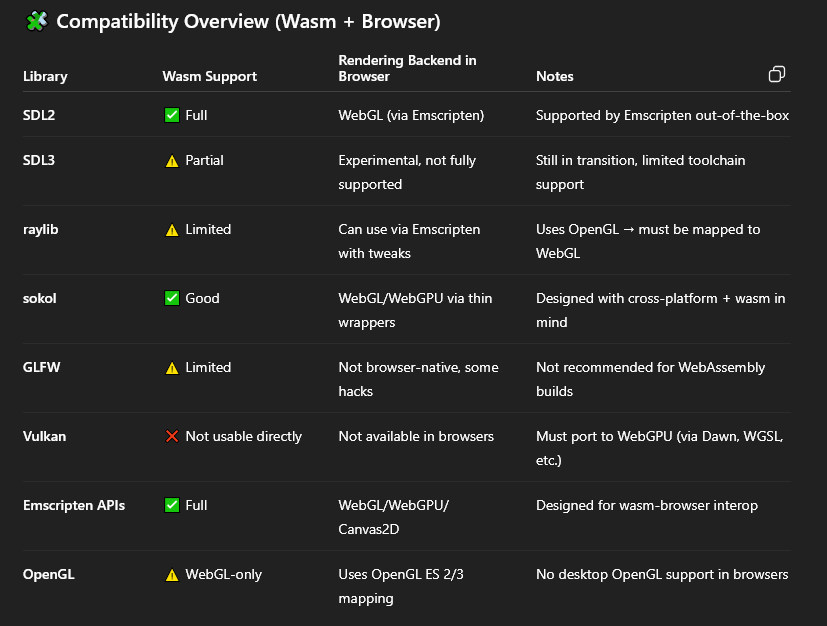
You do need to consider which graphics or system libraries you're using in your local app before exporting to WebAssembly, because not all libraries are equally compatible with the browser environment.
-
No direct access to GPU drivers:
-
Must use WebGL or WebGPU (via JS bindings).
-
-
No access to native OS APIs:
-
Input, window management, and threading must go through browser APIs.
-
-
No Vulkan, OpenGL, or DirectX:
-
These are not available natively in browsers.
-
-
 .
.
Using
Odin
-
With Emscripten.
C++
-
Emscripten
-
Compiles.
-
Rust
-
-
Yew.rs exists with the intention of replacing React.
-