Windows
Disclaimer
-
I absolutely hate Windows.
-
I haven't switched to Linux yet, as I have a lot of other things to do, but I will.
Future
-
(2025-10-18)
-
Windows 10 ended support on (2025-10-14).
-
I will never update to Windows 11.
-
When switching OS, I’ll go for Linux, for sure.
Symlink
Hard Link pointing to a directory
-
mklink /J "new_folder_created" "source_folder_to_link" -
Example :
-
cd C:\blablabla\game_server -
mklink /J "worlds" "..\client_side\worlds" -
This makes the game server have a link to the
client_side; a newworldsfolder is created in the game server.
-
Stupid Things
Installation
Minimal Installation
-
-
"The real PowerToys for Windows 11"
-
Uninstallation / Cleaning
Drivers
Cleaners
-
-
Uninstaller.
-
Install via GitHub Releases.
-
-
Revo Uninstaller.-
Trash compared to the one above.
-
Closed-source, paid.
-
-
CCleaner-
DON'T use it. It's terrible.
-
Disk
-
-
"BleachBit cleans files to free disk space and to maintain privacy."
-
-
-
Closed-source, paid.
-
"As best partition manager for Windows, MiniTool Partition Wizard aims to maximize disk performance. It helps create/resize/format partition flexibly, convert disk between MBR and GPT disks, convert partition between NTFS and FAT32, and convert dynamic disk to basic without data loss in a few clicks."
-
Privacy
-
-
ChrisTitus makes videos criticizing Windows, etc., so he created this app to remove stupid stuff from it.
-
-
-
Disables many things, etc.
-
Probably ChrisTitusWindowsUtil is better.
-
Metadata
Telemetry
Security
Require permission to delete a folder
-
(2025-10-07)
-
Restarting the PC solved it. Kinda.
-
I tested billions of things before, didn’t work, so whatever.
-
-
(2025-11-02)
-
Using
rm <folder_name>worked.
-
Viruses
Windows Update
Disable
SSD
Environment variables
-
It’s not possible to find a file inside a folder that starts with
.(dot).-
Ex:
-
.config/.
-
-
Etc
Things to disable
-
-
https://www.minitool.com/data-recovery/run-or-stop-chkdsk-on-startup.html
-
Visual Customization
Default Image Editor
-
Change default image editor app .
-
HKEY_CLASSES_ROOT\SystemFileAssociations\image\shell\edit\command. -
I did this to set Aseprite as the default editor.
-
Folder Views
Taskbar
-
Remove the 'bubbles notifications' from the taskbar:
-
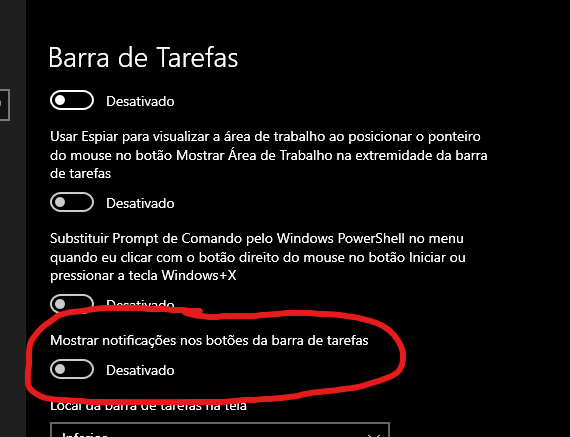 .
.
-
Folders
Visual minimalism
Disable annoying visual stuff
Apps
-
-
Fuzzy finder.
-
Goes well with FlowLauncher.
-
Impressions :
-
Very ugly on Win10, but does what it promises.
-
Good app.
-
-
-
-
Useful to ungroup icons in the taskbar.
-
Must-have for improving the taskbar.
-
It must start with Windows, since it only works when open.
-
-
~ Rainmeter .
-
Visual customization.
-
Skins .
-
Impressions :
-
A complete mess.
-
-
-
~ EarTrumpet .
-
Volume per app.
-
-
~ Volume2 .
-
Volume per app, kinda, something like that.
-
It bugged for me.
-
"advanced Windows volume control".
-
-
~FxSound.
-
~WinSetView
-
Impressions :
-
The app itself is super ugly.
-
Helps a bit.
-
-
~Battery Mode.
-
Power saving.
-
-
~FanControl.
-
Change fan speed.
-
-
~ TranslucentTB .
-
Makes the taskbar transparent.
-
-
ZoomIt-
Shortcuts to zoom.
-
Deal breaker.
-
Only included in PowerToys.
-
Didn’t find an OpenSource alternative.
-
-
-
AltSnap.-
Move windows with Alt.
-
Deal breaker:
-
Apparently triggers antivirus false positives.
-
-
-
Monitorian-
Control monitor brightness.
-
-
Twinkle tray-
Alternative to Monitorian.
-
-
ShareX.-
Screenshot and editor.
-
-
Crop and Lock.-
Sounds better than OnTopReplica, kinda.
-
Only included in PowerToys.
-
Didn’t find an OpenSource alternative.
-
When testing :
-
I had the app for months and never used it. Never felt any need.
-
Don’t want anything from Microsoft, no way.
-
-
-
-
When testing :
-
I had the app for months and never used it. Never felt any need.
-
Downloading via GitHub makes it feel like I’m getting a trojan.
-
-
-
IconViewer.-
Save app icons as PNGs.
-
Equalize the audio you hear.
-
-
-
It’s a bundle made by Microsoft.
-
Crop and Lock.
-
Sounds better than OnTopReplica, kinda.
-
Didn’t find an OpenSource alternative.
-
-
Color Picker.
-
Ok.
-
~It’s ColorPicker.
-
-
~Text Extractor.
-
Kinda ok.
-
~It’s TextGrab.
-
-
~FancyZones.
-
Kinda ok.
-
-
Run-
Search bar.
-
It’s FlowLauncher.
-
-
Keyboard Manager.-
Useless, use AutoHotKey.
-
-
Mouse Utilities-
All useless.
-
-
Mouse Without Borders-
Useless.
-
-
QuickAccent-
Useless.
-
-
Preview Pane.-
No.
-
-
Thumbnail Icon Preview-
No.
-
-
File Locksmith-
Useless.
-
-
Image Resizer.-
No.
-
-
New+-
No.
-
-
Peek-
Absurdly useless and bad.
-
-
PowerRename-
Useless. Use Bulk Rename Utility.
-
-
CommandNotFound-
No.
-
-
EnvironmentVariables-
Hell no.
-
-
HostFileEditor-
Ultra useless.
-
-
RegistryPreview-
Ultra useless.
-
-
Workspaces-
No.
-
-
ShortcutGuide-
No.
-
-
ScreenRuler.-
Useless.
-
-
Advanced Paste.-
Terrible.
-
-
Awake.-
No.
-
-
Always on Top.-
No.
-
-
Impressions :
-
I hated the bundle.
-
270MB+, for so many useless, bad, and Microsoft-looking things.
-
Awful.
-
Download apps individually.
-
The only reason I keep it installed is CropAndLock, since I didn’t find a standalone version of it.
-
-
-
-
Replaces the right-click menu on Win11.
-
Impressions :
-
Hated it.
-
The configuration process is a pain, with its own syntax.
-
On Windows 10:
-
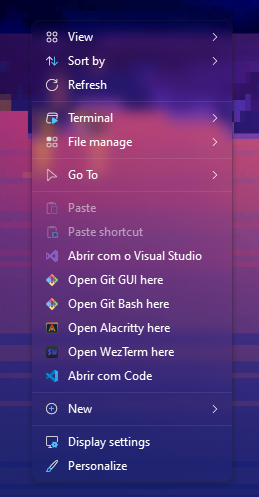 .
.
-
-
-
-
-
Search bar.
-
PowerToys Run.
-
Impressions :
-
Didn’t like it, simply.
-
A terrible, bloated "fuzzy finder".
-
-
-
GlazeWM.-
Window manager.
-
Shortcuts similar to ArchLinux i3.
-
Integrates with Zebar.
-
Impressions :
-
Feels glitchy and requires configuration.
-
Adds a top bar, similar to Linux.
-
Overall, didn’t like it.
-
Adds nothing of great value, visually ugly and glitchy.
-
Maybe customizable to look ok, but I’m not in the mood, since it’s an override app, not a redefining one.
-
-
-
Zebar.-
"create customizable and cross-platform desktop widgets."
-
Impressions :
-
Same criticisms as GlazeWM.
-
Didn’t interest me at all.
-
-
-
WinToys.