HTML
Attributes
-
hrefis an example of an attribute for an element:
<a HREF="demo.html">simple</a>
-
Attributes are placed inside the start tag, and consist of a name and a value , separated by an "
=" character. -
The attribute value can remain unquoted if it doesn't contain ASCII whitespace or any of
"'`=<or>. Otherwise, it has to be quoted using either single or double quotes. The value, along with the "=" character, can be omitted altogether if the value is the empty string.
Global Attributes
-
.
Elements / Tags
Document Metadata
html (
<html>
)
-
Represents the root (top-level element) of an HTML document, so it is also referred to as the root element .
-
There can be only one
<html>element in a document. -
Attributes :
-
Globals.
-
Providing a
langattribute with a valid BCP 47 language tag on the<html>element will help screen reading technology determine the proper language to announce. The identifying language tag should describe the language used by the majority of the content of the page. Without it, screen readers will typically default to the operating system's set language, which may cause mispronunciations.
-
-
version(Deprecated)-
Specifies the version of the HTML Document Type Definition that governs the current document. This attribute is not needed, because it is redundant with the version information in the document type declaration.
-
-
-
Has exactly 2 children:
-
<head>. -
<body>.
-
Head (
<head>
)
-
Everything inside the head element is not seen in the web page.
-
Contains machine-readable information ( metadata ) about the document, like its title , scripts , and style sheets . There can be only one
<head>element in an HTML document. -
Attributes :
-
Globals.
-
profile(Deprecated)-
The URI s of one or more metadata profiles, separated by white space .
-
-
Link (
<link>
)
-
Specifies relationships between the current document and an external resource. This element is most commonly used to link to stylesheets , but is also used to establish site icons (both "favicon" style icons and icons for the home screen and apps on mobile devices) among other things.
<link rel="icon" href="html5.png" type="image/x-icon">
<link rel="stylesheet" href="main.css" type="image/css">
-
"The only stylesheet that exist is css".
-
Attributes :
-
List .
-
Meta (
<meta>
)
-
Represents metadata that cannot be represented by other meta-related elements, such as
<base>,<link>,<script>,<style>, or<title>.
Style (
<style>
)
-
Scope for defining a CSS style inside the HTML file.
-
Contains style information for a document, or part of a document. It contains CSS, which is applied to the contents of the document containing the
<style>element. -
The
<style>element must be included inside the<head>of the document. -
In general, it is better to put your styles in external stylesheets and apply them using
<link>elements. -
If you include multiple
<style>and<link>elements in your document, they will be applied to the DOM in the order they are included in the document — make sure you include them in the correct order, to avoid unexpected cascade issues. -
Attributes :
Title (
<title>
)
-
Defines the document's title that is shown in a browser 's title bar or a page's tab. It only contains text; HTML tags within the element, if any, are also treated as plain text.
-
Attributes :
-
Only globals.
-
~Base (
<base>
)
-
Specifies the base URL to use for all relative URLs in a document. There can be only one
<base>element in a document. -
A document's used base URL can be accessed by scripts with
Node.baseURI. If the document has no<base>elements, thenbaseURIdefaults tolocation.href.
Content
Body (
<body>
)
-
Represents the content of an HTML document.
-
There can be only one
<body>element in a document. -
Attributes :
-
Only globals.
-
Content Sectioning
-
Content sectioning elements allow you to organize the document content into logical pieces. Use the sectioning elements to create a broad outline for your page content, including header and footer navigation, and heading elements to identify sections of content.
Division (
<div>
)
-
Group elements together, so they can be styled and represent complex UI.
Content Sectioning - Semantic
Headings (
<h1>
to
<h6>
)
-
Headers are meant to indicate a hierarchy of content.
-
Don't choose the heading based on its size.
-
Every page should have only one h1 header. Using more than 1 will render fine, but it can confuse search engines.
~Section (
<section>
)
-
Semantic.
-
The content is grouped by semantic purpose.
Header (
<header
)
<header
)-
Semantic.
-
header .
-
Represents introductory content, typically a group of introductory or navigational aids. It may contain some heading elements but also a logo, a search form, an author name, and other elements.
-
Use
<h1>to<h6>.
Navigation (
<nav>
)
<nav>
)-
Semantic.
~Address (
<address>
)
-
Semantic.
-
Indicates that the enclosed HTML provides contact information for a person or people, or for an organization.
-
Can be used in a variety of contexts, such as providing a business's contact information in the page header, or indicating the author of an article by including an
<address>element within the<article>. -
Attributes :
-
Only Globals.
-
~Article (
<article>
)
-
Semantic.
-
article .
-
Represents a self-contained composition in a document, page, application, or site, which is intended to be independently distributable or reusable (e.g., in syndication). Examples include: a forum post, a magazine or newspaper article, or a blog entry, a product card, a user-submitted comment, an interactive widget or gadget, or any other independent item of content.
-
Attributes :
-
Only Globals.
-
Aside (
<aside>
)
-
Semantic.
-
aside .
-
Represents a portion of a document whose content is only indirectly related to the document's main content. Asides are frequently presented as sidebars or call-out boxes.
-
Attributes :
-
Only Globals.
-
Footer (
<footer>
)
-
Semantic.
-
footer .
-
Represents a footer for its nearest ancestor sectioning content or sectioning root element. A
<footer>typically contains information about the author of the section, copyright data or links to related documents. -
Attributes :
-
Only Globals.
-
Header Group (
<hgroup>
)
-
hgroup .
-
Seems kinda ok.
-
-
Represents a heading and related content. It groups a single
<h1>–<h6>element with one or more<p>. -
Attributes :
-
Only Globals.
-
Grouping Content
Paragraph (
<p>
)
-
Creates an extra space before and after.
-
Not using a paragraph will make the text look more stacked into each other.
List (
<li>
)
-
.
Unordered List (
<ul>
)
-
ul .
Ordered List (
<ol>
)
-
Numerical Order.
-
The
<ol>creates a scope for<li>.
<ol>
    <li>This is number 1
    <li>This is number 2
    <li>This is number 3
</ol>
-
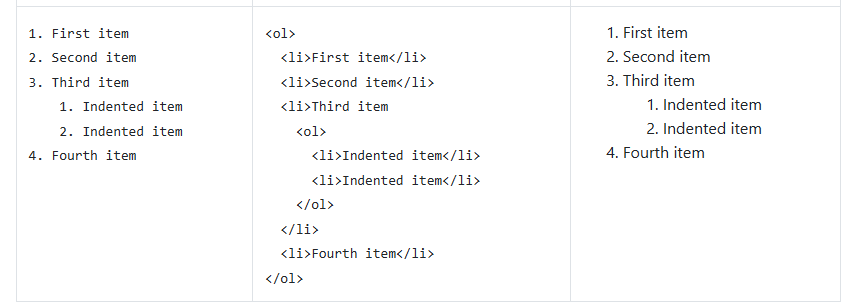 .
.
Description List (
<dl>
)
-
Description Term (
<dt>). -
Description Details (
<dd>). -
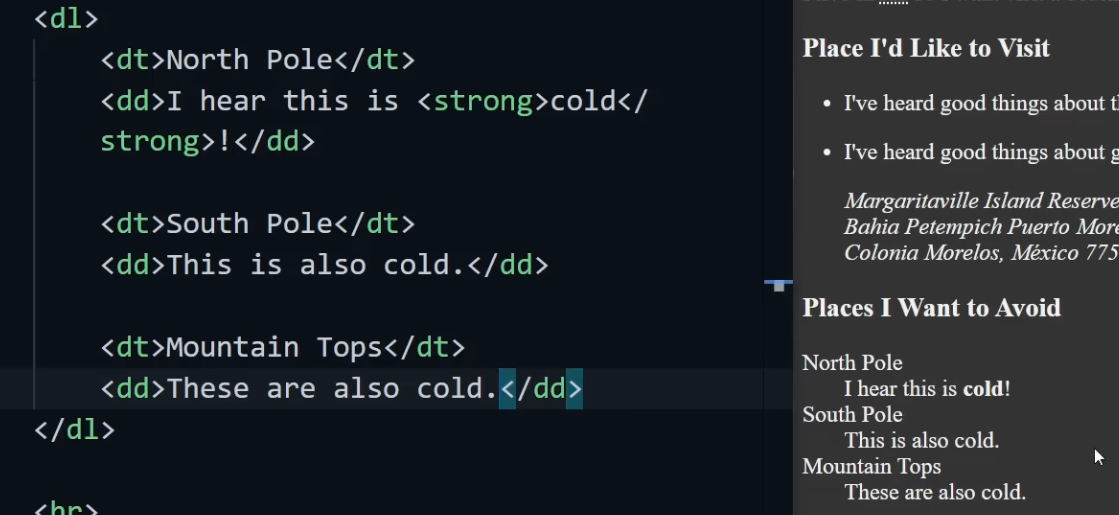 .
.
Block Quote (
<blockquote>
)
-
.
Pre (
<pre>
)
-
.
Figure (
<figure>
)
-
.
Fig Caption (
<figcaption>
)
-
.
Text-level (Inline) Content
Span (
<span>
)
-
.
Stress Emphasis (
<em>
)
-
This should be stylized to whatever you like.
-
This can be useful for search engines.
-
By default is displayed as italics.
Strong (
<strong>
)
-
Represents strong importance, seriousness, or urgency for its contents.
-
Similar to
<em>. -
By default is displayed as bold.
Italics (
<i>
)
-
Deprecated.
Bold (
<b>
)
-
Deprecated.
Line Break (
<br>
)
-
.
Horizontal Rule (
<hr>
) / Horizontal Line
-
.
Abbreviation (
<abbr>
)
-
.
Anchor (
<a>
) (Link to a different web page)
-
<a>is an HTML anchor element. It defines a hyperlink used to link to another page, file, section, email, or external site. -
href-
Destination URL or file path. Can be relative or absolute.
-
-
target-
Controls where the link opens.
-
_self(default)-
Opens in the same frame/tab (default).
-
-
_blank-
Opens in a new tab or window.
-
-
_parent-
Opens in the parent frame (if inside an iframe).
-
-
_top-
Opens in the full window, replacing any frames.
-
-
<framename>-
Opens in a specific frame with that name.
-
-
Markdown :
-
-
title-
Tooltip text shown when hovering.
-
-
download-
Forces download of the linked resource instead of navigation.
-
-
rel-
Defines relationship between the current document and the linked one.
-
It also affects security and SEO.
-
The default is none .
-
noopener-
Prevents the new tab (when using
_blank) from accessingwindow.opener, avoiding security risks.
-
-
noreferrer-
Hides the referrer URL from the destination site.
-
-
nofollow-
Tells search engines not to follow this link for ranking.
-
-
ugc-
Marks user-generated content (e.g., comments).
-
-
sponsored-
Marks paid or affiliate links.
-
-
stylesheet-
Used when linking CSS files.
-
-
Can be combined. Ex:
rel="noopener noreferrer".
-
-
type-
Specifies the MIME type of the linked resource. Mostly relevant for downloads or non-HTML links.
-
Helps the browser know what kind of file it is.
-
The default is none .
-
Ex:
<a href="manual.pdf" type="application/pdf">Open PDF</a>. -
typeis rarely needed for standard links. It’s mainly used when the linked resource is not HTML, for example in: -
downloads (
application/pdf,image/png, etc.), -
media links (
audio/mpeg,video/mp4), -
or when hinting the browser how to handle non-HTML content.
-
Modern browsers infer MIME types automatically from server headers, so
typeis mostly redundant. It’s still used in some contexts like<link>or<script>tags, not<a>.
-
-
hreflang-
Specifies language of the linked resource.
-
Indicates the language of the linked resource using an ISO language code.
-
Helps search engines understand language targeting.
-
The default is none .
-
<a HREF="URL">link text</a>
<a HREF="Banco de Dados - MongoDB.html"> Banco de Dados - MongoDB </a>
-
For linking to an ID:
<a HREF="#my_section_in_this_same_page"> My Section </a>
-
For going back to the top:
<a HREF="#"> Top </a>
-
External links :
-
http://google.com
-
-
Email :
-
mailto:the_email@gmail.com
-
Embedded Content
Image (
<img>
)
-
In HTML5 there's no need for closing the image tag; no
>, only>. -
This is ok:
<img src="assets/test_image.png" alt="">
-
Omitting the
altattribute on an<img>element is a validation error under HTML5 standards.
SVG (
<svg>
)
iframe (
<iframe>
)
-
Example:
<iframe class="excalidraw" src="https://excalidraw.com/#json=4957924963123200,ogHbxHEoOQM2tl2h1bgt8g" style="height: 300px; width: 600px"></iframe>.
Audio (
<audio>
)
Video (
<video>
)
Canvas (
<canvas>
)
Embed (
<embed>
)
Object (
<object>
)
Table Content
Form
<form>
Input
<input>
Text Area
<textarea>
Button
<button>
Label
<label>
Select
<select>
Option
<option>
Field Set
<fieldset>
Legend
<legend>
Data List
<datalist>
Output
<output>
-
Represents the result of a calculation performed by the application, or the result of a user action.
-
The
forcontent attribute allows an explicit relationship to be made between the result of a calculation and the elements that represent the values that went into the calculation or that otherwise influenced the calculation. The for attribute, if specified, must contain a string consisting of an unordered set of unique space-separated tokens , none of which are identical to another token and each of which must have the value of an ID of an element in the same tree . -
The form attribute is used to explicitly associate the output element with its form owner . The name attribute represents the element's name. The output element is associated with a form so that it can be easily referenced from the event handlers of form controls; the element's value itself is not submitted when the form is submitted.
-
The element has a default value override (null or a string). Initially it must be null.
Progress
<progress>
Meter
<meter>
Script and Data
Script (
<>
)
-
Example: here is a form with a script that sets the value of the form's output element to say "Hello World":
<form name="main">
 Result: <output name="result"></output>
 <script>
  document.forms.main.elements.result.value = 'Hello World';
 </script>
</form>
No Script
<noscript>
Template
<template>
Slot
<slot>
Data
<data>
Deprecated
Etc
IDs
-
Every element in HTML can have an ID.
id="my_section"
Entities
-
-
Non-breaking space.
-
Used when you want to keep two words together, so they are not separated by line breaks.
-
-
"-
HTML entity for a straight double quote (
").
-
-
“-
left (opening) curly double quote (“).
-
-
”-
right (closing) curly double quote (”).
-
-
<-
<
-
-
>-
>
-
-
©-
Copyright symbol.
-
Paths
How the Browser handles URLs
-
If the URL starts with :
-
a scheme (
http:) it is absolute. -
/it is root-relative (origin + path). -
//it is protocol-relative. -
Otherwise it is resolved relative to the document’s base URL.
-
A
<base>tag (<base href="...">) can change the base used.
-
-
If the URL ends with :
-
/it is treated as a directory.
-
-
Sources example :
-
If using
<img src="assets/test_image.png">on the page/docs/vulkan/vulkan-fast-test/, the browser will look for/docs/vulkan/vulkan-fast-test/assets/test_image.png. -
If using
<img src="/assets/test_image.png">on the page/docs/vulkan/vulkan-fast-test/, the browser will look for/assets/test_image.png.
-
HTTP Requests
Event Trigger
Tricks
Snippets
-
Generate boiler-plate:
-
!+ tab.
-
-
Generate dummy text:
-
Lorem50 -> enter.
-
Idea / Rant
-
It's an idea I had that would be better than the current syntax for HTML.
-
I'm lazy atm and I'm not writing everything I thought about this, but anyway. Web sucks, and I was investigating to at least improve the way styles and pages structures are represented.
-
No built-in tags.
-
Search Engines would release a list of tags that would better represent the content of the page. This strings are NOT built-in the language, but only flags to help SEO.
-
Everything would be a "DIV" by default, and tags are used just for SEO.
-
As everything is a DIV, no one is a DIV.
my-group: tags_for_SEO {
    paola-text: breadcrums {
        OOOIii paola\n
        asdifuhasdf\n
        asdfhijasdf
        asuijdohf
    }

    caio-text {  /* no tag here */
        caio's text
    }

    hello
}
-
What about styles?
-
My initial idea was to have no styles in this language, but maybe it should have? I'm not sure.
-
Styling being separate seems reasonable for easily swappable themes.
-
-
What about dynamism?
-
What about attributes?
-
etc