Godot - GDScript
Print, Strings and Debug
Prints and Debugs in terminal
-
Prints the elements 'text_1' and 'text_2', separated by a 'space' between them:
-
prints('text_1', 'text_2')
-
-
Prints the elements 'text_1' and 'text_2' separated by 'tab':
-
printt('text_1', 'text_2')
-
-
Prints 'text' as an 'Error' message, with red highlight, printed in the Output area: (the
push_error()sounds more correct, as it references the lines of the 'error'.)-
printerr('text')
-
-
Prints 'text' as an 'Error' message, with red highlight and Engine indicators, printed in the Debugger area:
-
push_error('text')
-
-
Prints 'text' as a 'Warning' message, with yellow highlight and Engine indicators, printed in the Debugger area:
-
push_warning('text')
-
Useful code for debug with prints
var count := 0

func _process(_delta) -> void:
    count += 1
    if !count % 30:  ## will print once every 30 frames.
        print()
Skip a function or operation without crashing ('pass')
if true:
    pass

func set_direction():
    pass
Line break
if 2 == 2 \
    and x != y \
    and "psps" > "cat":
    x = y
    emit_signal("succeeded")
My configs
-
Project Settings->Advanced Settings->debug/gdscript/warnings/. -
Unused Parameter.
-
Ignore
-
Reasonable to ignore since adding
_each time while prototyping is tedious.
-
-
Unused Signal.
-
Ignore
-
Important for Global Signals.
-
-
Untyped Declaration.
-
Warn
-
-
Unsafe Property Access.
-
Warn
-
-
Unsafe Method Access.
-
Warn
-
-
Unsafe Cast.
-
Warn
-
Unknown effect.
-
-
Unsafe Call Argument.
-
Warn
-
-
Int as Enum without Cast
-
Ignore
-
Annoying warning when testing enums.
-
Operations
Logical Operations
-
Negation:
-
if my_node is not Node3D: -
or
-
if not my_node is Node3D:
-
Ternary Operations
-
var slowness = 0 if current_effects["Slowness"] == null else current_effects["Slowness"].value -
variable = (1 - (0 if (current_effects["Slowness"] == null) else (current_effects["Slowness"].value) / 100.0))-
Be careful in this part: '(1 - (0'! Important to separate what belongs to IF and what does not!
-
-
print("greater than zero" if (counter > 0) else "less than or equal to zero")
Bitwise Operations
-
OR
|: "the result is an append". -
XOR
^: "the result is a de-append" -
AND
&: "the result is the intersection" -
Define an Enum:
enum effect {
    SLOWNESS = 1
    STUN = 2
    SILENCE = 4
    PUSH = 8
    POISON = 16
    #...
}
-
Boolean evaluations:
(a & b): ## True if there is an intersection between a and b.
()
-
Operations:
a |= b   # append
a ^= b   # (?) de-append
a &= ~b  # remove 'b' from 'a'
Strings
String formatting
-
Formatting:
var elapsed_time = float(Time.get_ticks_msec() - start_time_ms) / 1000.0
time.set_text("%0.2f seconds" % elapsed_time)
Arrays
Map array
points.assign(points.map(func(point : Vector2i) -> Vector2i:
    return point + Vector2i(-1, 0)
    ))
-
Map:
-
Performs mapping and returns the mapping result.
-
Return is always of type
Array.
-
-
Assign:
-
Takes all elements from an array and puts them into itself, converting types.
-
In this case, converts the return of
maptoArray[Vector2i], sincepoints : Array[Vector2i].
-
-
Assign seems to clear the current array, but it's strange.
-
Functions
Methods
Get Method List
-
Generally the SCRIPT has fewer methods than the NODE.
-
Sometimes you can use the SCRIPT for a faster lookup, but sometimes the desired functions only appear on the NODE.
print((get_script() as Script).get_method_list().size())    ## 104
print(get_method_list().size())                             ## 194
Anonymous Functions, Callables
Set / Get
@export var surfaceColors: PackedFloat32Array = [1.0] :
    get:
        return surfaceColors
    set(value):
        surfaceColors = value
Lambda Functions
-
Demo .
area.area_entered.connect(func(area : Area2D):
    #code
    )
Callables
-
-
Very cool.
-
Demonstrated uses:
-
Function to profile execution time of other functions.
-
Function to periodically emit another function.
-
Array
.map()method. -
Array
.filter()method.
-
-
Signals
Signal creation
signal attacked
signal item_dropped(name : String, amount : float)
Signal connection
-
Connect Signals via manual connection in Godot interface.
-
This is possible both for built-in Signals and custom signals created with
signal my_signal.
-
-
Using.Object.connect() -
Using
Signal.connect().
var player = player.new()

# 5: Connect the 'hit' signal to 'self' via the function '_on_player_hit'.
player.hit.connect(_on_player_hit)

# 6: Connect the 'hit' signal to 'self' via the function '_on_player_hit'; passing parameters ('sword', 100).
player.hit.connect(_on_player_hit.bind("sword", 100))
-
Prefer using
Signal.connect()overObject.connect(), as it references the Signal without using strings. -
Methods (3,4) and (7,8) are used only if you want to connect not necessarily to 'self', but to another node.
-
About parameter use in connection:
-
Parameters are normally (almost always) passed during signal emission:
signal.emit(arg1, arg2)oremit_signal('signal', arg1, arg2). -
Using
.bind(arg1, arg2)during connection implies that parametersarg1andarg2will always be passed when the signal is emitted.
-
Signal emission
-
Using.Object.emit_signal() -
Using
Signal.emit().
# Emit the signal.
health_changed.emit()

# Emit the signal; passing parameters (health, max_health).
health_changed.emit(health, max_health)
-
Prefer
Signal.emit()overObject.emit_signal(), for referencing the Signal without strings.
Typing
Static Typing
Checking variable type
-
Returns the number corresponding to the variable type, associated with an ENUM described in
@GlobalScopeunder 'Variant.Type'.-
int typeof(x : Variant)
-
Changing variable type
-
Convert to 'string':
-
String str(x : Variant) -
String var_to_str(x : Variant)
-
Enums
-
"you can get that enum with:
EnumName.keys()[the_int]".
Casting
-
-
Dubious implementation and gives warnings when it shouldn't, ~kinda.
-
-
TLDR (I think):
-
Use:
-
var drag_data : DragData = data
-
-
Do not use:
-
var drag_data := data as DragData
-
-
Data Structures vs RefCounted vs Resource
-
"if I make
myobject.array = myarray, then when I change themyobject.array, themyarrayis not changed. When I do the same thing, but instead of making the object hold an array, I make it hold a Resource or RefCounted, it works, like somyobject.resource = myresource, so when I changemyobject.resourcethemyresourcechanges as well." -
"This also works with
myobject.node = mynode, but it was said that this could cause some memory leak problems."-
As stated in RefCounted documentation: no need to use free(), as these objects do it automatically when not in use. Same for Resource.
-
-
The choice between RefCounted and Resource depends on whether you want to use this data in the inspector.
-
RefCounted cannot be used in
@export; this causes an error.
-
Classes
-
Classes: Example of using
class_nameto help code cohesion and safety .-
Beginner friendly, very useful.
-
Class
-
class_name MyClass -
Class Constructor.
-
func _init() -> void: -
Can pass parameters.
-
Inner Class
-
Explanation of use, etc: Reddit post .
class Test extends Node3D:
    pass


class Test extends Hitbox:
    pass
-
Inner Class Constructor.
-
func _init() -> void: -
Can pass parameters.
-
Accessing a variable inside a Node or Class
-
With a dot:
-
node.variable_name
-
-
With a string:
-
node["variable_name"]
-
Keyword
super()
-
"super() is used to call the parent's class method from within the child overriding method."
class A
func say():
  print("A")

class B
extends A
func say():
  super() # will call A.say()
  print("B")
-
B.new().say(): will print A then B.
Information transfer via Script inheritance (libraries / class)
-
Method with
extends "res://path"orextends _class_name_:-
Advantages:
@export varfunctionalities work normally. You can call all functions and properties directly, without accessing them asmy_library._function-or-property_name. -
Disadvantages: Only one 'extends' per script, creating strong dependencies on the library for scripts inheriting this way.
-
-
Method with
var my_library = _class_name_.new():-
Advantages: Allows your own 'extends', making scripts that inherit libraries this way have weak dependency on the library.
-
Disadvantages: You need to use
my_library._function-or-property_nameevery time you want to use a resource in the library.@export varfunctionalities inside the class do not work. You cannot@export varin a script and use it as a class because scripts/classes are Objects and cannot be exported.
-
-
Method with
@export var my_resource : Resource:-
Advantages: Very flexible, allowing resources contained in the Resource to be used globally or locally.
-
Disadvantages: Requires 'extends Resource', limiting usability in some cases. The interface is unintuitive and requires practice.
-
-
Method with Dictionary or Array:
-
Advantages: Easy to implement, compact.
-
Disadvantages: Less versatile, may require scanning the Dictionary/Array depending on the task.
-
Annotations
Export Variables
Export FLAGS
-
Example of various export annotations usage .
-
The example at {4:50} was interesting, about
@export_group('Item', 'item_').
-
@export: Export variables to Inspector
-
Exporting variables while defining a 'type' or 'range'.
-
@export var amount : float = 52.0 -
@export_range(0.0, 100.0, 3.0) var amount : float = 52.0
-
-
Improve visualization of exports in Inspector by defining a Group or Subgroup: (Very useful!)
-
@export_group(name: String, prefix: String = "") -
@export_subgroup(name: String, prefix: String = "")
-
-
Resource export :
-
@export var resource : _class_name
-
-
Custom Resource export :
-
For this to work, the corresponding Resource Script must have a 'class_name', making it a valid Class to use as a 'Resource type'.
-
@export var resource : _custom_class_name
-
-
Not sure if these options work:
-
@export @onready var node : NodePath = get_node(node) -
@export @onready var node : Node = get_node(node)
-
On Ready
@onready
-
Difference between
@onready varandvar:-
"var means you're setting the variable on initialization - which is before child creation. While
@onready varmeans you're creating the variable, waiting until all children have been created, and then setting the value after the node enters the tree."
-
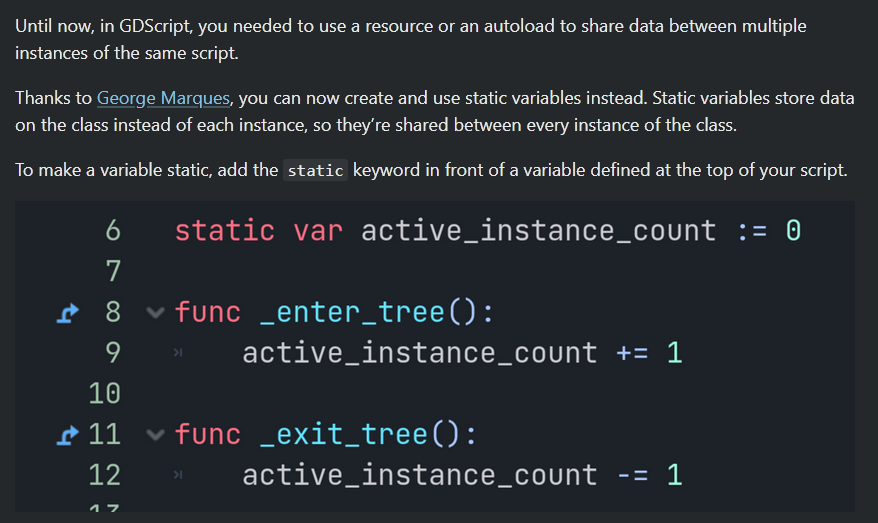
Static Variables
-
Can be used to share information between instances of the same Scene:
-
 .
.
-
Execution
Frequency of calling '
_physics_process()
' and its execution order
-
NCarter: "Everything is called in sequence, it'll never run two process-type functions simultaneously.
-
The way
_physics_process()works is that the engine looks at how long the last frame worked and then runs a loop which calls_physics_process()as many times as is necessary to compensate. -
Normally your vsynced frame rate would be 60Hz and the default
_physics_process()rate is also 60Hz, so you just get one_physics_process()per frame. If you're actually running at 120Hz, you'll get two_physics_process()calls per frame (for each object). If you're running at 45Hz or something, you'll get a mixture of one and zero_physics_process()calls per frame. Like I say, these are called in a loop, so you get_processonce per frame and zero or more_physics_process()calls one after another in the same frame. It doesn't do anything fancy like try to space out the_physics_process()calls so that they are called at regular intervals in real time, so there is no way they can overlap each other for that reason. I think there's something in there to deal with snowballing_physics_process()cost, which would happen if_physics_process()is taking so much time up that it makes the frame take longer, and then even more_physics_process()calls are needed on the next frame. I think it has a maximum number of calls it will make in a single frame, and the consequence will be that the action slows down; it's that, or if the_physics_process()takes too long to call, then it stops rendering to catch up."
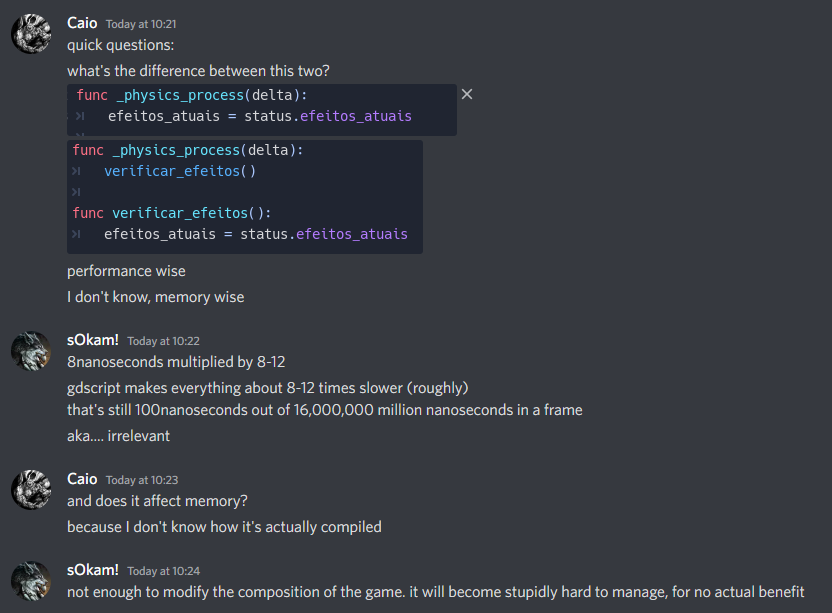
Execution time
-
 .
.
Notifications
Execution order
-
init > enter_tree > ready.
'set_deferred' and 'call_deferred' (Delay a task until the next frame)
-
set_deferredis used to change a property. Only 1 parameter can be passed.-
hitbox.set_deferred("disabled", true)
-
-
call_deferred("callable deferred") is used to call a 'callable' (function/method). Multiple parameters can be passed according to the number expected by the function/method.-
hitbox.call_deferred("explode_hitbox", 'hell yeah!', true)
-
-
A 'queue' is made before executing the task, waiting for the next frame to run it. This is important when altering a physics process of the engine or doing something extreme to a node.
-
Some examples where it might be important to use one of these methods:
-
queue_free(); -
Changing the shape of CollisionShapes2D or CollisionPolygons2D;
-
Toggle 'Monitoring', 'Monitorable', Layers, and Collision Masks.
-
-
Await
-
Create a timer in the script.
-
Use
awaitby creating a Timer and waiting for its 'timeout' Signal:-
This method creates a 'temporary Timer' at the top of the SceneTree containing this Node, while waiting for the 'timeout' Signal to indicate the Timer has ended, allowing the Script to continue from the
await. The 'temporary Timer' created by.create_timer()can only exist at the top of a SceneTree and is deleted automatically when its time ends. -
The
create_timertime is given in seconds. -
await get_tree().create_timer(0.2).timeout
-
-
Use
awaitwith an existing node while waiting for its Signal.
$AniPlayer.play('animation')
await $AniPlayer.animation_finished
-
Note: Timers created in the
SceneTreecannot be paused unless parameters of the.create_timer()call are changed.
Limitations
Pass function arguments out of order and/or by name
func _ready():
    test(b = 'hello') # crashes here

func test(a = 2, b = 'nice', c = null)
    print(a, b, c)