Game AI
-
"Before being intelligent, one must not be stupid. A character that can stay 'grounded' in the environment can convey much more intelligence than a complex character that does stupid things."
Architecture Strategies
Utility AI / Fuzzy Logic
About
-
"Results in behaviors that appear more intelligent and natural."
-
"Utility AI is extremely flexible. Instead of relying on rigid transitions between states or predefined behavior hierarchies, the agent can adapt dynamically to a wide range of situations."
-
"It is relatively easy to add new actions or adjust utility functions for more complex behaviors without having to redesign the whole system."
-
Disadvantages:
-
"Loss of some designer control".
-
"Can be hard to conceptualize".
-
Games that use it
-
The Sims.
-
Into The Breach.
-
Half-Life 2.
-
Spore.
-
Warframe.
-
Zoo Tycoon.
"Types" of Utility AI
-
"Absolute Utility"
-
Ranks / divides into categories.
-
-
"Relative Utility".
-
Calculates how "appropriate" something is.
-
Structure
-
'Consideration':
-
Is a number representing a subset of game state which, from the perspective of the algorithm, is worth being considered during score calculation.
-
-
'Curve':
-
Is a function that converts one value into another. It usually takes the form of an analytical curve.
-
-
'Evaluator':
-
Is responsible for processing 'considerations' and returning the final score assigned to the evaluated behavior.
-
-
'Selector':
-
Is responsible for selecting the most suitable behavior based on scores received from evaluators.
-
"Aggregation Methods"
-
"Methods used to evaluate multiple considerations and obtain the final score".
-
Mult
-
Sum
-
Average
-
Max
-
Min
"Weight"
-
On the obtained score after aggregating the considerations.
-
Used in:
-
'Applying Weight and mathematical equations in Utility AI'.
-
-
-
On the individual score of each consideration, before aggregation.
-
No use of weight.
-
Used in:
-
Implementing Utility AI in Unity.
-
-
"Tags"
-
"The entity is this kind of thing".
-
"This event happened".
-
"This state is active".
-
Race
-
Faction
-
History
-
Also:
-
Attributes.
-
Effects.
-
Interruptions
-
"How to solve the problem where one action switches to another due to runtime variations while the first action is being executed?"
-
Make a bool to store whether the action can or cannot be interrupted.
-
Make a float of "persistence", where the current action is assigned a modifier so that the new action must have a substantially higher score for the action to be changed.
-
I found this suggestion quite useful.
-
-
Explanations
-
Applying Weight and mathematical equations in Utility AI .
-
Great video. It shows in practice how the analysis of considerations is done after their normalization.
-
Presentation from 2015.
-
My notes :
-
DSEs (Decision Score Evaluators).
-
Have internal considerations to obtain a final score.
-
Carry an action with them.
-
-
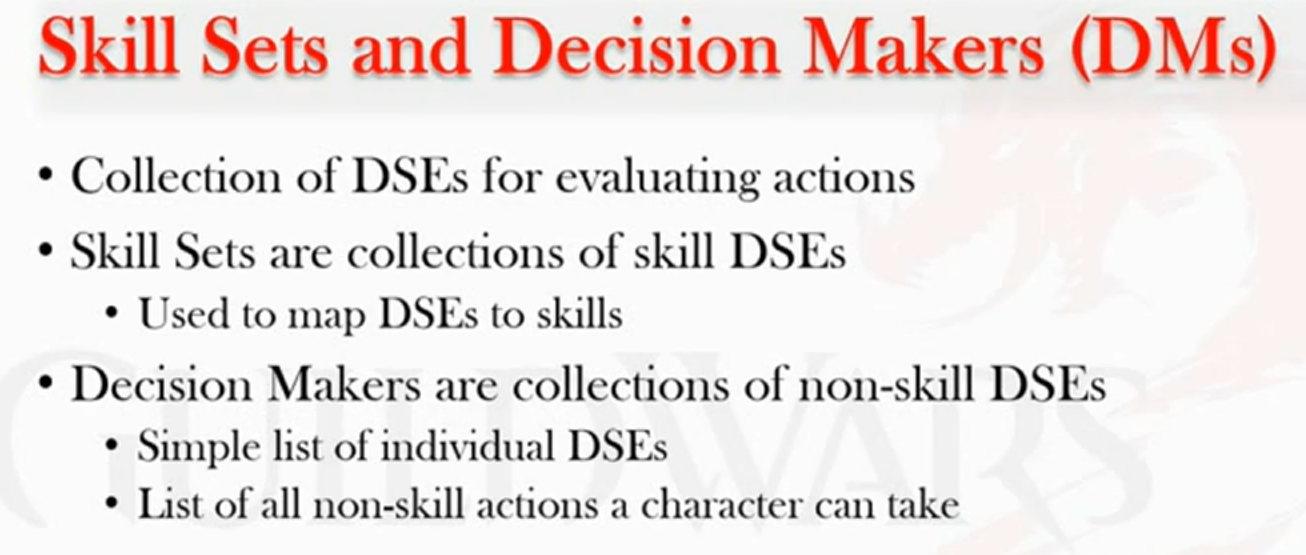
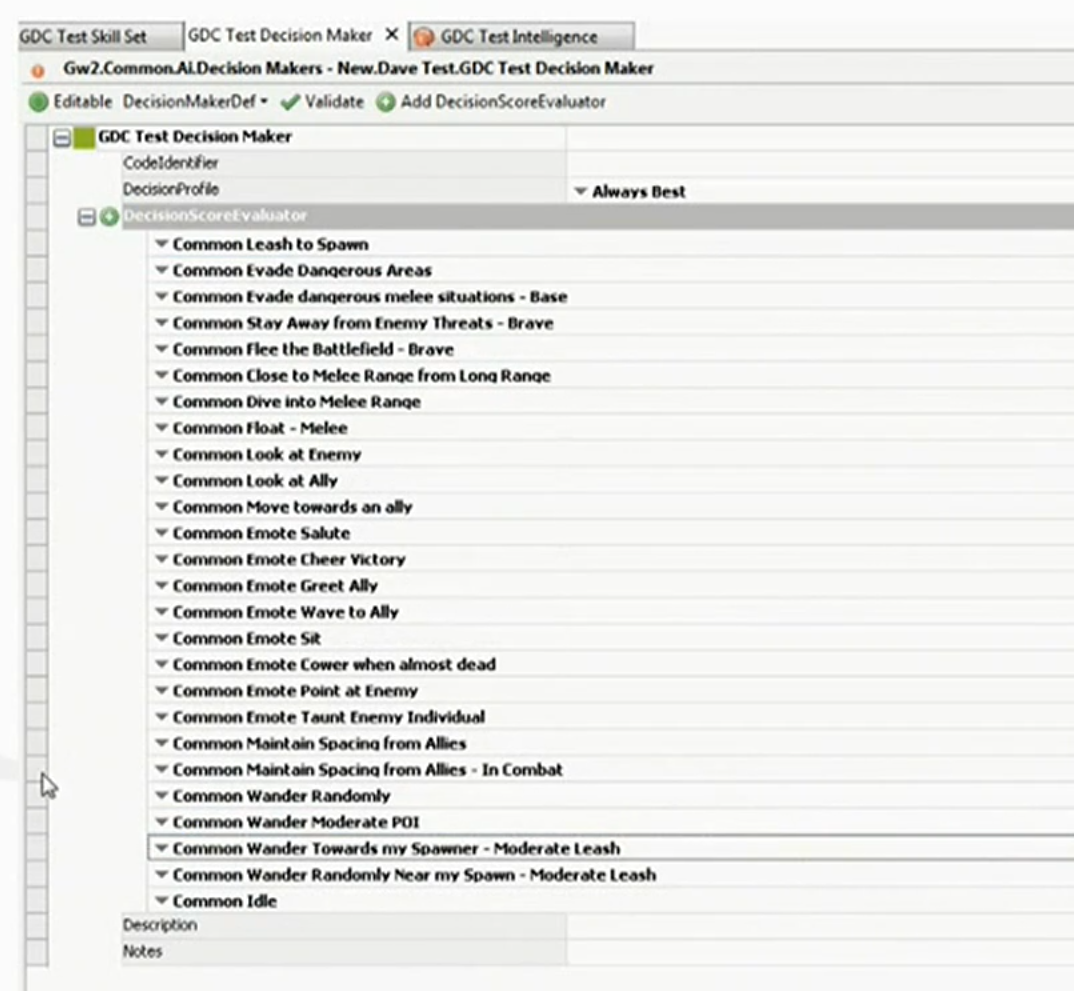
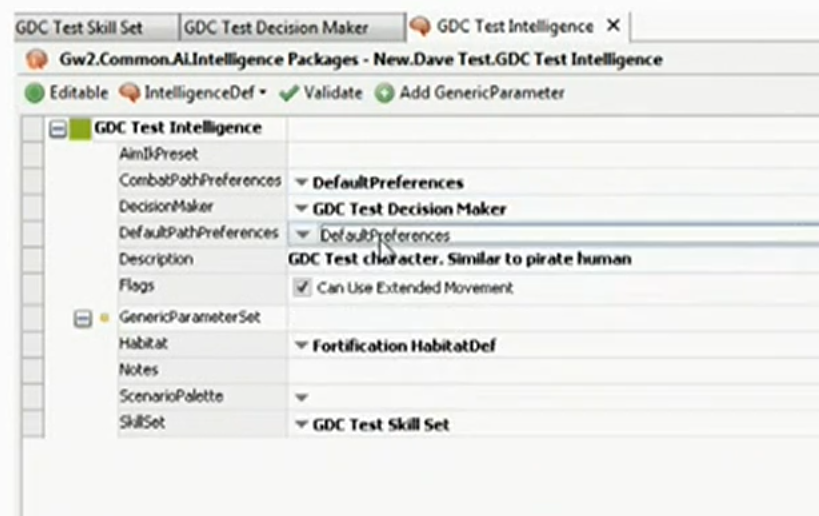
Skill Set and a Decision Maker:
-
 .
.
-
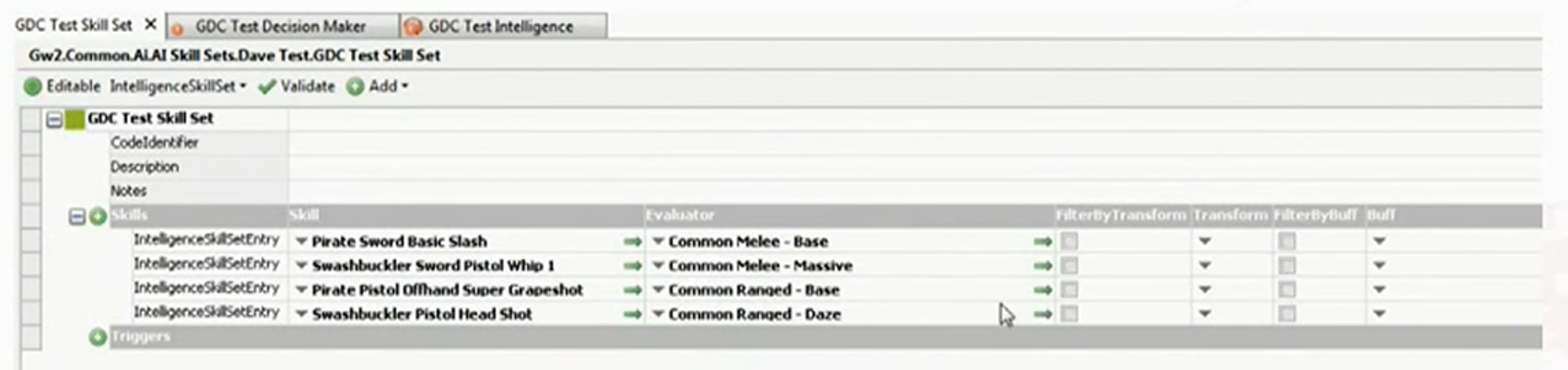
The only difference between a Skill Set and a Decision Maker is that a Skill Set uses an "export" parameter corresponding to the animation / attack action. This is done because the DSEs used for Skill Sets are not specific to a single action and can be used across multiple characters.
-
All DSEs from Skill Sets and DSEs from Decision Makers are put in the same "bucket", that is, without making any distinction between "combat" and "out of combat".
-
-
Score evaluation:
-
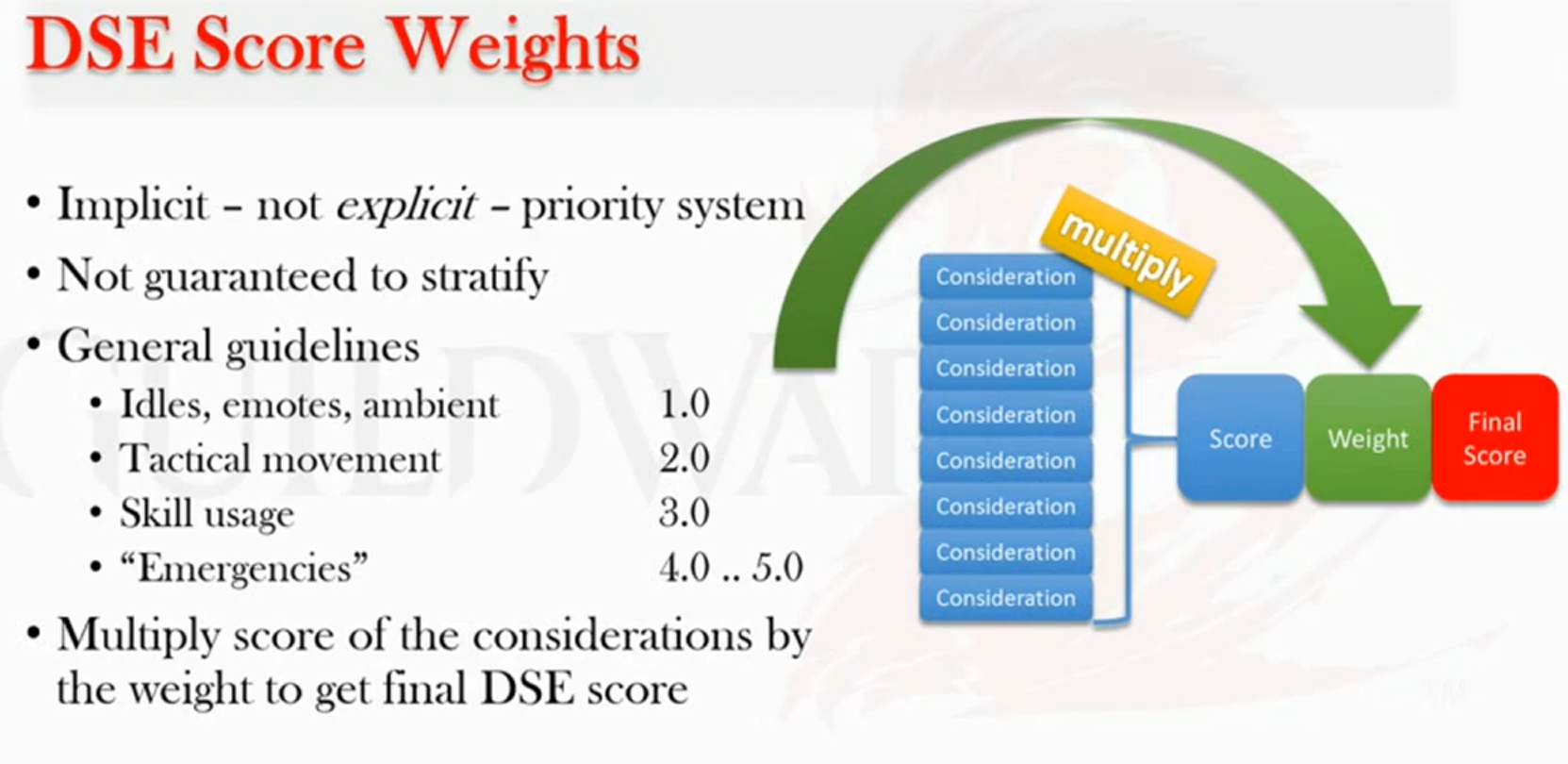
The only thing that truly makes the entity not be "stupid" in combat (or vice versa), is that each DSE has an attached weight, so that Skill Set DSEs have weight 3.0, while Decision Maker DSEs can vary from weight 1.0 up to about 4.0~5.0.
-
 .
.
-
-
Multiplication of Scores:
-
A compensation factor is used when multiplying scores to "make the multiplication make more sense".
-
The equation is not explained.
-
-
modification_factor = 1 - (1 / num_considerations) -
makeup_value = (1 - score) * modification_factor -
`final_score_consideration = score + (makeup_value * score)
-
-
Optimization:
-
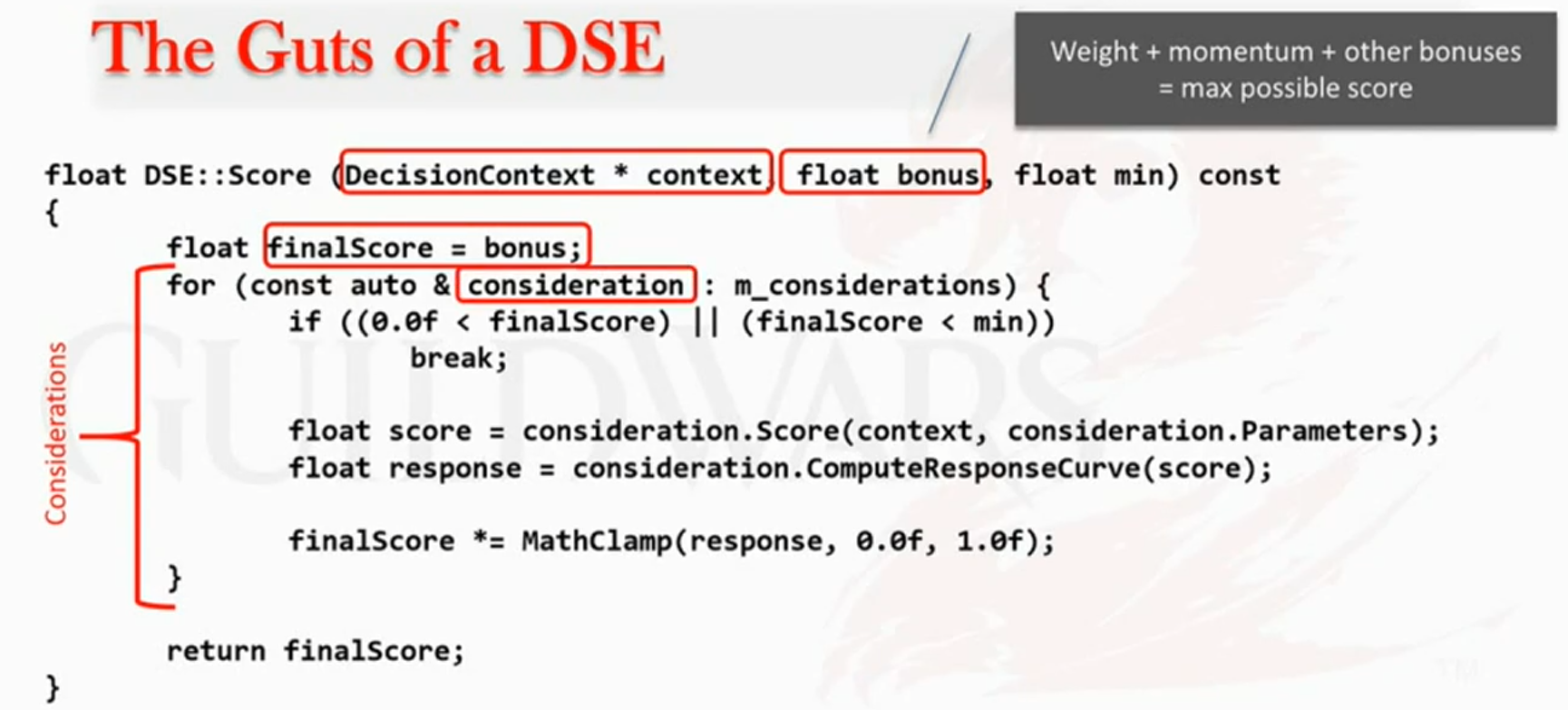
Considering that all possible actions are placed in the same "bucket", that requires optimization.
-
 .
.
-
The 'min' is used as an output parameter for the loop to optimize the calculation. If the 'finalScore' drops below 'min', cancel the loop and return the 'finalScore'; that is, the action will not happen anyway, so give up and exit the loop.
-
This does not make much sense to be used if you use 'pick random' (or derivates) among the best actions. It makes sense in their case because they use 'pick best'.
-
-
-
-
Circumstantial DSEs (via new Decision Maker):
-
Behavior injection is used based on the entity's context. For example, if the entity enters a tavern, tavern actions are injected as now part of the pool of possible actions; upon leaving the cave, those possibilities are removed.
-
This injection is done via a new Decision Maker, parallel to the entity's Decision Maker, called "Decision Maker Package".
-
-
Evaluations of a DSE's circumstances:
-
"Influence Maps" are discussed, which are used when there are multiple enemies in the world and you want to know, for example, "am I close to an enemy?". Two maps were made for each entity: an influence map of where it can move in 1 second; a map of where it can attack.
-
At first I thought it was something very specific, only for analytics, but it can be useful to help decision-making when facing multiple enemies, etc.
-
-
-
{~10:00}
-
Compensation factor for multiplication of scores.
-
-
{20:30}
-
Explanation of DSEs (Decision Score Evaluators).
-
-
{23:50}
-
Differences between a 'Skill Set' and a 'Decision Maker'.
-
-
{29:10 -> 30:50}
-
"Decision Maker Packages".
-
-
{30:55 -> 44:55}.
-
"Influence Maps".
-
-
{51:55}
-
Example of assembling an AI.
-
 .
.
-
 .
.
-
 .
.
-
-
-
Applying mathematical models in Utility AI .
-
Presentation from 2012.
-
The first part of the talk is about using "Absolute Utility" and "Relative Utility", following certain rules:
-
Do not use weight <= 0, it can be "inappropriate".
-
Do not use 'very small weight', since that causes "Artificial Stupidity".
-
Those options can be chosen randomly and can be stupid.
-
-
Use "weighted random".
-
This can only be done if the bad options are eliminated.
-
Random but Reasonable.
-
-
-
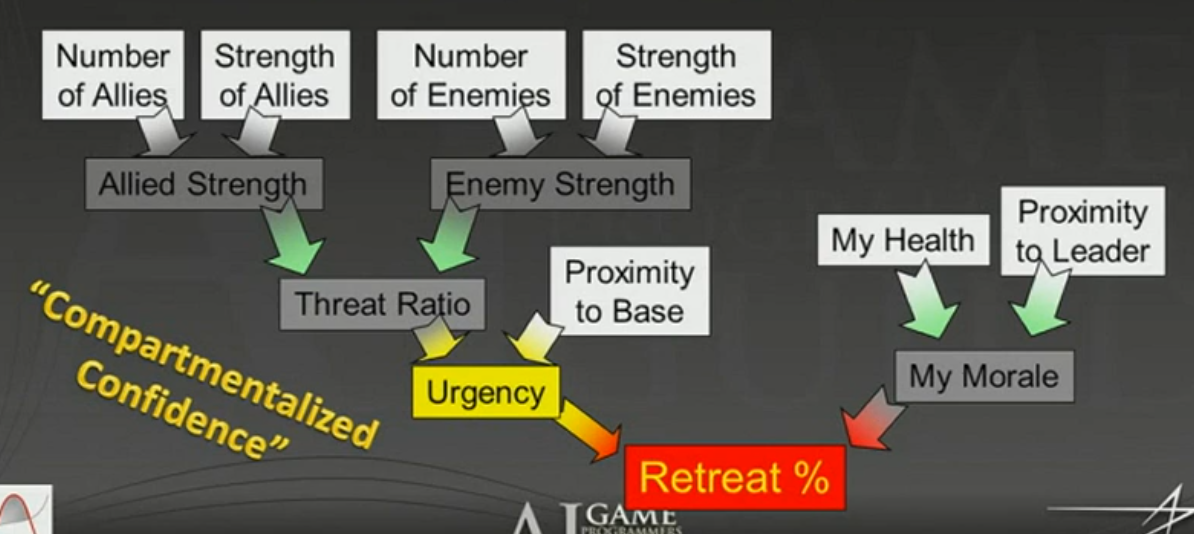
The second part of the talk is about applying mathematical models to decision making:
-
 .
.
-
-
The second part is better presented and a bit more relevant.
-
-
Modeling behaviors with mathematical functions .
-
Presentation from 2010.
-
It is a more introductory presentation about the concept, although it shows some of the math behind the considerations.
-
His newer presentations are better.
-
The questions at the end of the video are interesting.
-
-
-
The video is much longer than it should be because the code architecture part is done slowly. There is little theoretical content.
-
Technique used:
-
After the status is normalized, he applies a curve for each status obtaining a score for the 'consideration'. He then averages all the action's considerations to obtain the action's final score.
-
No 'weight' is applied.
-
-
{01:00:50}
-
The most relevant part of the video, where the concepts applied in the video are explained via drawings.
-
-
-
Utility AI in Into The Breach .
-
You can hardly say that this game implements Utility AI, since the AI is so simple that none of the potential complexity of Utility AI is really used.
-
Characters only 'advance' -> 'attack' -> repeat.
-
-
Usage:
-
An interesting system is made where each tile of the game receives a score based on its "usefulness", so tiles near buildings or enemies receive '+5' to the score, while tiles near enemies receive '-2' to the score. A tile on fire receives '-15' to the score.
-
The score is obtained via an evaluation of the 'amount of damage' that can be dealt by attacking from that tile.
-
-
Randomization is used for balance so that it does not always pick the best option and gives greater variability.
-
Recently attacked targets receive fewer points to avoid attacking the same target twice in a row.
-
There is no cooperation between enemies; they do not even know the other exists.
-
-
-
-
Presentation from 2019.
-
It is said that the use of randomization is always interesting; "do not make it deterministic, because that makes it less interesting".
-
Task scheduling is discussed.
-
It is possible to have multiple tasks at the same time, but with different priority levels.
-
-
Mentions using graphical apps to better visualize the curves.
-
The mathematical implementation of 'considerations' or 'evaluations' is not explained.
-
-
Utility AI in triple-A games .
-
It is just a 'documentary' video showing the use of Utility AI in triple-A games; absolutely nothing technical.
-
It is very introductory and concise.
-
-
Utility AI in The Sims and in Warframe .
-
Presentation from 2018.
-
The first part talks about things to paid attention during pathfinding and 'Influence Maps'.
-
The second part gives motivations about Utility AI and ends with a demo of Utility AI, using tags and stats.
-
Overall, not a very relevant implementation video. It is basically a documentary, but it is interesting.
-
-
-
It explains a bit about curves and how to combine curves.
-
"Each consideration should be plotted on a curve".
-
"Weights can be used to multiply the final score "
-
-
Working with 'fuzzy floats' while using Utility AI.-
The video is somewhat irrelevant compared to the other videos. It is introductory and does not help much.
-
It introduces some more technical things about implementing the system, but does not give necessary solutions to those problems. For example, it does not explain how to de-abstract floats into something more tangible and debuggable.
-
Graphing tools
-
Desmos .
-
GeoGebra .
-
Curvature App, for visualizing and creating curves for Utility AI.-
The program seems to use XML for data, which I don't like.
-
After downloading I did not find it very relevant.
Addons for Godot
-
-
MIT License.
-
The addon is inside a demo project.
-
The addon offers little utility, but at the same time it is simple and concise.
-
I would not use it anywhere, but it's okay and serves as a basis to better understand the idea of Utility AI.
-
JarkkoPar's Addon, with GDExtension.-
It is a very complex addon with many nodes.
-
The system has signal emission, cooldown system, etc.
-
The problem is that it is extremely generalized, so it implements Behavior Trees inside it, etc.
-
Although the addon has documentation on GitHub, it is not possible to clear particular doubts because the variables and nodes are not documented in Godot, and you cannot inspect the code.
-
All addon files are binary...
-
-
I did not like the addon because of this. Maybe reading the documentation gives interesting ideas, but I did not feel like using it.
-
-
-
Uses a strange structure with Resources and Classes, without any node definition.
-
The code is well organized and technical, but done in a very questionable way.
-
The addon itself offers almost no utility. Absolutely nothing special. Just the basics.
-
I did not like the addon.
-
Needs-based AI
-
About .
-
Used in The Sims as well, supposedly.
-
Seems like a category of Utility AI.
-
FSM (Finite State Machines) or HSFM (Hierarchical State Machines)
About
-
The larger the state machine, the harder it is to manage the state machine.
-
Not widely used because it is known to be problematic for any kind of expansion.
-
It is quite deterministic and not emergent.
-
Can have a maximum complexity of "O"($n^2$) when considering that each node must be "connected" to all other nodes.
-
*Care with State Machines:
-
Only use a State Machine when the defined State can be used in other places, making sense to treat it as a Component.
-
Avoid defining States that might want to run simultaneously; ideally define States as diametrically opposed behaviors (COMBAT x DIALOG, AIRBORNE x GROUNDED).
-
Use a State Machine only when the situation calls for a State Machine. Avoid using States for everything, because that induces difficulty accessing behaviors by "locking" everything behind 'if/else's.
-
Do not define a State Machine as the core of an entire object; "does it make sense that the first thing the entity tries to execute is a sequence of 'if/else' conditionals?". It does not sound healthy for the code to induce conditionals right away. Overuse of State Machines makes the system exponentially harder to debug as complexity grows.
-
Because of the likely confusion created by this design pattern, it is useful to make a States x Actions table, as done in ChristopherOkhravi's video.
-
Games that use it
-
-
Good video. Useful to understand a bit about FSMs. Demonstrates FSM problems.
-
-
-
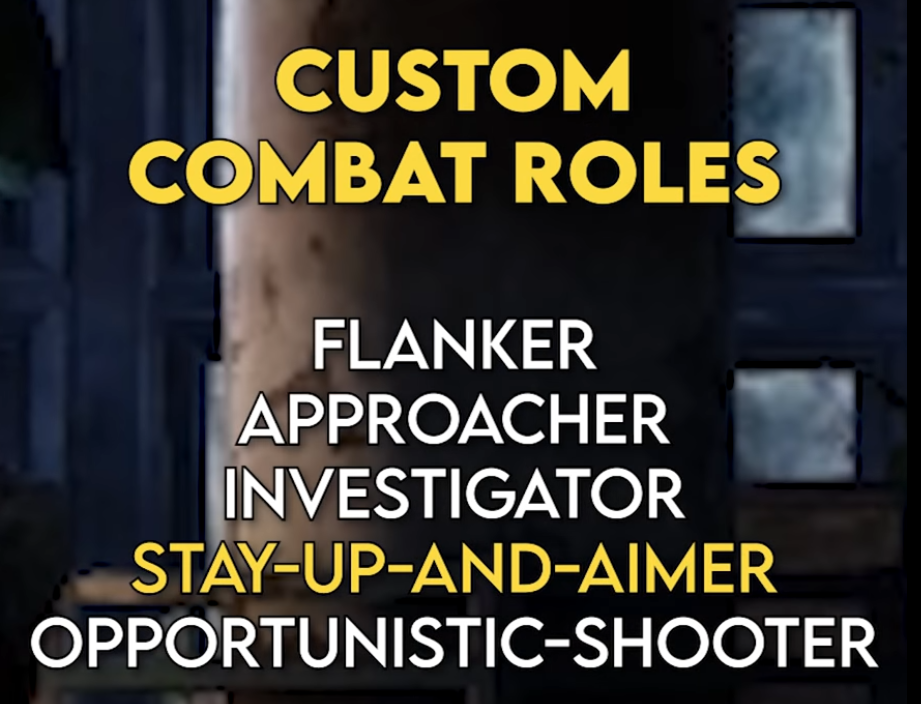
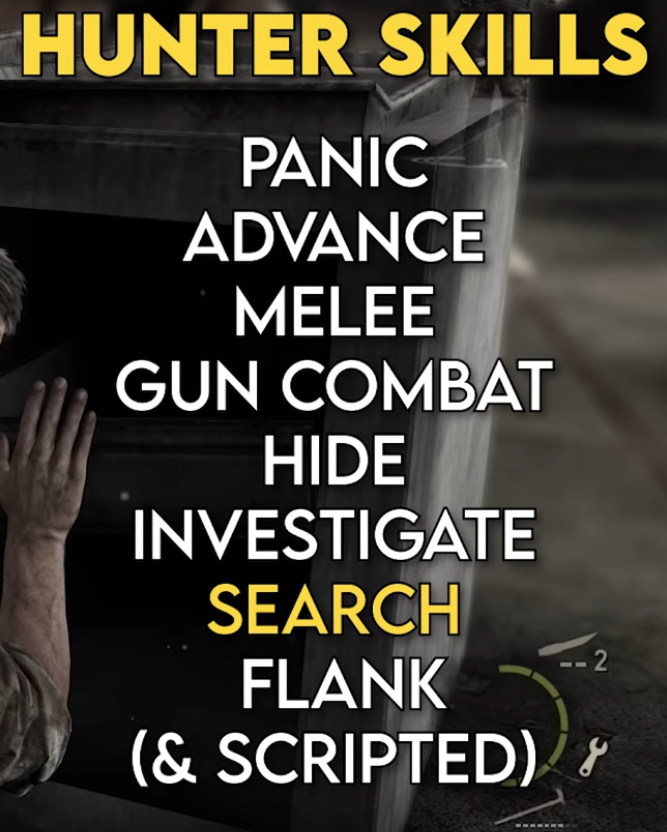
Human enemies:
-
Skills (States):
-
-
Roles:
-
-
The entire game's AI system is highly dependent on environment configuration, since many times there is no space for an enemy to execute its "role".
-
The system also suffers in open or highly vertical areas.
-
-
-
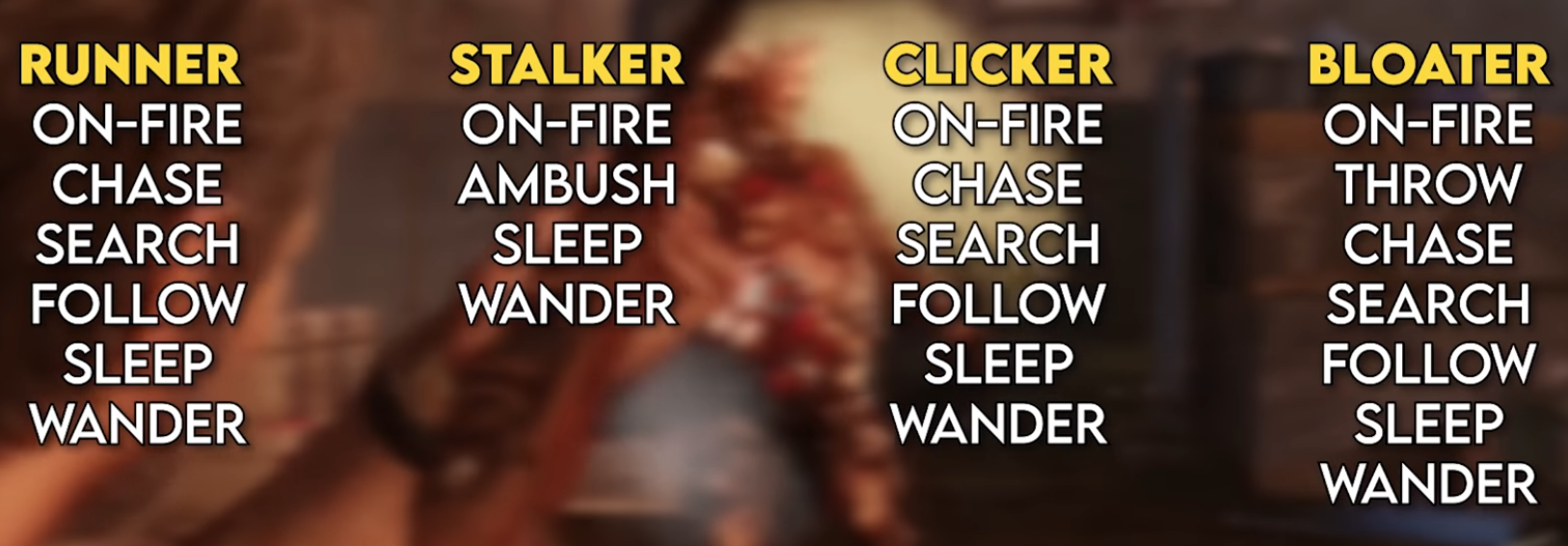
Zombies:
-
Skills (States):
-
 .
.
-
-
-
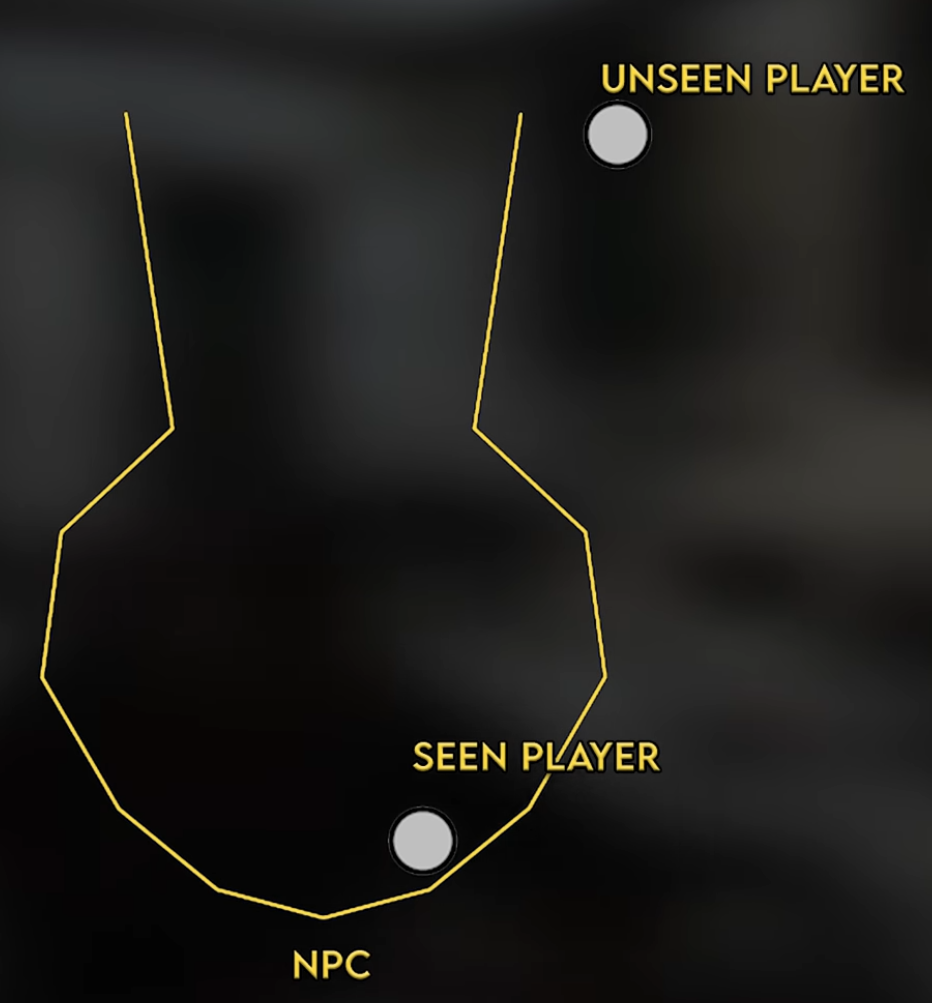
Vision:
-
This geometric shape is used instead of the generic "cone" because it makes much more sense.
-
 .
.
-
-
-
-
Same system as The Last of Us 1, with small tweaks.
-
The first game's video explains the systems better.
-
-
Metal Gear Solid (1998)
-
Halo: Combat Evolved (2001)
-
Batman Arkham Asylum (2009)
-
Doom (2016)
-
Hollow Knight
-
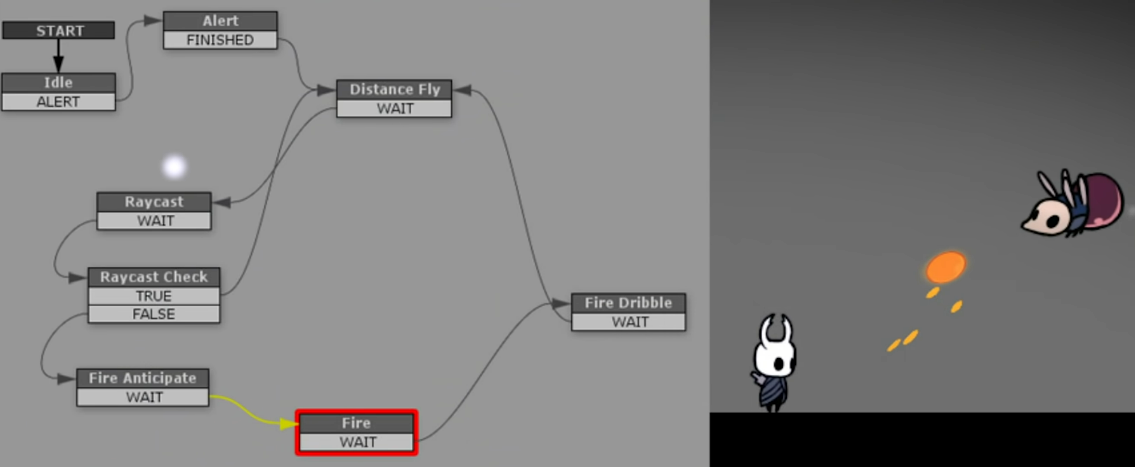
Hollow Knight - PlayMakerFSM .
-
Official tool used to visualize FSMs when building mods.
-
-
 .
.
-
Explanations
-
-
{8:35}
-
He draws a table with permutations between States x Actions (he doesn't use signals for this). This is very useful.
-
-
{37:50}
-
The video finally starts.
-
-
{50:40}
-
The end of the UML diagram is interesting, indicating that States have references to the 'gate' (State Machine in the example), and that functions are defined in the State Machine, in IState and its derived States.
-
-
{1:09:17}
-
He summarizes the code made for 'Gate' (StateMachine), 'GateState' (State Interface) and 'OpenGateState' (State derived from the Interface).
-
The reference to the State Machine is passed in the State's constructor.
-
-
*Review:
-
I liked that he made a States x Actions table; it's useful.
-
He uses a pattern where each State manages the change to another State by calling a function inside the StateMachine.
-
The way it's done, however, he uses 'new State_Name' in the call to 'change_state(_)', which is better for abstraction but raises the question whether "creating 'new' every time you want to change state causes duplicate instance problems?"
-
-
I also had the question:
-
"who calls 'payOk()' on the StateMachine?" which was not well explained.
-
-
-
-
Understanding State Machines and implementation in Godot .
-
Short, well-produced and interesting video.
-
Gives good ideas, although some are questionable, they are interesting for reflection.
-
-
Understanding State Machines and creating 'Wander' and 'Follow' states in Godot .
-
Review:
-
The video is confusing and could have been better explained.
-
Highly questionable design decisions:
-
Use of 'groups' to find the player.
-
A state worries about which state it should change to by emitting a signal containing a string, as shown at {6:55}.
-
Storing states by their names using dictionaries and strings.
-
-
-
State Class:
-
Used as a pseudo-Interface to ensure each 'state' has the 4 main functions defined.
-
The general idea is that 'Update' and 'PhysicsUpdate' are called only if that 'state' is the 'currentState'.
-
Enter:
-
pseudo-ready().
-
Should be called 'OnEnter()', since it is only called as a consequence of entry, without executing the entry.
-
-
Update:
-
pseudo-process().
-
-
PhysicsUpdate:
-
pseudo-physics_process().
-
-
Exit:
-
on leaving the state.
-
Should be called 'OnExit()', since it is only called as a consequence of exit, without executing the exit.
-
-
-
State management and transitions:
-
The StateMachine node only manages:
-
Storage of all available States in a dictionary via '_ready'.
-
Calling 'Update' and 'PhysicsUpdate' of the current state.
-
Receiving the 'Transitioned' signal to do: 'old_state.exit()', 'new_state.enter()' and 'current_state = new_state'.
-
-
State change is done inside the current state's 'Update' or 'PhysicsUpdate' by emitting the signal 'Transitioned.emit(self, "~new_state")'.
-
-
States:
-
The way 'Follow state' was defined is compromising, not using areas or raycasts, simply searching for the 'Player' with 'get_tree().get_first_node_in_group('Player')', which ignores physical collision interactions and can hinder interactions with other entities and break a stealth system.
-
-
-
-
*Review:
-
The video is explained in a rushed manner and with zero context for those who do not understand C#; it could have been much more didactic.
-
-
State Class:
-
Used as a pseudo-Interface to ensure every 'state' has the 4 main functions defined.
-
The general idea is that 'Do' and 'FixedDo' are called only if that 'state' is the 'currentState'.
-
Enter:
-
pseudo-ready().
-
-
Do:
-
pseudo-process().
-
-
FixedDo:
-
pseudo-physics_process().
-
-
Exit:
-
on leaving the state.
-
-
-
Management and state switching:
-
There is no StateMachine node, so all state control is done inside the player's script, poorly. It manages:
-
'if state.isComplete: SelectState();'. That is, different from the video State Machine: Understanding state machines and creating 'Wander' and 'Follow' , this video makes a "state selector" in the manager so that no state should worry about selecting the 'next state'.
-
The function 'SelectState()' changes the 'state' (aka current_state) to a new state based on 'if' conditions, then calls 'state.Enter()'.
-
-
Note:
-
The 'grounded' conditional is exactly like 'is_on_floor()' in GDScript.
-
-
{31:46 -> 35:00}:
-
Important for defining the logic of state restart and permission for a state to overwrite another state.
-
-
-
States:
-
IdleState:
-
{28:07} version before final interruption changes.
-
{34:33} final version.
-
-
RunState:
-
{29:07} version before final interruption changes.
-
{34:43} final version.
-
-
AirState:
-
{29:44} final version.
-
-
KneelState (crouch):
-
{31:23} final version.
-
-
-
-
Code Class by AdamCYounis (2): Create States that contain States hierarchically in Unity .
-
.
-
His code is confusing and poorly written in many moments, creating complexity and awkwardness where there should be none.
-
I made some drafts with good changes that could be made to the code.
-
One thing I hated about his code is how it makes the Entity itself be the StateMachine, making the design super inflexible to changes.
-
-
*Review:
-
The design in the video is messy and simply confusing. Many things could be modified to give much more clarity to the design; still, it keeps the big problem of over-using state machines, creating an uncomfortable and insecure design pattern. Analyzing this design showed me how problematic state machines can be; doing them hierarchically only creates more problems and demonstrates the fragility of the design.
-
I absolutely did not like how exponentially complex and confusing this design becomes when adding behavior options; the design is highly prone to confusion and debugging problems.
-
-
-
-
The solutions presented are poor, as they only serve to demonstrate the amount of problems generated by making a game completely based on state machines; this is one of the reasons I dislike this design pattern.
-
Behavior Trees
About
-
I found it very similar to the State Machine, just with some larger controllers (selectors), etc.
-
Apparently allows greater scalability than State Machine, but it sounded very similar.
-
The 'Blackboard' (variables and world state) is read by the Tree and also written by the Tree when executing something.
-
It is quite deterministic and not emergent.
Games that use it
-
Halo 2 up to Halo Infinite (2004 to 2021).
-
Destiny 2 (supposedly).
-
Gears of War.
-
-
Has an 'AI Director' and an 'Alien AI'. The first stores player information.
-
-
-
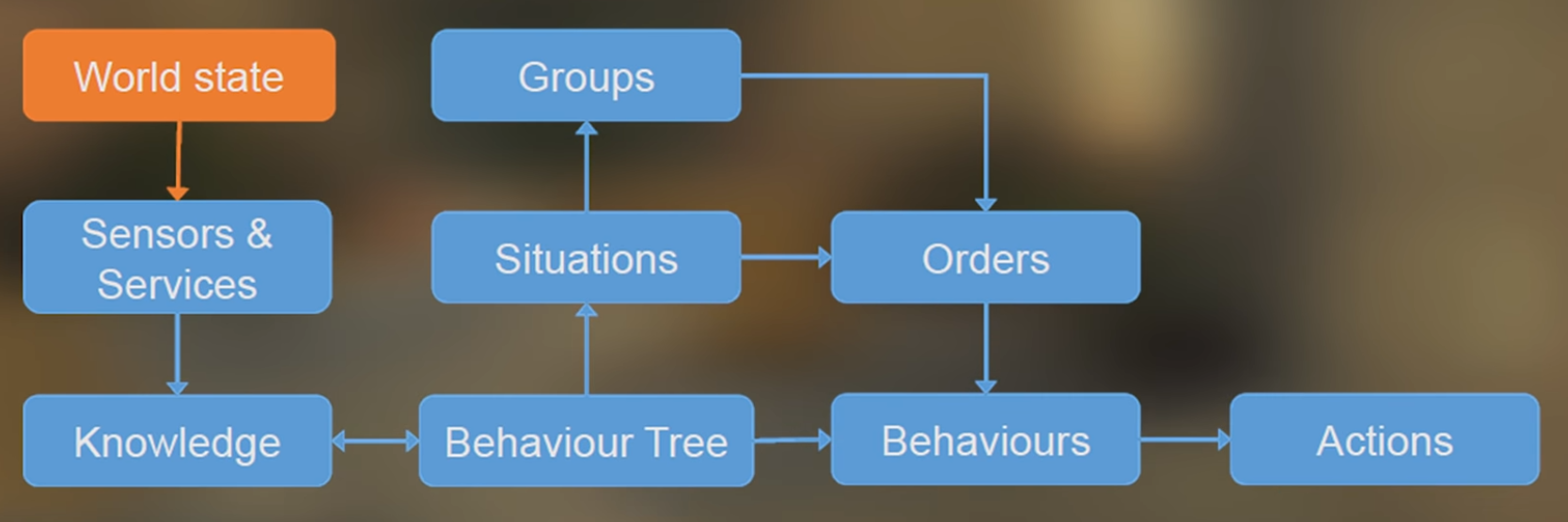 .
.
-
The video is not very useful, I found it so-so.
-
-
-
The video is a bit poor because it's sponsored.
-
-
Far Cry 3.
-
Far Cry Primal.
-
Bioshock Infinite.
Examples
-
-
"Blackboard":
-
Stores world information for the entire Tree.
-
-
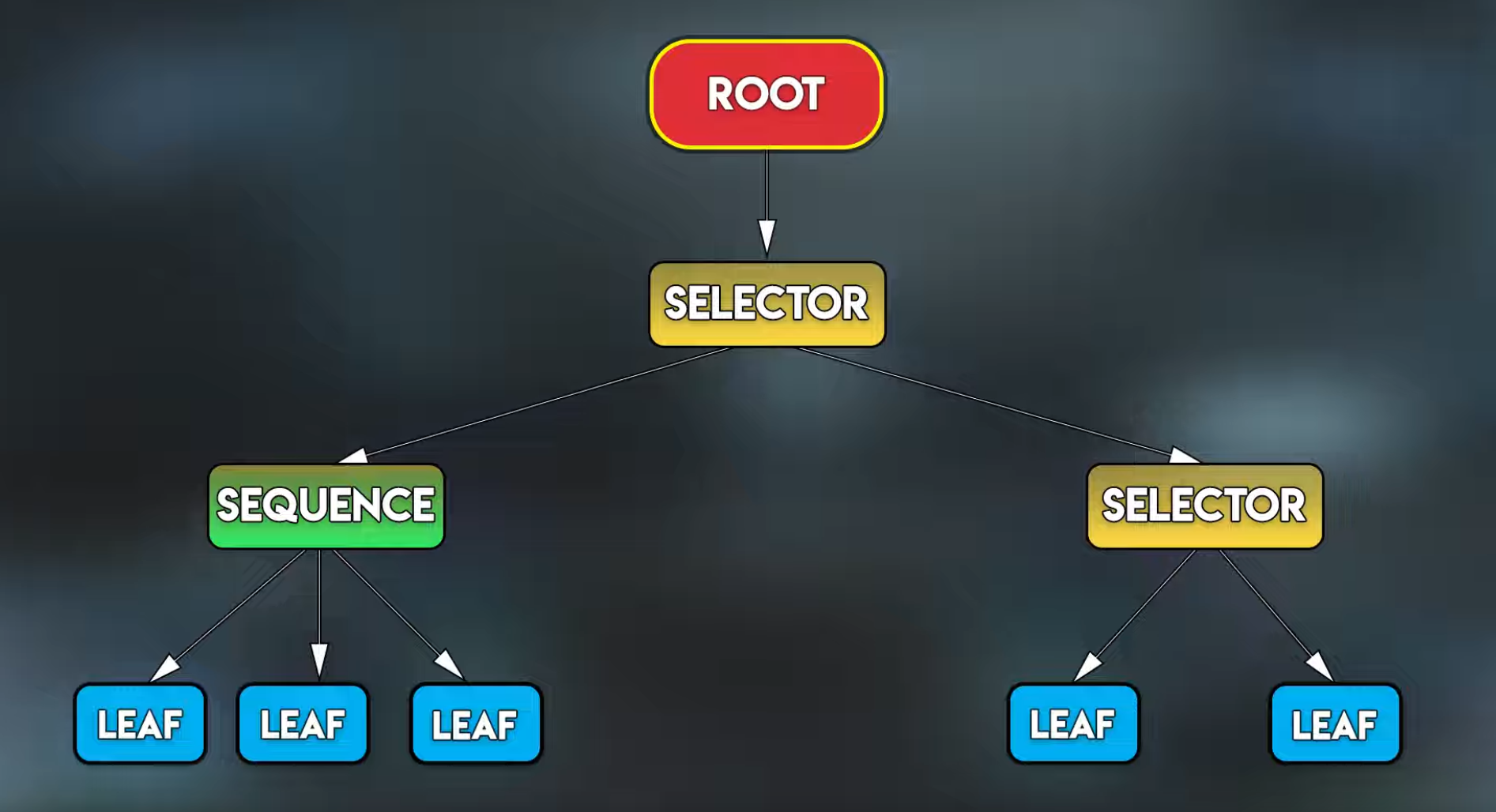 .
.
-
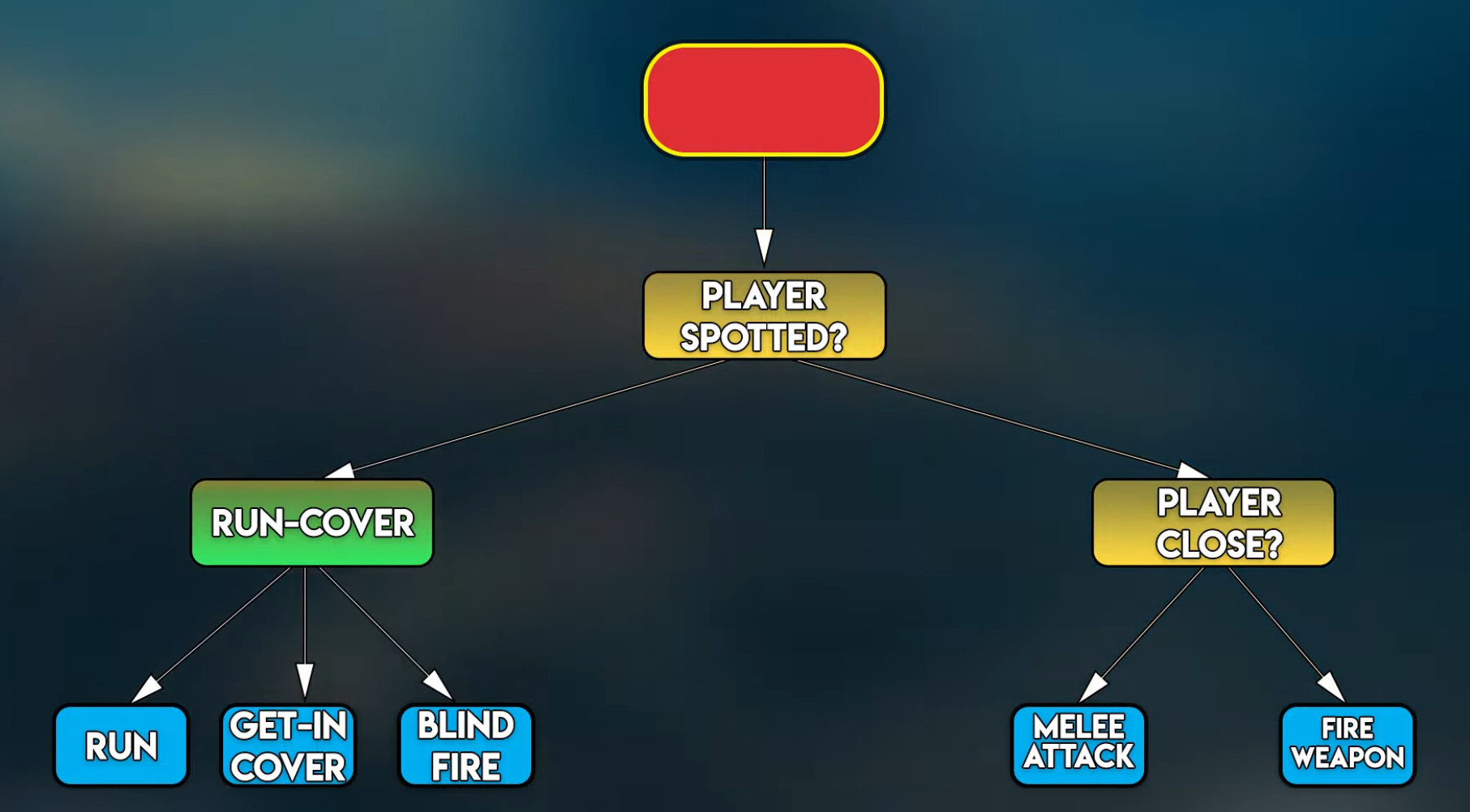 .
.
-
-
AI in Godot using the BeeHave addon .
-
{1:14 -> 14:40}
-
Explanation of what a Behavior Tree is.
-
-
{8:15 -> 12:12}
-
Demonstration of the Behavior Tree in action.
-
-
{17:10}
-
Shows debugger visualization of BeeHave nodes, which is pretty neat.
-
-
-
OOP tips for modular use of 'Behavior Trees' and 'Hybrid between Behavior Tree and Utility AI' .
-
There are 3 presentations. All focus on OOP, organization, guidelines, etc.
-
The first presentation talks about Behavior Trees.
-
Kind of so-so, a bit too introductory.
-
-
The second presentation talks about Utility AI, but used in a hybrid way; it did not captivate me at first glance.
-
Interesting to encourage the use of Utility AI, but other presentations focused on this are better.
-
-
The third presentation talks about Behavior Trees.
-
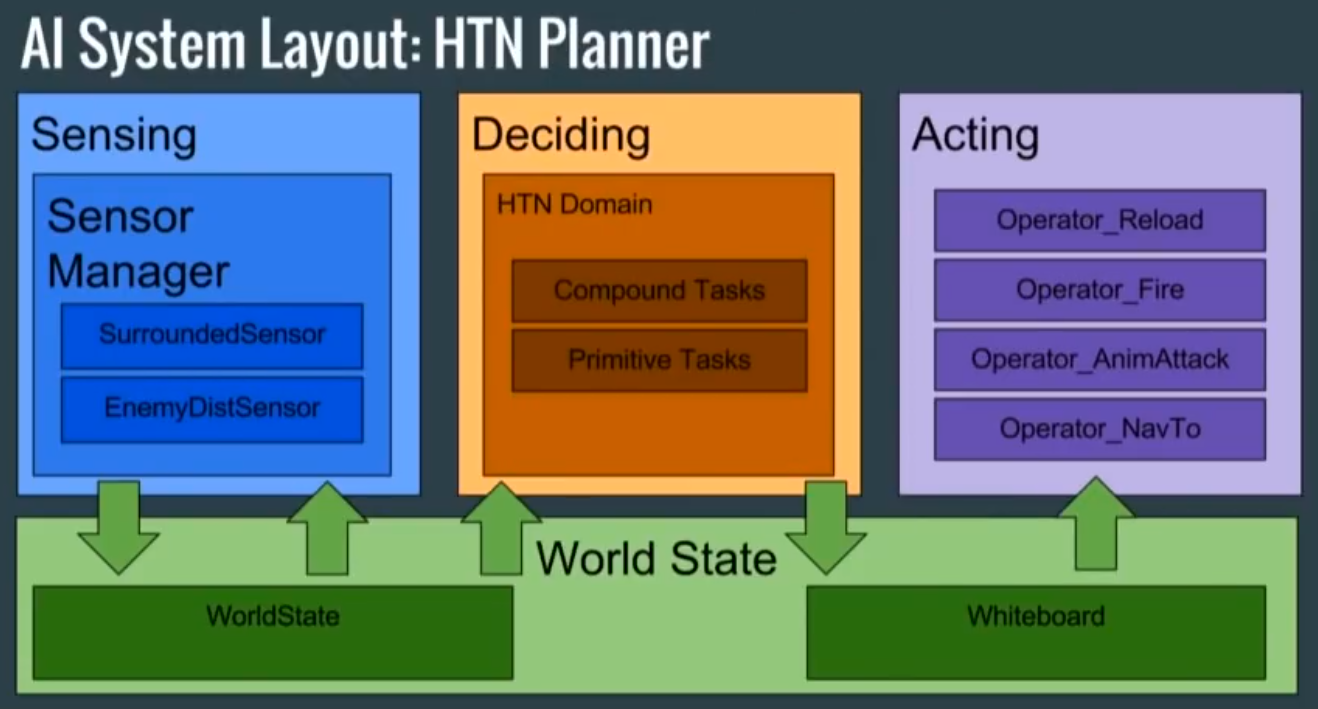
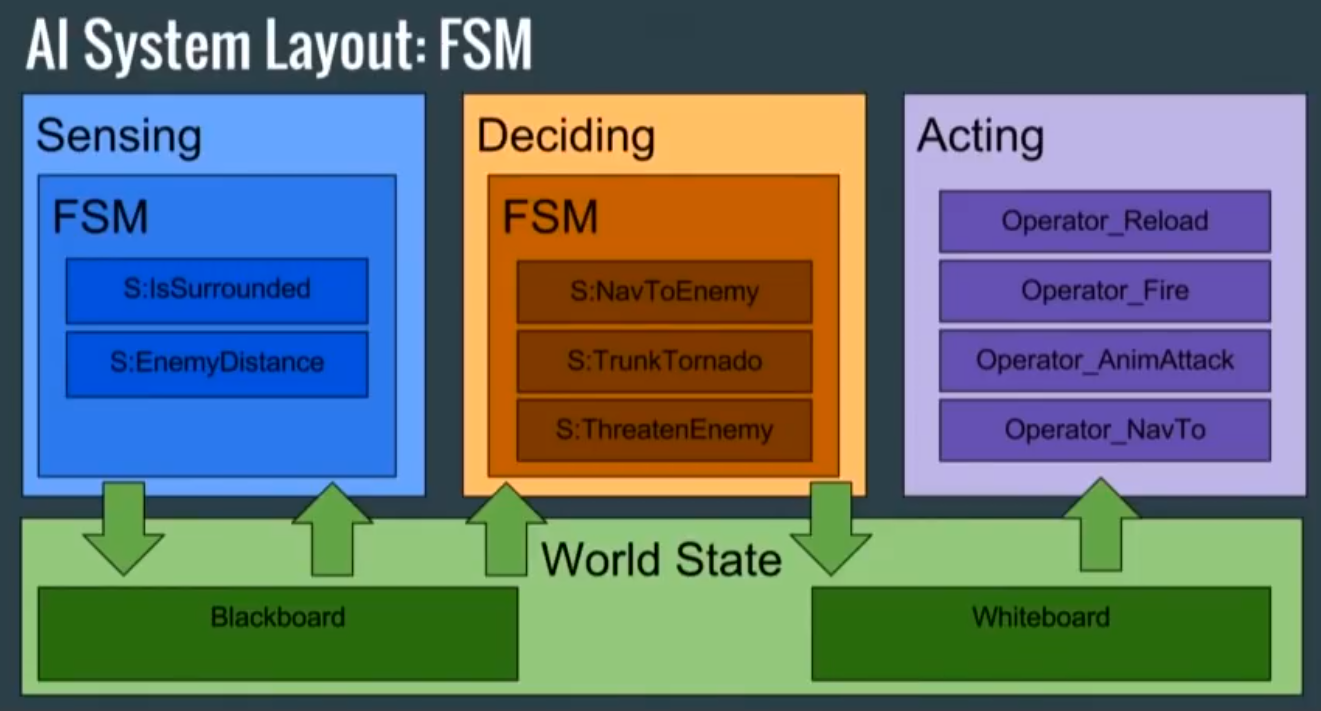
This part I found most interesting, for introducing the concept:
-
Separate the parts of "Sense", "Plan" and "Act".
-
-
Has good guidelines, very useful.
-
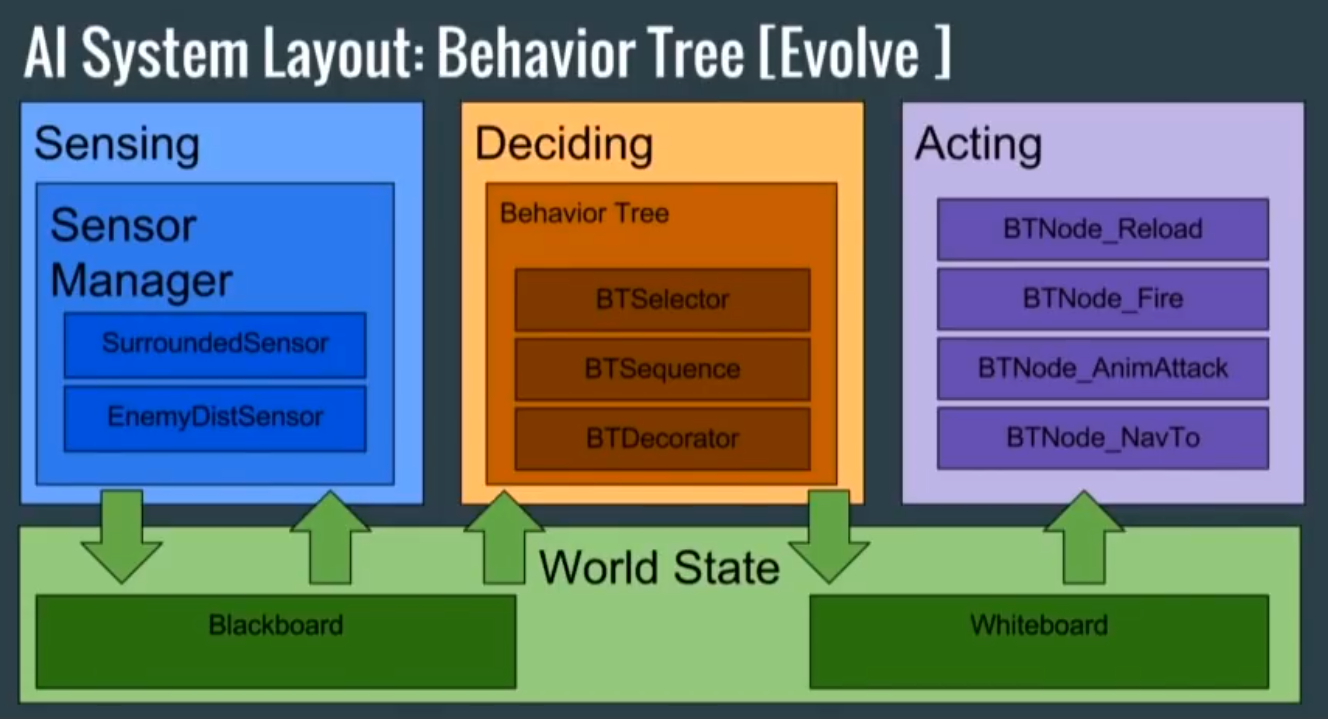 .
.
-
 .
.
-
 .
.
-
-
It is a very useful video for OOP. Not as useful to me overall, since I already knew many of these things, but it is a good video.
-
HTN (Hierarchical Task Network)
About
-
.
Games that use it
-
Killzone 2 and 3.
-
Dying Light.
-
Max Payne 3.
Explanations
-
Explanation, with example in Godot .
-
Good explanation. The only explanation I found about this strategy.
-
GOAP (Goal-Oriented Action Planning)
About
-
Definition of Goals and definitions of actions to execute those Goals.
-
Each possible action has a weight and conditionals to be executed, generating a "pseudo-score" for each possible action to fulfill the Goal, choosing the best action at the end.
-
Goals must be ordered so you need to execute the first Goal in the list before moving to the next.
-
Has an initially complex and confusing implementation for sure.
-
Can have some performance issues since each entity must consider every possible plan of actions to fulfill the Goal before taking any action.
-
In the worst case, one has $O((nm)^d)$, where $n$ is the number of possible actions, $m$ is the number of goals and $d$ is the depth of the path.
-
Because of this, "design short plans" is repeated billions of times due to performance concerns.
-
For this reason, A* is also normally used to do the "pathfinding" to choose the best action within the Tree, to optimize the speed of this decision-making in the Tree.
-
-
Has some visualization and debugging difficulties.
-
Supposedly allows "emergent behavior", but that is quite obtuse; this kind of thing is not obvious due to implementation complexity. Very likely Utility AI can achieve more emergence more easily.
-
*Impressions:
-
I found the definition of a 'goal' very abstract, sometimes giving the impression that something could be defined both as an action and as a goal.
-
Seems very oriented to stealth games or games with autonomous NPCs, but it is somewhat irrelevant for combat moments.
-
I did not like it very much overall, as decision-making and goal definition are somewhat abstract.
-
I have the impression that the strategy seems very "literal", but its implementation is somewhat confusing because of that.
-
Considering the target cases for this strategy, using Utility AI sounds better because it is more organic and allows emergence in NPC behavior.
-
Games that use it
-
F.E.A.R. .
-
Meh, basically a documentary, not very technical.
-
-
Shadow of Mordor.
-
Same company as F.E.A.R.
-
-
Condemned 1 and 2.
-
Same company as F.E.A.R.
-
-
Tomb Raider.
-
Rise of Tomb Raider.
Explanations
-
Good explanation and comparisons between FSM and Behavior Trees .
-
GDC on using GOAP in Shadow of Mordor and Tomb Raider .
-
The first and second presentations are kind of bad, while the third presentation (about analytics) is okay.
-
The first two presentations seem like the speakers did not rehearse well or simply assume everyone knows what they are talking about.
-
-
Much is said about performance optimization when using GOAP, which is not so relevant for indie devs normally.
-
In the last part of the video analytics are shown about the number of plans per NPC and the number of NPCs that can be active at the same time; that may be interesting.
-
Examples
HGN (Hierarchical Goal Network)
About
-
Hardly used.
-
Differences between HTN and HGN:
-
"HTN is oriented to decomposing tasks into subtasks, while HGN organizes and plans based on a hierarchy of goals."
-
-
By its nature this creates AI that is very predictable, like enemies in Dark Souls. To prevent this, RNG is used.
Games that use it
-
-
As shown in the Combat Wheel section, the probability of an attack occurring is altered at runtime depending on the context of the fight, creating greater variability and less predictability.
-
It is an interesting approach, somewhat reminiscent of scores in Utility AI, as mentioned in the video.
-
STRIPS (Stanford Research Institute Problem Solver)
About
-
About .
-
From what I understand, it is a system that precedes GOAP, so STRIPS is considered outdated by current standards.
-
"STRIPS is considered a 'language' because it defines a formal representation to describe planning problems and the operators needed to solve those problems. Its components form a 'language' to specify and solve planning problems, allowing algorithms to understand and manipulate the problem representation to find a solution."
Rule-based AI
About
-
"Rule-based AI operates on a simple yet powerful premise: it uses a set of predefined 'if-then' conditions to process data and make decisions. This form of AI mimics human decision-making by following explicitly programmed instructions, making it a reliable and predictable system for various applications. Unlike its more dynamic counterparts, rule-based AI stands out due to its reliance on human-crafted rules. This dependence ensures that every operation and decision it makes can be traced back to a specific set of guidelines developed."
-
In other words, it's just 'ifs' and 'elses'.
-
Very dated. Hardly qualifies as a 'strategy'.
Games that use it
-
Pac-Man (1980)
-
Skyrim (2011)
Evaluations
-
Content:
-
Behavior.
-
-
Services:
-
Locomotion.
-
Pathfinding.
-
Pathfinding
Memory and Line Of Sight
-
I have to evaluate which of the methods below I prefer. I haven't thought about it yet.
"Player Memory System"
-
Aka "Footprints System" that I made.
-
Used when becoming 'unreachable'.
-
It was important for problems where the entity loses information about the target, such as changing floors, or when the entity goes behind cover.
-
.
"System of visibility of player-occupied tiles" (I call it the "Scenting System")
-
A system alternative to the "Memory System", making the player "occupy" a much larger space in the world's tiles, so the enemy can follow information from those tiles if the player disappears.
-
I did not like this system alone because there is no logic of "memory", but it is definitely interesting.
-
I do not think this system 'replaces' / 'is replaced by' the Memory System. I believe it is complementary and can add more dynamics to chases and stealth games.
-
Video demonstrating the concept .
-
The first half of the video is irrelevant.
-
"Breadcrumb System"
-
A system very similar to the ones above, almost a mix of both.
-
I found it okay.
-
Video demonstrating the concept .
-
The rest of the video is largely irrelevant.
-