BalenaEtcher
-
Put distros on a USB drive for installation.
Major
-
Major .
Debian
-
Setup :
-
Bootloader - GRUB
-
Init System - systemd
-
Display Render - Xorg
-
Display Manager - SDDM/GDM
-
Desktop Environment - KDE/GNOME
-
Package Manager - APT
-
-
Package format :
-
.deb
-
-
Package Manager :
-
High-level:
-
apt-
Old.
-
You have to download the whole package for each upgrade.
-
-
-
Low-level:
-
dpkg
-
-
-
Generally has older packages, but they don’t usually have many bugs and are very reliable.
-
Stable Releases.
-
Can be a bad thing if something new was just released, so you won't have support.
-
Fedora
-
Based on RedHat (RHEL).
-
Opinions :
-
"Blend between Debian and Arch, with the best of both worlds".
-
"dnf is slow".
-
-
Setup :
-
Bootloader - Systemd
-
Init System - systemd
-
Display Render - Wayland
-
Desktop Environment - GNOME
-
Package Manager - DNF
-
-
Package format :
-
.rpm
-
-
Rolling Release.
-
Quite secure, being based on RHEL, a bit better than Debian based.
-
Fedora is the umbrella project — it includes multiple editions for different use cases:
-
Fedora Workstation
-
Fedora Server
-
Fedora IoT
-
Fedora Silverblue
-
Fedora CoreOS
-
etc.
-
-
Fedora Spins:
-
Fedora KDE Spin
-
KDE Plasma
-
-
Fedora SoaS
-
Sugar
-
-
Fedora i3 Spin
-
i3 WM
-
-
Fedora Workstation-
Gnome.
-
-
Fedora XFCE Spin-
XFCE
-
-
Fedora LXQt Spin-
LXQt
-
-
Fedora Cinnamon-
Cinnamon
-
-
Fedora MATE-
MATE
-
-
-
Purpose :
-
General-purpose Linux distro focused on developers, workstations, and modern software.
-
-
Base :
-
RPM-based, sponsored by Red Hat.
-
-
Security tools :
-
Standard Linux security with SELinux enabled by default; no pentesting tools preinstalled.
-
-
Desktop Environment :
-
GNOME by default (modern and feature-rich).
-
-
Package Manager :
-
High-level:
-
dnf-
Does differential updates, reducing the amount downloaded per update.
-
Does good dependency resolution.
-
-
-
Low-level:
-
rpm
-
-
-
Update model :
-
Fixed releases approximately every 6 months with predictable upgrade cycles.
-
-
Security model :
-
Strong security defaults (SELinux, secure boot, frequent security patches).
-
-
Ease of use for gaming :
-
Good support with Steam, Proton, flatpak, and latest drivers; not gaming-focused but compatible.
-
-
Server hosting :
-
Reliable and stable for servers; requires some sysadmin knowledge for tuning SELinux and updates.
-
-
Pros :
-
Strong security posture with SELinux enforcement.
-
Stable with predictable release and upgrade schedule.
-
Good support for gaming through official repos and flatpak.
-
Large, active user and developer community.
-
Official support for containers (Podman, Docker) and virtualization.
-
-
Cons :
-
Gaming-related setup requires some manual configuration (drivers, Proton tweaks).
-
Less bleeding-edge software compared to rolling distros like Manjaro.
-
SELinux can complicate software setup if not configured properly.
-
Arch
-
-
-
Holy moly.
-
Steps :
-
Flash drive.
-
BIOS.
-
Driver partition.
-
etc, etc, etc, etc, etc, etc.
-
Boot loader.
-
Drivers
-
-
-
Package format :
-
.pkg.tar.zst
-
-
Package Manager :
-
pacman
-
-
Package repo :
-
AUR
-
Community Build Kit.
-
"It's flawed and sometimes things aren't updated or are badly updated".
-
AUR Helpers (optional, user-installed)
-
Wrappers like
yay,paru, etc.
-
-
-
-
Rolling Release.
-
Opinions I found interesting :
-
-
Talks about the need for AUR, which is overrated.
-
-
Based
Nobara
-
.
-
Nobara .
-
The site explains it extensively.
-
-
Based on Fedora.
-
Is not an immutable distribution.
-
Nobara allows direct changes to system files, package installations via
dnf, and manual modifications like a standard Linux distro.
-
Fedora KDE
-
.
-
Based on Fedora.
-
Fedora with KDE Plasma.
PikaOS
-
PikaOS .
-
Purpose :
-
Ubuntu-based distro focused on gaming , performance , and streamlined user experience .
-
-
Base :
-
Ubuntu (LTS or interim).
-
-
Security tools :
-
Inherits Ubuntu’s AppArmor, UFW, and secure defaults.
-
-
Desktop Environment :
-
GNOME (heavily customized for performance and usability).
-
-
Package Manager :
-
apt(Debian-style), plus Flatpak support out of the box.
-
-
Update model :
-
Fixed release, follows Ubuntu’s cadence.
-
-
Security model :
-
Strong—AppArmor enabled, good defaults, supported by Ubuntu’s infrastructure.
-
-
Ease of use for gaming :
-
Very high—preinstalled Proton GE, Steam, Wine, DXVK, Vulkan, MangoHUD, and gaming tweaks.
-
-
Server hosting :
-
Not recommended; tailored for desktop/gaming with added packages and tweaks.
-
-
Pros :
-
Easy setup for gaming and general use.
-
Ubuntu compatibility: access to
.debpackages and large support ecosystem. -
Preinstalled tools: Steam, Lutris, Wine-GE, GameMode, MangoHUD, OBS, and others.
-
Comes with custom performance tweaks and low-latency kernel.
-
Better out-of-the-box NVIDIA support than standard Ubuntu.
-
Familiar Ubuntu base with added polish and gaming features.
-
-
Cons :
-
Smaller dev team and community; less support and slower updates than mainline Ubuntu.
-
Some customizations may interfere with expected Ubuntu workflows or tooling.
-
Adds many preinstalled tools—can feel bloated for minimal setups.
-
Not designed for server use or long-term enterprise workloads.
-
CachyOS
-
.
-
CachyOS .
-
Purpose :
-
Arch-based distro focused on performance, especially for gaming and desktop responsiveness.
-
-
Base :
-
Arch Linux.
-
-
Security tools :
-
Standard Arch security; no enhanced MAC system (no SELinux/AppArmor by default).
-
-
Desktop Environment :
-
Multiple options (KDE Plasma is default); tuned for performance.
-
-
Package Manager :
-
pacman, plus CachyOS repos and AUR access.
-
-
Update model :
-
Rolling release, synced with Arch but with curated/testing steps.
-
-
Security model :
-
Basic; relies on upstream Arch practices. Custom kernels may have hardened or performance options.
-
-
Ease of use for gaming :
-
High—comes with custom kernel (Bore, Liquorix), performance tweaks, Steam, Proton, gaming tools preconfigured.
-
-
Server hosting :
-
Not recommended; designed for desktop/gaming, not long-term stability.
-
-
Pros :
-
Precompiled performance-tuned kernels (like Cachy, BORE, Zen, Liquorix).
-
Aggressive compiler optimizations (Bore kernel + CPU-specific flags).
-
Preconfigured with gaming tools (e.g., MangoHUD, Gamemode, Proton support).
-
Fast and responsive desktop experience.
-
Access to AUR and Arch ecosystem.
-
-
Cons :
-
Rolling release: update management needed to avoid breakage.
-
Smaller community and fewer support resources than Arch/Manjaro/Fedora.
-
Custom kernels may create compatibility issues with some proprietary software or modules.
-
Not suitable for servers or mission-critical stability.
-
Some features (like Cachy Kernel) are non-standard, which may make debugging harder.
-
EndeavourOS
-
.
-
Based on Arch.
-
Close to vanilla Arch but with a friendly installer and curated defaults.
-
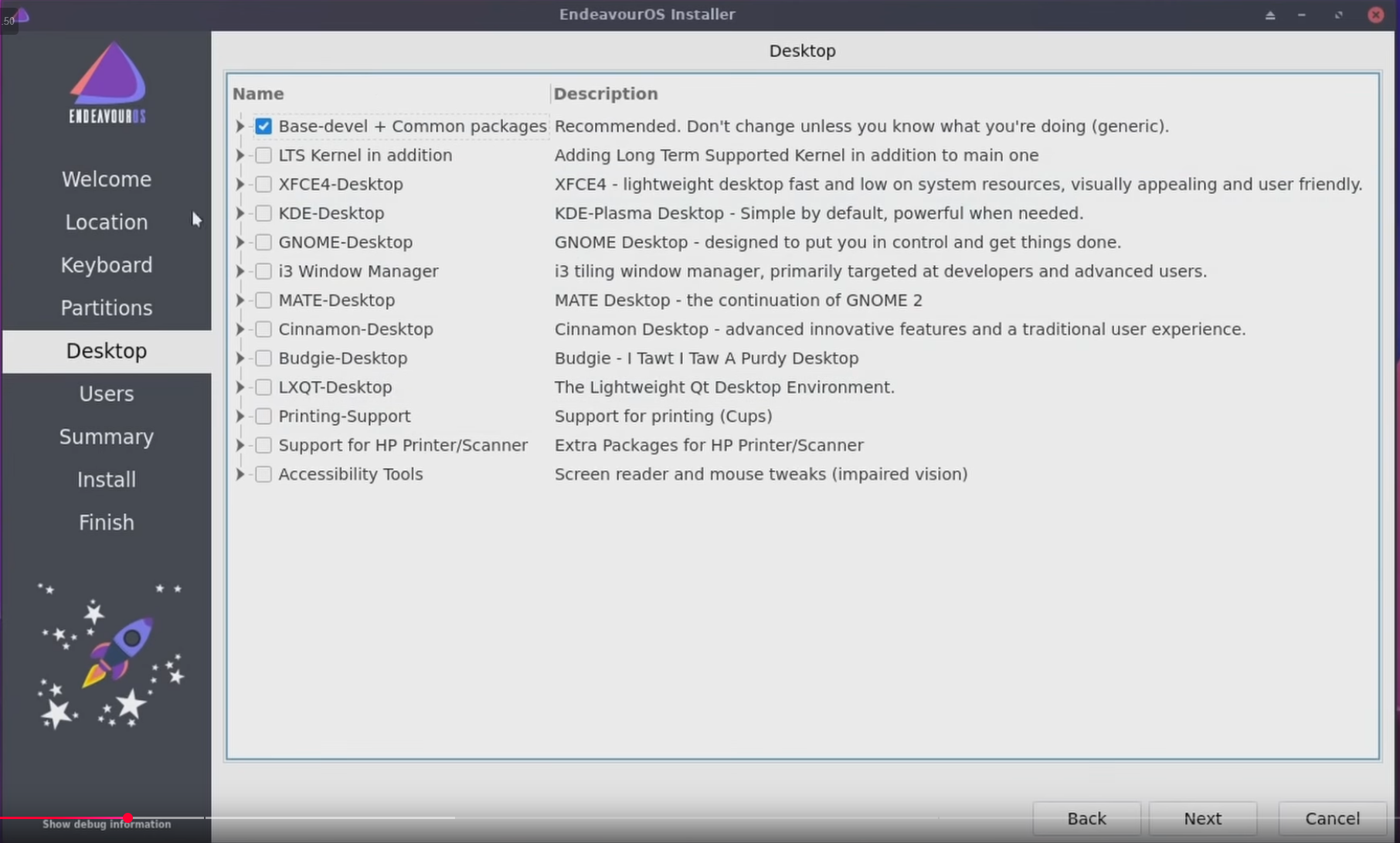
Only has 1 installer, but during installation you are given several DE options.
-
 .
.
-
It is possible to install more than one.
-
-
Package Manager :
-
yay, which is an AUR helper.
-
-
AUR :
-
Enabled via yay, manually.
-
-
Releases :
-
Near real-time Arch packages
-
Garuda
-
Purpose :
-
Gaming and performance-focused Arch-based distro with flashy visuals and pre-optimized settings.
-
-
Base :
-
Arch Linux.
-
-
Security tools :
-
Standard Linux permissions; no enhanced security framework like SELinux/AppArmor.
-
-
Desktop Environment :
-
Multiple editions (KDE Dr460nized is the flagship); heavily customized.
-
-
Package Manager :
-
pacman, plus access to AUR and preinstalled GUI tools (Pamac, Garuda Assistant).
-
-
Update model :
-
Rolling release with latest kernel, drivers, and software.
-
-
Security model :
-
No special hardening; rolling model requires update caution.
-
-
Ease of use for gaming :
-
Very high—preinstalled Steam, Lutris, Wine, GameMode, and performance tweaks.
-
-
Server hosting :
-
Not recommended; tuned for desktop/gaming, not for minimalism, stability, or uptime.
-
-
Pros :
-
Excellent out-of-the-box gaming setup.
-
Beautiful and modern UI (especially KDE Dr460nized).
-
Preinstalled tools for managing drivers, system snapshots (Btrfs + Timeshift), and performance tweaks.
-
Frequent updates, latest kernel and Mesa drivers for gaming performance.
-
Great for users who want Arch + convenience + gaming focus.
-
-
Cons :
-
Resource-heavy: high RAM and disk usage compared to other distros.
-
Rolling release: requires regular updates, with some risk of breakage.
-
Not optimized for server use or long-term stability.
-
Lots of customizations can make troubleshooting harder.
-
Uses ZRAM and Btrfs by default, which can behave differently from traditional setups.
-
~Kali
-
Based on Debian.
-
Aimed at hacking.
-
Purpose :
-
Penetration testing and cybersecurity research.
-
-
Base :
-
Debian Testing.
-
-
Security tools :
-
Comes preloaded with hundreds of pentesting/security tools.
-
-
Desktop Environment :
-
Xfce by default (lightweight).
-
-
Package Manager :
-
apt.
-
-
Update model :
-
Rolling, but based on Debian Testing (less stable than Debian Stable).
-
-
Security model :
-
Focus on security tools, not desktop/user security features.
-
-
Ease of use for gaming :
-
Limited focus; gaming software not prioritized.
-
-
Server hosting :
-
Possible but not optimized; might require manual setup.
-
-
Pros :
-
Best for learning cybersecurity tools out-of-the-box.
-
Large, active community for pentesting.
-
Supports ARM and other architectures for lab setups.
-
-
Cons :
-
Not designed for daily desktop use or gaming.
-
Rolling model with Debian Testing base can lead to stability issues.
-
Many security tools running by default can bloat system and complicate maintenance.
-
Gaming software and drivers not prioritized or preconfigured.
-
Mint
-
Based on Ubuntu.
-
Mint .
-
Known for being the easiest.
-
Used by PewDiePie, later he switched to Arch.
~OpenSuse
-
OpenSuse .
-
Purpose :
-
General-purpose, enterprise-grade distro with focus on stability (Leap) or rolling updates (Tumbleweed).
-
-
Base :
-
Independent; shares core with SUSE Linux Enterprise (SLE).
-
-
Security tools :
-
AppArmor enabled by default; strong security policies.
-
-
Desktop Environment :
-
KDE Plasma (default), GNOME, and others available.
-
-
Package Manager :
-
zypper(RPM-based); supports YaST GUI for system config.
-
-
Update model :
-
Leap : Fixed release (more stable, SLE-aligned).
-
Tumbleweed : Rolling release (bleeding-edge, but tested).
-
-
Security model :
-
Strong defaults (AppArmor, secure boot, updates); enterprise-grade tools.
-
-
Ease of use for gaming :
-
Decent support; not gaming-focused but compatible with Steam, Proton, Lutris.
-
-
Server hosting :
-
Very capable; Leap especially suited for long-term deployments.
-
-
Pros :
-
Leap is very stable; ideal for servers or production systems.
-
Tumbleweed is a well-tested rolling release with automated QA (openQA).
-
YaST provides powerful GUI and CLI tools for system administration.
-
AppArmor provides strong security sandboxing.
-
Good hardware support, especially on KDE (the default).
-
Access to community and 3rd-party repos (Packman) for multimedia and gaming tools.
-
-
Cons :
-
Not as popular for gaming: needs manual setup for drivers, codecs, Steam/Proton.
-
Leap often has older packages, which can impact newer gaming features/tools.
-
Tumbleweed can still break things despite testing (rolling nature).
-
Smaller gaming community compared to Debian/Arch-based distros.
-
Some proprietary software vendors do not offer
.rpmbuilds tested on openSUSE.
-
~Peppermint
-
Based on Ubuntu.
-
Uses LXDE/XFCE components; blends desktop and web apps via ICE, aiming for speed and simplicity.
~Kubuntu
-
Based on Ubuntu.
-
Ubuntu with KDE Plasma as the default DE, that's it.
~Linux Lite
-
Based on Ubuntu.
Manjaro
-
Based on Arch.
-
Gives you options for different installers: XFCE, KDE, GNOME.
-
Helps with driver installation.
-
Opinions :
-
AUR can update, but Manjaro doesn't, because Manjaro is conservative.
-
Apparently the idea of being "Arch but user friendly" is kind of bait because of this.
-
I saw a video about Manjaro not having good releases, for shipping WIP.
-
I saw opinions about Manjaro being strange, due to how packages are released, causing many errors so sometimes it's better not to update, but you want to update.
-
Again, "not using AUR, or not having the latest updates, leaves you without a reason to use Arch".
-
-
Package Manager :
-
pacman + Pamac (GUI).
-
-
AUR : Enabled via GUI.
-
Releases :
-
With a delay buffer (~1-2 weeks)
-
-
Purpose :
-
User-friendly Arch-based Linux distro aimed at desktop users wanting bleeding-edge software with easier management.
-
-
Base :
-
Arch Linux.
-
-
Security tools :
-
Standard Linux permissions; no mandatory MAC systems like SELinux enabled by default.
-
-
Desktop Environment :
-
Multiple official flavors (Xfce, KDE Plasma, GNOME), all preconfigured for ease of use.
-
-
Package Manager :
-
pacmanwith optional GUI frontends like Pamac.
-
-
Update model :
-
Rolling release with a 1-3 week delay on Arch package updates for stability.
-
-
Security model :
-
Basic Linux security; relies on community updates and user configuration.
-
-
Ease of use for gaming :
-
Excellent—latest graphics drivers, Steam, Proton, Lutris, and AUR provide vast gaming software availability.
-
-
Server hosting :
-
Possible but requires careful update management; rolling updates may occasionally cause issues affecting uptime.
-
-
Pros :
-
Access to the latest software and drivers for gaming and development.
-
User-friendly installer and preconfigured desktop environments.
-
Large community support with many user-contributed packages in AUR.
-
Good out-of-the-box gaming experience with Steam and Proton.
-
Flexible and customizable due to Arch base.
-
-
Cons :
-
Rolling release model can introduce occasional instability or breakage.
-
No enforced security frameworks like SELinux by default.
-
Requires more manual intervention for system maintenance compared to fixed-release distros.
-
AUR packages are user-contributed and may vary in quality and security.
-
Pop!_OS
-
Pop!_OS .
-
Based on Ubuntu.
-
Uses Gnome as default DE.
-
"Focus on performance and tiling workflow."
Bazzite
-
Bazzite .
-
Complete focus on gaming.
-
Immutable, I don't want it.
SteamOS
-
Based on Ubuntu.
-
Complete focus on gaming.
-
Immutable, I don't want it.
Fedora Workstation
-
Fedora with Gnome.
-
Is the desktop edition of Fedora, intended for laptops and PCs.
Ubuntu
-
Based on Debian.
-
Uses Gnome as default DE.
-
Package format :
-
.deb
-
Lubuntu
-
Based on Ubuntu.
-
Uses LXQt as default DE.
Xubuntu
-
Based on Ubuntu.
-
Is Ubuntu with XFCE as default DE, that's it.
Nix / NixOS
-
Not based on Debian, Arch, etc.
-
Declarative, reproducible Linux distro using the Nix package manager; system configurations are stored in code and can be rolled back easily.
Ultra low-level
Gentoo
-
Ultra low-level.
LinuxFromScratch
-
Apparently more difficult and lower-level than Arch.