-
Instructions are in execution order .
Setup
Prerequisites
-
Download and install Temurin 17 .
-
Download and install the Android SDK .
In Android Studio
-
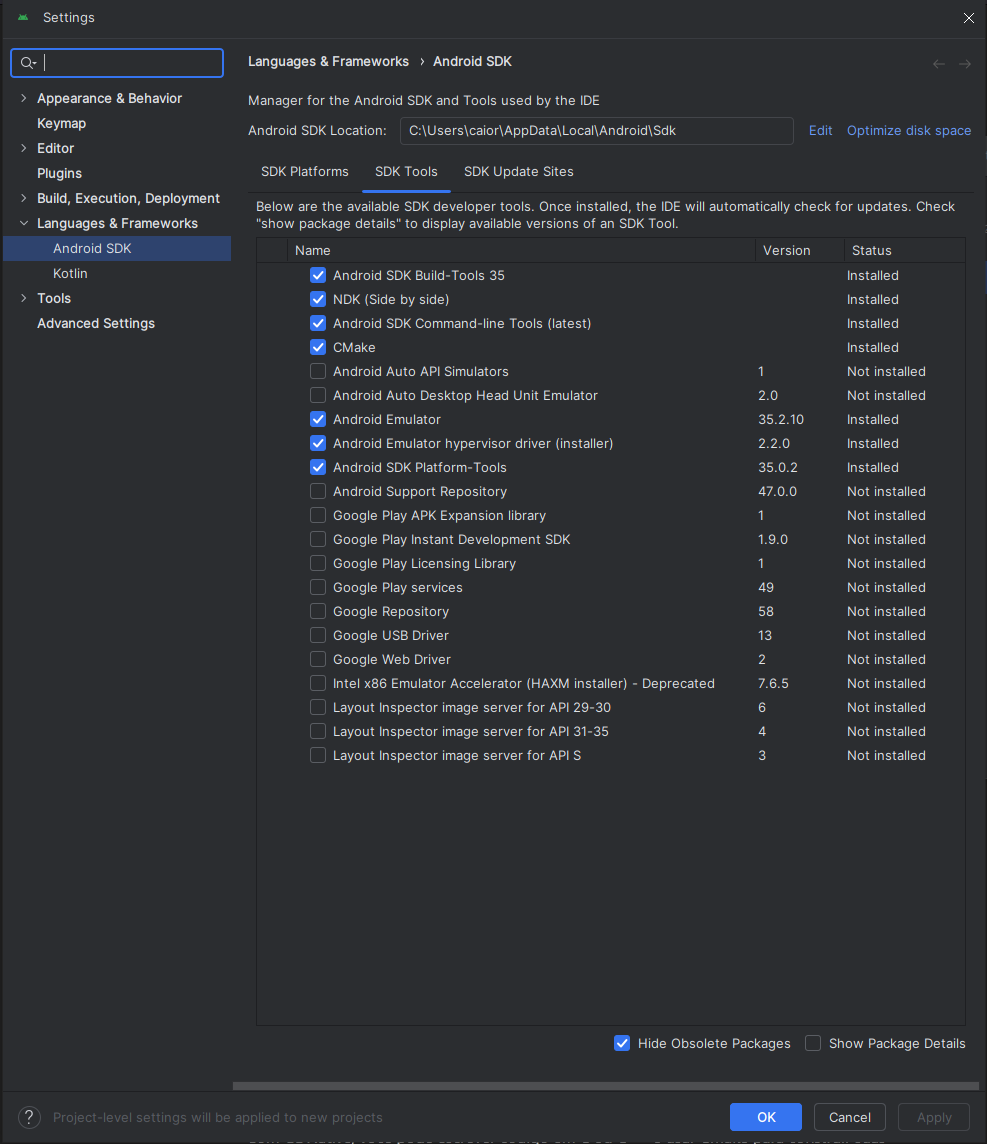
Inside the SDK Manager :
-
SDK Tools:
-
 .
.
-
-
In Godot
-
Android SDK Path:
-
C:/Users/_user_/AppData/Local/Android/Sdk
-
-
Java SDK Path (Temurin 17 path):
-
C:/Program Files/Eclipse Adoptium/jdk-17.0.12.7-hotspot
-
Export
Package name
-
*Troubleshooting:
-
If you get an error saying 'Could not install to device', make sure you do not have an application with the same Android package name already installed on the device (but signed with a different key).
-
If you have an application with the same Android package name but a different signing key already installed on the device, you must remove the application in question from the Android device before exporting to Android again.
-
-
Keystore
-
"Debug keystores are now automatically generated by the editor since Godot 4.3".
-
Release:
-
Enter the path to the keystore file you just generated.
-
-
Release User:
-
Replace with the key alias
-
-
Release Password:
-
Key password.
-
Note that the keystore password and the key password currently have to be the same.
-
From what I understand, this is a current limitation of Android Studio.
-
-
Settings
-
Explanation of some export settings .
-
Does not use Gradle, nor does it comment about it.
-
Gradle
-
It is optional.
-
Requirements :
-
You need to click
Project -> Install Android Build Template. -
I believe Gradle relies more heavily on installations done in Android Studio.
-
-
From what I perceive, all folders and files inside the
res://Android/buildfolder should never be changed. Things inside there are useful, but just use Godot's export interface and everything is configurable in a much better way. -
Troubleshooting :
-
(2024-10-18) I had problems enabling Gradle.
-
I tried to download all correct versions of dependencies but it did not help.
-
"When using the gradle Android build system, assets that are placed within a folder whose name begins with an underscore will not be included in the generated APK. This does not apply to assets whose file name begins with an underscore."
-
"For example,
_example/image.pngwill not be included as an asset, but_image.pngwill." -
Using it in a project that does not have folders starting with
_solved the problem.
-
-
-
Debugging
One-click Deploy
-
-
Super simple, very useful.
-
Note:
-
When you enable 'USB Debugging' on the phone and connect it to the PC, it asks whether you want to allow the 'Computer with RSA key fingerprint ' to access the phone.
-
-
Adb (Android Debug Bridge)
-
*About:
-
Comes bundled with the standard Android Studio installation.
-
adb logcat.-
Lets you see all things from the connected device.
-
-
adb logcat -s godot-
Lets you see only logs related to Godot.
-
-
You can use
adb logcat > log.txt, which will generate a file with all logs.
-
-
Add the path
C:\Users\_user_\AppData\Local\Android\Sdk\platform-tools\to Environment Variables. -
Environment Variables -> System variables/Path -> Edit -> New -> paste the path above.
Wireless: Via 'adb tcpip'
-
I can set my phone's IP to be static to make connecting with
adb connecteasier. -
*Requirements:
-
The phone must have 'USB Debugging' enabled.
-
It is necessary to have 'adb' installed together with (probably) all JDK and Android Studio requirements.
-
Both devices must be on the same Wi-Fi network.
-
The used port must be open (5555); it usually is.
-
-
*Method:
-
Connect the cable.
-
Type
adb tcpip 5555.-
"Essentially, it turns the connected device into a 'server' ready to receive connections over Wi-Fi".
-
tcpip:-
"This adb command argument changes the communication interface of ADB from 'USB' (the default) to 'TCP/IP' mode."
-
-
5555:-
"This is the network port where ADB will listen for connections. The number 5555 is the default port used by ADB for TCP/IP connections. You can choose another port if you prefer, but 5555 is widely used because it is the default."
-
-
-
Disconnect the cable.
-
Type
adb connect phone_local_ip_address:5555.-
The phone's IP address is found in 'About phone -> Status information -> IP address'.
-
The format is usually "192.168.0.x".
-
-
Done.
-
To disconnect, you can do
adb disconnect phone_local_ip_address:5555.-
It only ends the current connection, and the device will still continue to listen on port 5555, which still represents a risk.
-
-
To return adb to USB configuration, you can do
adb usb.-
This is important for security reasons.
-
Running
adb usbwithout first doingadb disconnectwill not cause any problem, but it is good practice to disconnect before switching to USB mode. Theadb usbcommand ensures the device is no longer available for wireless ADB connections, minimizing security risks even if the connection were still active.
-
-
-
*Advantages:
-
Smooth debugging with
adb logcat -s godot. -
One-click Deploy can be used to export and automatically open the app on the phone via wireless.
-
-
*Disadvantages:
-
Does not show Godot debugging when running One-click Deploy.
-
Wireless: Other options
-
WebSockets
-
WebSockets allow bidirectional real-time communication between the client (in this case your Godot app) and a server (can be local or cloud).
-
Flexibility for real-time communication.
-
Works on any network as long as the device and server are reachable.
-
-
HTTP/REST API
-
Create an HTTP server that can be accessed via RESTful calls. The Godot app can send and receive data via HTTP requests.
-
You can use frameworks like Flask (Python), Express (Node.js) or any other server that supports HTTP.
-
Easy to implement and test.
-
Good for applications that do not require real-time communication.
-
-
Multiplayer using NAT Punchthrough
-
A technique that allows devices on different networks (with NAT) to communicate directly without a relay server.
-
Enables direct device-to-device communication, reducing latency.
-
-
Bluetooth
-
For applications that need short-range communication, Bluetooth is a viable option.
-
You can use the Android API to manage Bluetooth connections from Godot, although this may require more work for permissions and device management.
-
Useful for nearby devices not on the same Wi-Fi network.
-
-
TCP/UDP Sockets
-
You can use sockets to establish communication between the Godot app and a server or between devices.
-
Godot has support for sockets, allowing you to create both TCP/UDP servers and clients.
-
Flexibility to create a variety of communication solutions.
-
-
Godot Steam Networking (for games)
-
If your project is a game and you plan to release on Steam, you can use Steam's networking system, which supports matchmaking and other features.
-
You can use Steamworks APIs with Godot to manage multiplayer connections and communication.
-
Easy integration with the Steam platform and support for NAT Punchthrough.
-
Permissions
File System
-
"On mobile platforms, this path is unique to the project and is not accessible by other applications for security reasons."
-
You can READ and WRITE files there, but you cannot view them from the computer or phone. The game can access these files without issues.
-
No permissions are required for this to be done on the
user://path.
-
-
Supposedly, by rooting the phone it is possible to access these files.
-
-
user://path:-
/data/data/my.app.name/filesor/SD card/Android/my.app.name/files.
-
-
*Verification:
-
Using
adb, it is possible to verify that files are being saved.-
 .
.
-
-
If I ask the game itself to print the content of the accessed file, it is also possible to verify that the content is being saved.
-
-
*Weirdness with the pathing:
-
In the case of the Galaxy A31 it was odd.
-
Using
file.get_absolute_path()I obtained/data/data/com.caioraphael.sistemaesqueletico/files/resultados.json, but this path does not exist in the file system. -
The file system on that phone was inside
Android/data/com.caioraphael.sistemaesqueletico/, but there was nothing inside that folder.-
In this case, no folder inside
Android/data/contained any app information.
-
-
-
-
*Alternatives:
-
"Firebase".
-
"Cloud Firestore is a NoSQL database that is part of the Firebase platform".
-
-
"REST API".
-
Tools
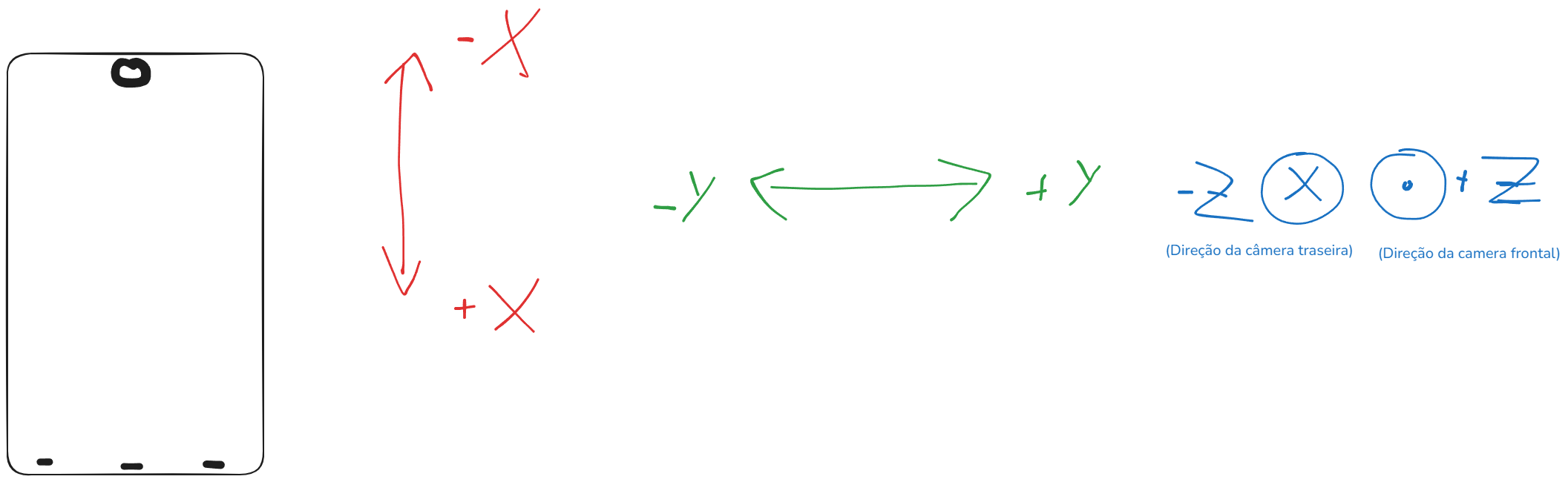
Accelerometer
-
Axis:
-
 .
.
-
Android Plugins
-
Gradle is required.
-
Explanation about using Android Library / Explanation about using Android Plugins .