Attributes
-
It's what goes inside a style.
-
color,padding, etc.
Specificity
-
More specific selectors get priority.
-
The order is:
ID > Class > Element.
Important
!important
Closest vs Contains
-
Use
closestwhen you want to find the closest ancestor matching a selector. -
Use
containswhen you want to check if one element is a descendant of another. -
In your click event handling, you might use
closestto determine if the clicked element or any of its ancestors has a specific class. This is helpful when you want to capture clicks on or within a specific container. On the other hand,containsis used to directly check if one element contains another.
Units
Pixels
-
Absolute measurement.
REM
-
Relative to the base font size.
-
Changing the font size will change the spacing of everything.
Position
relative
-
The element stays in the normal flow .
-
You can use
top,left,right,bottomto offset it visually , but the space it occupies in the document does not change . -
Other elements still behave as if it’s in the original position .
absolute
-
The element is removed from the normal flow .
-
It is positioned relative to the closest ancestor with
position: relative|absolute|fixed. -
Other elements behave as if it doesn’t exist , so it doesn’t affect layout height or width.
Pseudo-Classes
-
:hover -
:first-child -
:nth-child(2)
Pseudo-Elements
Marker
-
Reason to use
::beforeinstead:-
::markerhas limited styling . You can’t useposition,transform, orflexboxon it. -
::markerinherits color and size but cannot be freely moved. -
::beforeis a normal pseudo-element , so it supports full layout control: absolute positioning, transforms, scaling, etc.
-
-
Use
::markerfor simple, semantic bullets when default positioning is fine. -
Use
::beforewhen you need custom placement, animation, or different symbols per nesting level.
Before
-
.
After
-
.
Media Queries
-
Allows styling for mobile or different screen sizes.
-
Triggered by "breakpoints".
/* else */
body {
    background-color: blue;
}


/* if this condition passes (if the width is less than 600px), use this style */
@media screen and (max-width: 600px) {
    body {
        background-color: olive;
    }
}
Operations
Ternary Operations (
?
and
:
)
-
The
?and:are part of the ternary conditional operator, which is a shorthand way of writing anif-elsestatement in a single line. The expression before the?is evaluated, and if it's true, the value before the:is used; otherwise, the value after the:is used.
Background image
-
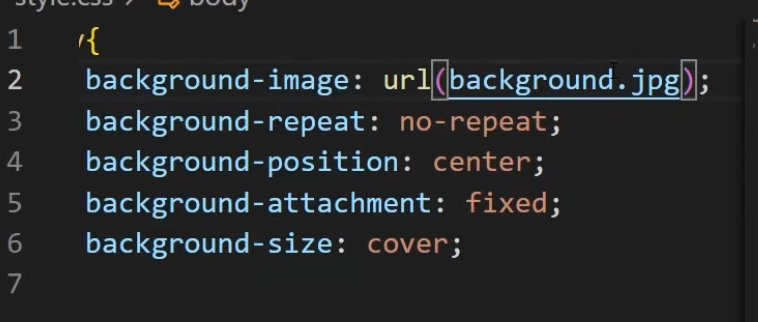 .
.