Conventions
Terminology
-
HEAD :
-
Current branch.
-
-
Trees :
-
Directories.
-
-
Blobs :
-
Files.
-
-
*.txt-
All files with .txt extension.
-
-
.-
All files.
-
Tag
-
In Git, a tag is a reference to a specific point in the repository’s history. Unlike branches, which can move as new commits are added, tags are static references to a specific commit. Tags are often used to mark important points in the repository’s history, such as releases (e.g., v1.0, v2.0).
-
Doesn't change anything about commits and branches.
-
Lightweight Tags :
-
Simple references to a commit and are essentially just a name for that commit.
-
They don’t store additional metadata such as the tagger’s name, email, or date.
-
Often used for temporary or quick references.
-
-
Annotated Tags :
-
Stored as full objects in the Git database and contain metadata.
-
Metadata includes the tagger’s name, email, date, and a tagging message.
-
Recommended for marking releases or other significant events because they provide more information.
-
-
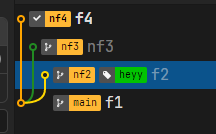
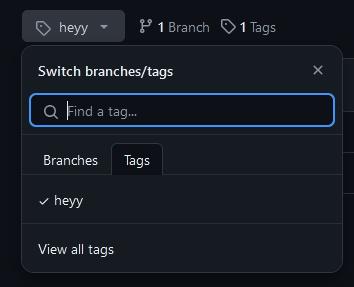
Using an Annotated Tag, and writing a message 'message here':
-
Patch
-
Actually creates a "patch notes" of differences between commits.
-
Nothing is committed or changed; everything remains the same. It just saves a log file in the chosen location.
-
Example I made:
From c771e59a7b26cfd3670ccfb62e282c8e4a576e7b Mon Sep 17 00:00:00 2001
From: Caio Raphael <caioraphael00@gmail.com>
Date: Sat, 20 Jul 2024 08:47:29 -0300
Subject: [PATCH] f2

---
 file_2.txt | 1 +
 1 file changed, 1 insertion(+)
 create mode 100644 file_2.txt

diff --git a/file_2.txt b/file_2.txt
new file mode 100644
index 0000000..7ec9a4b
--- /dev/null
+++ b/file_2.txt
@@ -0,0 +1 @@
+aa
\ No newline at end of file
--
2.38.1.windows.1
-
Whatever. Weird reading.
-
The "save as patch" option when selecting commits does exactly the same. It doesn't change anything, it just downloads the .patch file.
Archive
-
Just downloads a branch into a .zip file.
-
Doesn't change anything in branches or commits.
-
In Git context, an "archive" typically refers to a packaged snapshot of the repository at a specific point in time. Useful for distribution, backup, or deployment. The
git archivecommand creates an archive file (e.g., .tar or .zip) of the repository’s contents.