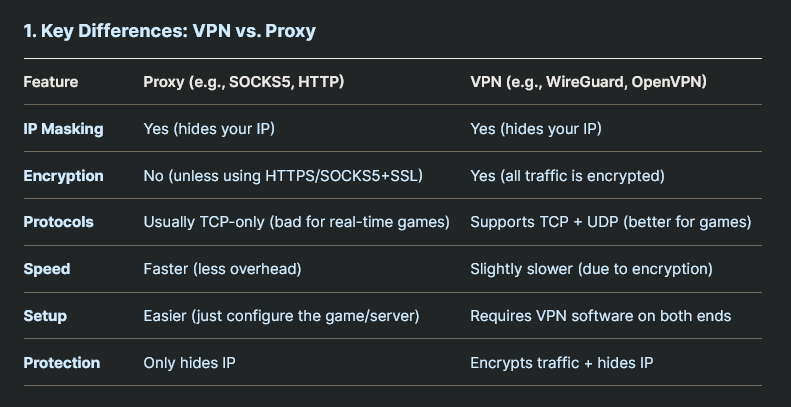
VPN vs Proxy
-
 .
.
OpenVPN
-
Open-source.
-
A VPN is a service that protects your internet connection, while OpenVPN is one of the tunneling protocols helping VPN services do that.
-
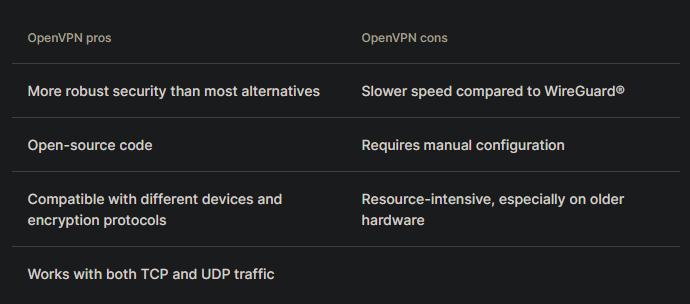
OpenVPN is one of the safest VPN protocols. It uses SSL/TLS to ensure data security and has access to the OpenSSL library for further customization, including additional security features.
-
 .
.
-
Flexibility :
-
Works on multiple platforms (Windows, macOS, Linux, Android, iOS).
-
-
Compatibility :
-
Can traverse firewalls and NAT (Network Address Translation).
-
-
Performance :
-
Can be tuned to prioritize speed (UDP) or reliability (TCP).
-
-
Security :
-
Implements SSL/TLS certificates for authentication and encryption.
-
-
Customizable :
-
Allows configuring specific rules for different network needs.
-
Encryption
-
Supports strong encryption algorithms like AES-256 to protect information.
Main Components
-
OpenVPN Server :
-
Usually located centrally, such as in the office or in the cloud.
-
Manages client connections and authentication.
-
Is the entry point to the private network.
-
-
OpenVPN Client :
-
Software installed on devices that want to access the private network.
-
Establishes the connection with the server.
-
Common Uses
-
Remote Access :
-
Employees can access corporate resources from anywhere in the world.
-
-
Online Privacy :
-
Users can hide their IP address and protect their connection on public networks.
-
-
Bypass Geographic Restrictions :
-
Allows access to content blocked in certain regions.
-
-
Interconnection of Networks :
-
Connects different physical networks, like company branches.
-
How to set up
-
Install the Server :
-
Install OpenVPN software on the server that will be the central point of the VPN.
-
Configure the required files (e.g., server.conf).
-
-
Generate Certificates :
-
Use tools like EasyRSA to create a CA (Certificate Authority) and issue certificates for the server and clients.
-
-
Configure the Client :
-
Install OpenVPN on the client device.
-
Import the configuration file generated by the server (usually with
.ovpnextension).
-
-
Start the Connection :
-
Connect to the server using the OpenVPN client.
-