-
Resources are views of memory with associated formatting and dimensionality.
-
Nvidia: Make sure to always use the minimum set of resource usage flags. Redundant flags may trigger redundant flushes and stalls in barriers and slow down your app unnecessarily.
Primary resources
-
Buffers.
-
Provide access to raw arrays of bytes
-
-
Images.
-
Can be multidimensional and may have associated metadata.
-
-
Tensors.
-
Can be multidimensional, contain format information like images and may have associated metadata.
-
-
Samplers.
-
Used to sample from images at certain coordinates, producing interpolated color values.
-
-
-
Uses buffers as the backing store for opaque data structures.
-
-
-
Uses buffers as the backing store for opaque data structures.
-
Used for realtime raytracing.
-
Buffers
-
Buffers in Vulkan are regions of memory used for storing arbitrary data that can be read by the graphics card.
-
They are essentially unformatted arrays of bytes.
-
Types of Buffers :
-
Unformatted array .
-
Uniform Buffer :
-
It remains uniform during the execution of a command (like a draw call).
-
Only load operations (read only).
-
"Read" == "Load".
-
This allows the GPU to cache them efficiently.
-
-
Loaded into L2, and further, into a L1 cache.
-
-
Storage Buffers :
-
Allow Load and Store operations.
-
Supports atomic operations.
-
Data can be loaded from GPU memory into L2->L1 caches, but can also store data from shaders into memory.
-
-
Texel Buffers :
-
Uniform Texel Buffer.
-
Storage Texel Buffer.
-
Formatted view.
-
-
Dynamic Buffers :
-
Dynamic Uniform Buffer.
-
Dynamic Texel Buffer.
-
-
etc.
-
-
Queues :
-
Just like the images in the Swapchain, buffers can also be owned by a specific queue family or be shared between multiple at the same time.
-
The buffer will only be used from the graphics queue, so we can stick to exclusive access.
-
-
Create
-
-
VkBuffer-
A chunk of GPU visible memory
-
-
VkBufferCreateInfo-
size-
Specifies the size of the buffer in bytes. Calculating the byte size of the vertex data is straightforward with
sizeof.
-
-
usage-
Indicates for which purposes the data in the buffer is going to be used.
-
It is possible to specify multiple purposes using a bitwise or.
-
-
flags-
Is used to configure sparse buffer memory, which is not relevant right now. We'll leave it at the default value of
0.
-
-
sharingMode-
Specifying the sharing mode of the buffer when it will be accessed by multiple queue families.
-
The buffer will only be used from the graphics queue, so we can stick to exclusive access.
-
NVIDIA:
-
VkSharingModeis ignored by the driver, soSHARING_MODE_CONCURRENTincurs no overhead relative toSHARING_MODE_EXCLUSIVE.
-
-
SHARING_MODE_EXCLUSIVE-
Specifies that access to any range or image subresource of the object will be exclusive to a single queue family at a time.
-
-
SHARING_MODE_CONCURRENT-
Specifies that concurrent access to any range or image subresource of the object from multiple queue families is supported.
-
-
-
-
Copy
-
Minimum Alignment :
-
-
optimalBufferCopyOffsetAlignment-
Is the optimal buffer offset alignment in bytes for vkCmdCopyBufferToImage2 , vkCmdCopyBufferToImage , vkCmdCopyImageToBuffer2 , and vkCmdCopyImageToBuffer .
-
This value is also the optimal host memory offset alignment in bytes for vkCopyMemoryToImage and vkCopyImageToMemory .
-
The per texel alignment requirements are enforced, but applications should use the optimal alignment for optimal performance and power use.
-
The value must be a power of two.
-
-
optimalBufferCopyRowPitchAlignment-
Is the optimal buffer row pitch alignment in bytes for vkCmdCopyBufferToImage2 , vkCmdCopyBufferToImage , vkCmdCopyImageToBuffer2 , and vkCmdCopyImageToBuffer .
-
This value is also the optimal host memory row pitch alignment in bytes for vkCopyMemoryToImage and vkCopyImageToMemory .
-
Row pitch is the number of bytes between texels with the same X coordinate in adjacent rows (Y coordinates differ by one). The per texel alignment requirements are enforced, but applications should use the optimal alignment for optimal performance and power use.
-
The value must be a power of two.
-
-
-
Images
-
Images contain format information. Can be multidimensional and may have associated metadata.
-
An Image, unlike a Buffer, is almost always used within a View.
-
A texture you can write to and read from.
-
VkImage. -
Stored as :
-
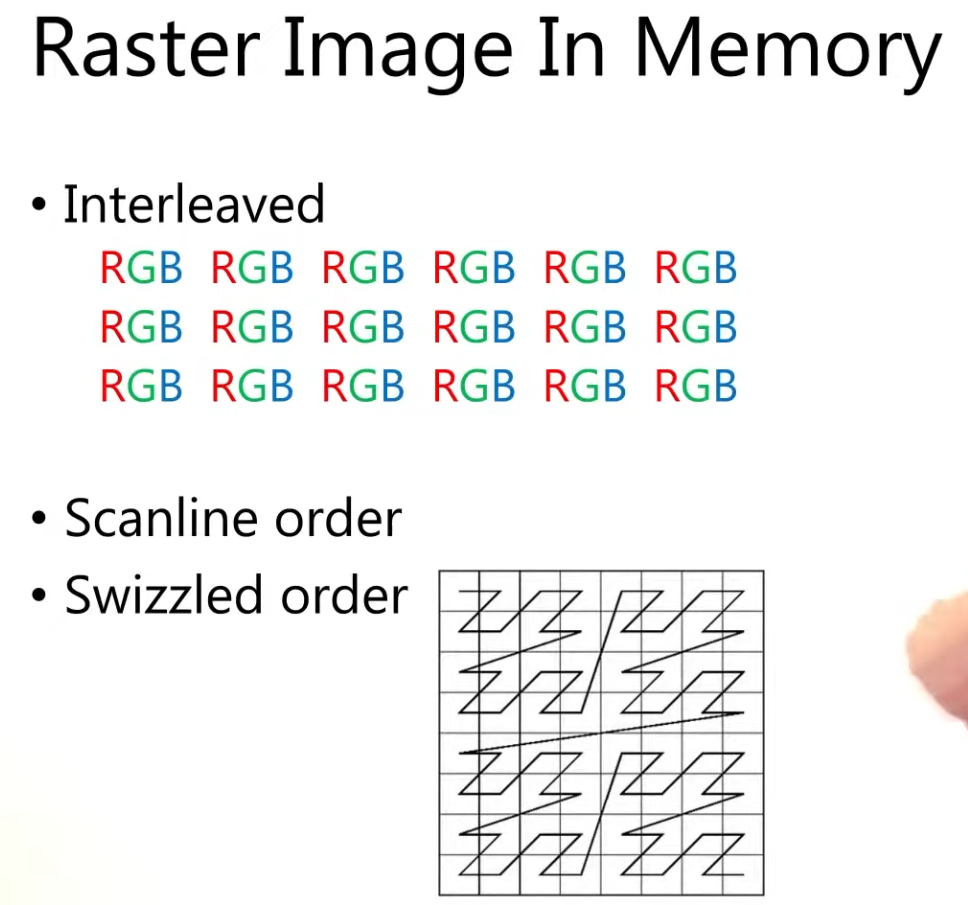 .
.
-
Create
-
-
ImageType -
extent-
Specifies the dimensions of the image, basically how many texels there are on each axis.
-
That’s why
extent.depthmust be1instead of0.
-
-
format -
tiling -
initialLayout-
Can only be one of these 3:
-
UNDEFINED-
Not usable by the GPU and the very first transition will discard the texels.
-
-
PREINITIALIZED-
Not usable by the GPU, but the first transition will preserve the texels.
-
-
ZERO_INITIALIZED_EXT-
Only if zeroInitializeDeviceMemory feature is enabled.
-
-
-
There are a few situations where it is necessary for the texels to be preserved during the first transition.
-
One example would be if you wanted to use an image as a staging image in combination with the
TILING_LINEARlayout. In that case, you’d want to upload the texel data to it and then transition the image to be a transfer source without losing the data.
-
-
However, we usually don't need this property and can use
UNDEFINED, as we can transition the image to be a transfer destination and then copy texel data to it from a buffer object.
-
-
usage -
samples-
For multisampling.
-
Only relevant for images that will be used as attachments.
-
The default for non-multisampled images is one sample.
-
-
mipLevels-
For mipmapping.
-
-
flags-
Related to sparse images.
-
Sparse images are images where only certain regions are actually backed by memory.
-
If you were using a 3D texture for a voxel terrain, for example, then you could use this to avoid allocating memory to store large volumes of "air" values.
-
-
sharingMode-
Specifies the sharing mode of the image when it will be accessed by multiple queue families.
-
-
queueFamilyIndexCount-
Is the number of entries in the
pQueueFamilyIndicesarray.
-
-
pQueueFamilyIndices-
Is a pointer to an array of queue families that will access this image. It is ignored if
sharingModeis notSHARING_MODE_CONCURRENT.
-
-
Types
-
Tells Vulkan with what kind of coordinate system the texels in the image are going to be addressed.
-
1D images
-
Can be used to store an array of data or a gradient.
-
-
2D images
-
Are mainly used for textures.
-
-
3D images
-
Can be used to store voxel volumes, for example.
-
Usages
-
Storage Image :
-
Load and Store.
-
Similar to a Storage Buffer.
-
-
Sampled Image :
-
Only load operations (read only).
-
Similar to Uniform Buffers.
-
The coordinates are between 0.0 and 1.0.
-
If a coordinate doesn't match exactly a pixel, then the result is an interpolation between the neighbouring pixels.
-
-
Input Attachment :
-
Only load operations (read only).
-
Within a renderpass.
-
Framebuffer-local.
-
Access to single coordinate only.
-
No access to other coordinates in that image.
-
-
Formats
-
Formats .
-
R8G8B8_SRGB-
Channels stored as 0–255.
-
After conversion, the values are in the 0-1 floating-point range.
-
Interpreted using the sRGB nonlinear transfer function (gamma correction).
-
When sampled, values are converted to linear color space in the shader automatically.
-
-
R8G8B8_UNORM-
Each 8-bit channel is an unsigned normalized integer.
-
Storage range: 0–255.
-
Interpreted as floating-point in the shader:
-
0 → 0.0
-
255 → 1.0
-
Linear mapping between.
-
-
-
R8G8B8_SNORM-
Each 8-bit channel is a signed normalized integer.
-
Storage range: –128 to +127.
-
Interpreted as floating-point in the shader:
-
–128 → –1.0
-
+127 → +1.0
-
Linear mapping between.
-
-
Tiling
-
Nvidia: Always use
TILING_OPTIMAL.-
TILING_LINEARis not optimal. Use a staging buffer andvkCmdCopyBufferToImage()to update images on the device.
-
-
Unlike the layout of an image, the tiling mode cannot be changed at a later time.
-
TILING_OPTIMAL-
The layout is opaque/driver-chosen.
-
Is described as an implementation-dependent (opaque) arrangement that the driver/GPU may reorder/tile texels for efficient access; it is the intended layout for GPU use.
-
When to use :
-
Image is used as a framebuffer attachment, sampled texture, or otherwise heavily used by the GPU (most rendering targets).
-
You want the GPU/driver to choose a layout that maximizes memory locality and bandwidth for rendering.
-
You will perform GPU-side post-processing / tonemapping / sampling / blits before presentation.
-
-
-
TILING_LINEAR-
The layout is row-major/predictable.
-
Lays out texels in row-major order (with row padding possible) and is the layout for which
vkGetImageSubresourceLayoutreturns meaningful offsets for host access; that is the mechanism used when an application needs direct CPU mapping/reading of image memory.-
However, in practice applications usually do GPU render → copy to a host-visible staging buffer/image rather than render directly into a linear-host-visible image.
-
-
LINEAR tiling does have functional and performance limitations (fewer supported formats/usages and worse GPU access patterns), which is why it’s rarely used for main rendering; typical use cases are CPU upload/download, debugging, or very small offscreen images. It is not only theoretically usable for CPU readback, but that is the primary practical use. You must query format/usage support for linear tiling because many formats or usages are unsupported in LINEAR.
-
When to use :
-
You explicitly need to map the image memory from the CPU (direct host read/write) and the driver reports support for the requested format/usage in linear tiling.
-
Use cases: readback for screenshots/debugging, direct CPU uploads for small resources, or special interop scenarios where a row-major layout is required.
-
-
-
GPU OPTIMAL to Host-Visible :
-
Strategy applied for 'creating a texture from file' .
-
If you want to be able to directly access texels in the memory of the image, then you must use
TILING_LINEAR. We will be using a staging buffer instead of a staging image, so this won't be necessary. We will be usingTILING_OPTIMALfor efficient access from the shader.
-
-
TLDR :
OPTIMAL+ explicit transfer to a host-visible staging resource when needed. -
Create your render target as
OPTIMALand allocateDEVICE_LOCALmemory (fast GPU local). After rendering, copy or blit the image to a host-visible staging resource (either a buffer viavkCmdCopyImageToBufferor a LINEAR image) and map that staging resource for CPU access. This avoids depending on limited linear support and keeps the GPU path fast.
-
Layouts
-
GENERAL-
Supports all types of device access, unless specified otherwise.
-
If the
unifiedImageLayoutsfeature is enabled, theGENERALimage layout may be used in place of the other layouts where allowed with no loss of performance.-
VkPhysicalDeviceUnifiedImageLayoutsFeaturesKHR.-
Can be included in the
pNextchain of theVkPhysicalDeviceFeatures2structure passed tovkGetPhysicalDeviceFeatures2. -
KHR_unified_image_layouts.-
This extension significantly simplifies synchronization in Vulkan by removing the need for image layout transitions in most cases. In particular, it guarantees that using the
GENERALlayout everywhere possible is just as efficient as using the other layouts. -
In the interest of simplifying synchronization in Vulkan, this extension removes image layouts altogether as much as possible. As such, this extension is fairly simple.
-
Proposal .
-
Article .
-
Interacts with :
-
VERSION_1_3
-
EXT_attachment_feedback_loop_layout
-
KHR_dynamic_rendering
-
-
Support :
-
-
unifiedImageLayouts(boolean)-
Specifies whether usage of
GENERAL, where valid, incurs no loss in efficiency. -
Additionally, it indicates whether it can be used in place of
ATTACHMENT_FEEDBACK_LOOP_OPTIMAL_EXT.
-
-
unifiedImageLayoutsVideo(boolean)-
Specifies whether
GENERALcan be used in place of any of the following image layouts with no loss in efficiency. -
VIDEO_DECODE_DST -
VIDEO_DECODE_SRC -
VIDEO_DECODE_DPB -
VIDEO_ENCODE_DST -
VIDEO_ENCODE_SRC -
VIDEO_ENCODE_DPB -
VIDEO_ENCODE_QUANTIZATION_MAP
-
-
-
-
It can be a useful catch-all image layout, but there are situations where a dedicated image layout must be used instead. For example:
-
PRESENT_SRC. -
SHARED_PRESENT. -
VIDEO_DECODE_SRC,VIDEO_DECODE_DST, andVIDEO_DECODE_DPBwithout theunifiedImageLayoutsVideofeature. -
VIDEO_ENCODE_SRC,VIDEO_ENCODE_DST, andVIDEO_ENCODE_DPBwithout theunifiedImageLayoutsVideofeature. -
VIDEO_ENCODE_QUANTIZATION_MAPwithout theunifiedImageLayoutsVideofeature.
-
-
While
GENERALsuggests that all types of device access are possible, it does not mean that all patterns of memory accesses are safe in all situations.-
Common Render Pass Data Races outlines some situations where data races are unavoidable. For example, when a subresource is used as both an attachment and a sampled image (i.e., not an input attachment), enabling feedback loop adds extra guarantees which
GENERALalone does not.
-
-
-
Only in
initialLayout:-
UNDEFINED-
Specifies that the layout is unknown.
-
This layout can be used as the
initialLayoutmember of VkImageCreateInfo . Image memory cannot be transitioned into this layout. -
This layout can be used in place of the current image layout in a layout transition, but doing so will cause the contents of the image’s memory to be undefined.
-
-
PREINITIALIZED-
Specifies that an image’s memory is in a defined layout and can be populated by data, but that it has not yet been initialized by the driver.
-
This layout can be used as the
initialLayoutmember of VkImageCreateInfo . Image memory cannot be transitioned into this layout. -
This layout is intended to be used as the initial layout for an image whose contents are written by the host, and hence the data can be written to memory immediately, without first executing a layout transition.
-
Currently,
PREINITIALIZEDis only useful with linear images because there is not a standard layout defined forTILING_OPTIMALimages.
-
-
ZERO_INITIALIZED_EXT-
Specifies that an image’s memory is in a defined layout and is zeroed, but that it has not yet been initialized by the driver.
-
This layout can be used as the
initialLayoutmember of VkImageCreateInfo . Image memory cannot be transitioned into this layout. -
This layout is intended to be used as the initial layout for an image whose contents are already zeroed, either from being explicitly set to zero by an application or from being allocated with
MEMORY_ALLOCATE_ZERO_INITIALIZE_EXT. -
Only if zeroInitializeDeviceMemory feature is enabled.
-
-
-
Transfer :
-
TRANSFER_SRC_OPTIMAL-
It must only be used as a source image of a transfer command (see the definition of
PIPELINE_STAGE_TRANSFER). -
This layout is valid only for image subresources of images created with the
USAGE_TRANSFER_SRCusage bit enabled.
-
-
TRANSFER_DST_OPTIMAL-
It must only be used as a destination image of a transfer command.
-
This layout is valid only for image subresources of images created with the
USAGE_TRANSFER_DSTusage bit enabled.
-
-
-
Present :
-
PRESENT_SRC-
It must only be used for presenting a presentable image for display.
-
-
SHARED_PRESENT-
Is valid only for shared presentable images, and must be used for any usage the image supports.
-
-
-
Read :
-
READ_ONLY_OPTIMAL-
Specifies a layout allowing read only access as an attachment, or in shaders as a sampled image, combined image/sampler, or input attachment.
-
-
DEPTH_READ_ONLY_OPTIMAL-
Specifies a layout for the depth aspect of a depth/stencil format image allowing read-only access as a depth attachment or in shaders as a sampled image, combined image/sampler, or input attachment.
-
-
STENCIL_READ_ONLY_OPTIMAL-
Specifies a layout for the stencil aspect of a depth/stencil format image allowing read-only access as a stencil attachment or in shaders as a sampled image, combined image/sampler, or input attachment.
-
-
DEPTH_STENCIL_READ_ONLY_OPTIMAL-
Specifies a layout for both the depth and stencil aspects of a depth/stencil format image allowing read only access as a depth/stencil attachment or in shaders as a sampled image, combined image/sampler, or input attachment.
-
It is equivalent to
DEPTH_READ_ONLY_OPTIMALandSTENCIL_READ_ONLY_OPTIMAL.
-
-
SHADER_READ_ONLY_OPTIMAL-
Specifies a layout allowing read-only access in a shader as a sampled image, combined image/sampler, or input attachment.
-
This layout is valid only for image subresources of images created with the
USAGE_SAMPLEDorUSAGE_INPUT_ATTACHMENTusage bits enabled.
-
-
-
Attachments :
-
ATTACHMENT_OPTIMAL-
Specifies a layout that must only be used with attachment accesses in the graphics pipeline.
-
-
COLOR_ATTACHMENT_OPTIMAL-
It must only be used as a color or resolve attachment in a
VkFramebuffer. -
This layout is valid only for image subresources of images created with the
COLOR_ATTACHMENTusage bit enabled. -
Nvidia: Use
COLOR_ATTACHMENT_OPTIMALimage layout for color attachments.
-
-
DEPTH_ATTACHMENT_OPTIMAL-
Specifies a layout for the depth aspect of a depth/stencil format image allowing read and write access as a depth attachment.
-
-
STENCIL_ATTACHMENT_OPTIMAL-
Specifies a layout for the stencil aspect of a depth/stencil format image allowing read and write access as a stencil attachment.
-
-
DEPTH_STENCIL_ATTACHMENT_OPTIMAL-
Specifies a layout for both the depth and stencil aspects of a depth/stencil format image allowing read and write access as a depth/stencil attachment.
-
Equivalent to
DEPTH_ATTACHMENT_OPTIMALandSTENCIL_ATTACHMENT_OPTIMAL.
-
-
ATTACHMENT_FEEDBACK_LOOP_OPTIMAL_EXT-
It must only be used as either a color attachment or depth/stencil attachment and/or read-only access in a shader as a sampled image, combined image/sampler, or input attachment.
-
This layout is valid only for image subresources of images created with the
USAGE_ATTACHMENT_FEEDBACK_LOOPusage bit enabled and either theUSAGE_COLOR_ATTACHMENTorUSAGE_DEPTH_STENCIL_ATTACHMENTand either theUSAGE_INPUT_ATTACHMENTorUSAGE_SAMPLEDusage bits enabled.
-
-
LAYOUT_RENDERING_LOCAL_READ-
It must only be used as either a storage image, or a color or depth/stencil attachment and an input attachment.
-
This layout is valid only for image subresources of images created with either
USAGE_STORAGE, or bothUSAGE_INPUT_ATTACHMENTand either ofUSAGE_COLOR_ATTACHMENTorUSAGE_DEPTH_STENCIL_ATTACHMENT.
-
-
Attachment Fragment Shading Rate
-
FRAGMENT_SHADING_RATE_ATTACHMENT_OPTIMAL-
It must only be used as a fragment shading rate attachment or shading rate image .
-
This layout is valid only for image subresources of images created with the
USAGE_FRAGMENT_SHADING_RATE_ATTACHMENTusage bit enabled.
-
-
-
Fragment Density Map :
-
FRAGMENT_DENSITY_MAP_OPTIMAL_EXT-
It must only be used as a fragment density map attachment in a
VkRenderPass. -
This layout is valid only for image subresources of images created with the
USAGE_FRAGMENT_DENSITY_MAPusage bit enabled.
-
-
-
-
Read / Attachment :
-
DEPTH_READ_ONLY_STENCIL_ATTACHMENT_OPTIMAL-
Specifies a layout for depth/stencil format images allowing read and write access to the stencil aspect as a stencil attachment, and read only access to the depth aspect as a depth attachment or in shaders as a sampled image, combined image/sampler, or input attachment.
-
Equivalent to
DEPTH_READ_ONLY_OPTIMALandSTENCIL_ATTACHMENT_OPTIMAL.
-
-
DEPTH_ATTACHMENT_STENCIL_READ_ONLY_OPTIMAL-
Specifies a layout for depth/stencil format images allowing read and write access to the depth aspect as a depth attachment, and read only access to the stencil aspect as a stencil attachment or in shaders as a sampled image, combined image/sampler, or input attachment.
-
Equivalent to
DEPTH_ATTACHMENT_OPTIMALandSTENCIL_READ_ONLY_OPTIMAL.
-
-
-
Video :
-
VIDEO_DECODE_DST-
It must only be used as a decode output picture in a video decode operation .
-
This layout is valid only for image subresources of images created with the
VIDEO_DECODE_DSTusage bit enabled.
-
-
VIDEO_DECODE_SRC-
Reserved for future use.
-
-
VIDEO_DECODE_DPB-
It must only be used as an output reconstructed picture or an input reference picture in a video decode operation .
-
This layout is valid only for image subresources of images created with the
USAGE_VIDEO_DECODE_DPBusage bit enabled.
-
-
VIDEO_ENCODE_DST-
Reserved for future use.
-
-
VIDEO_ENCODE_SRC-
It must only be used as an encode input picture in a video encode operation .
-
This layout is valid only for image subresources of images created with the
USAGE_VIDEO_ENCODE_SRCusage bit enabled.
-
-
VIDEO_ENCODE_DPB-
It must only be used as an output reconstructed picture or an input reference picture in a video encode operation .
-
This layout is valid only for image subresources of images created with the
USAGE_VIDEO_ENCODE_DPBusage bit enabled.
-
-
VIDEO_ENCODE_QUANTIZATION_MAP-
It must only be used as a quantization map in a video encode operation .
-
This layout is valid only for image subresources of images created with the
VIDEO_ENCODE_QUANTIZATION_DELTA_MAPorVIDEO_ENCODE_EMPHASIS_MAPusage bit enabled.
-
-
-
TENSOR_ALIASING_ARM-
Specifies the layout that an image created with
TILING_OPTIMALmust be in for it and a tensor bound to the same aliased range of memory to consistently interpret the data in memory. -
See https://registry.khronos.org/vulkan/specs/latest/html/vkspec.html#resources-memory-aliasing for a complete set of rules for tensor/image aliasing.
-
This layout is valid only for image subresources of images created with
USAGE_TENSOR_ALIASING.
-
Image Views
-
An image view references a specific part of an image to be used.
-
VkImageViewCreateInfo-
viewType-
Allows you to treat images as 1D textures, 2D textures, 3D textures and cube maps.
-
-
format -
components-
Allows you to swizzle the color channels around. For example, you can map all of the channels to the red channel for a monochrome texture. You can also map constant values of
0and1to a channel. In our case we'll stick to the default mapping.
-
-
subresourceRange-
Describes what the image's purpose is and which part of the image should be accessed. Our images will be used as color targets without any mipmapping levels or multiple layers.
-
If you were working on a stereographic 3D application, then you would create a Swapchain with multiple layers. You could then create multiple image views for each image representing the views for the left and right eyes by accessing different layers.
-
-
Copy: Blit (Copy image to image)
-
Transfer a rectangular region of pixel data from one image to another.
-
Unlike a raw copy (
vkCmdCopyImage), a blit can perform scaling and apply filtering (FILTER_LINEARorFILTER_NEAREST), which is consistent with the historical meaning of bit block transfer with optional transformations. -
Name :
-
Comes from bit block transfer (sometimes shortened to blt_).
-
It was introduced in the 1970s in the context of 2D graphics systems, particularly at Xerox PARC.
-
The idea was to copy rectangular blocks of bits (pixels) from one place in memory to another, often with operations like scaling, masking, or raster operations.
-
-
-
commandBuffer -
pBlitImageInfo-
srcImage-
Is the source image.
-
-
srcImageLayout-
Is the layout of the source image subresources for the blit.
-
-
dstImage-
Is the destination image.
-
-
dstImageLayout-
Is the layout of the destination image subresources for the blit.
-
-
regionCount-
Is the number of regions to blit.
-
-
pRegions-
Defines source and destination subresources, offsets, and extents.
-
Can define multiple regions in a single blit call.
-
For each element of the
pRegionsarray, a blit operation is performed for the specified source and destination regions. -
Offset :
-
The offset entries specify two corners of the rectangular/box region to blit (one corner and the opposite corner).
-
You normally set
offsets[0]to the region origin (frequently{0,0,0}) andoffsets[1]to the region end ({width, height, depth}), i.e. the bounds. -
If left unspecified, that produces the common
{0,0,0} -> {w,h,1}box. -
The Vulkan spec requires both offsets be provided and documents constraints on them (e.g. for 2D images
zmust be 0/1).
-
-
srcSubresource-
Is the subresource to blit from.
-
-
srcOffsets-
Is a pointer to an array of two VkOffset3D structures specifying the bounds of the source region within
srcSubresource.
-
-
dstSubresource-
Is the subresource to blit into.
-
-
dstOffsets-
Is a pointer to an array of two VkOffset3D structures specifying the bounds of the destination region within
dstSubresource.
-
-
filter-
Is a VkFilter specifying the filter to apply if the blits require scaling.
-
Determines how pixels are sampled if scaling occurs.
-
FILTER_NEARESTfor nearest-neighbor scaling. -
FILTER_LINEARfor linear interpolation.
-
-
Their layouts must be valid for transfer operations (
TRANSFER_SRC_OPTIMALandTRANSFER_DST_OPTIMAL).
-
-
Restrictions
-
Blit operations are supported only if the format and the physical device support
FORMAT_FEATURE_BLIT_SRCandFORMAT_FEATURE_BLIT_DST. -
Some formats (like depth/stencil) do not support blitting.
-
Multisampled images cannot be used directly as source or destination.
-