-
Now that everything is ready for rendering, you first ask the
VkSwapchainKHRfor an image to render to. Then you allocate aVkCommandBufferfrom aVkCommandBufferPoolor reuse an already allocated command buffer that has finished execution, and “start” the command buffer, which allows you to write commands into it. -
Next, you begin rendering by using Dynamic Rendering.
-
Then create a loop where you bind a
VkPipeline, bind someVkDescriptorSetresources (for the shader parameters), bind the vertex buffers, and then execute a draw call. -
If there is nothing more to render, you end the
VkCommandBuffer. Finally, you submit the command buffer into the queue for rendering. This will begin execution of the commands in the command buffer on the gpu. If you want to display the result of the rendering, you “present” the image you have rendered to to the screen. Because the execution may not have finished yet, you use a semaphore to make the presentation of the image to the screen wait until rendering is finished. -
At a high level, rendering a frame in Vulkan consists of a common set of steps:
-
Wait for the previous frame to finish
-
Acquire an image from the Swapchain
-
Record a command buffer which draws the scene onto that image
-
Re-recording every frame doesn't really take up performance.
-
-
Submit the recorded command buffer
-
Takes performance.
-
-
Present the Swapchain image
-
Puts it up on the screen.
-
-
Swapchain
-
Vulkan does not have the concept of a "default framebuffer," hence it requires an infrastructure that will own the buffers we will render to before we visualize them on the screen.
-
This infrastructure is known as the swapchain and must be created explicitly in Vulkan.
-
The Swapchain is essentially a queue of images that are waiting to be presented to the screen.
-
Our application will acquire such an image to draw to it, and then return it to the queue.
-
The conditions for presenting an image from the queue depend on how the Swapchain is set up.
-
The general purpose of the Swapchain is to synchronize the presentation of images with the refresh rate of the screen.
-
This is important to make sure that only complete images are shown.
-
-
Every time we want to draw a frame, we have to ask the Swapchain to provide us with an image to render to. When we’ve finished drawing a frame, the image is returned to the Swapchain for it to be presented to the screen at some point.
-
"Is a collection of render targets".
-
Render Targets is not a well-defined term.
-
-
The number of render targets and conditions for presenting finished images to the screen depends on the present mode.
-
VkSwapchainKHR-
Holds the images for the screen.
-
It allows you to render things into a visible window.
-
The
KHRsuffix shows that it comes from an extension, which in this case isKHR_swapchain.
-
-
-
Good video.
-
Pre-rotate on mobile.
-
When to recreate, recreation problems, recreation strategies, maintenance.
-
Present modes.
-
-
Support :
-
There are basically three kinds of properties we need to check:
-
Basic surface capabilities (min/max number of images in Swapchain, min/max width and height of images)
-
Surface formats (pixel format, color space)
-
Available presentation modes
-
-
It is important that we only try to query for Swapchain support after verifying that the extension is available.
-
Swapchain Creation
-
-
surface-
Is the surface onto which the swapchain will present images. If the creation succeeds, the swapchain becomes associated with
surface.
-
-
minImageCount-
we also have to decide how many images we would like to have in the Swapchain. However, simply sticking to the minimum means that we may sometimes have to wait on the driver to complete internal operations before we can acquire another image to render to. Therefore, it is recommended to request at least one more image than the minimum:
uint32_t imageCount = surfaceCapabilities.minImageCount + 1;-
We should also make sure to not exceed the maximum number of images while doing this, where
0is a special value that means that there is no maximum
if (surfaceCapabilities.maxImageCount > 0 && imageCount > surfaceCapabilities.maxImageCount) { imageCount = surfaceCapabilities.maxImageCount; } -
-
imageFormat-
For the color space we’ll use SRGB if it is available, because it results in more accurate perceived colors . It is also pretty much the standard color space for images, like the textures we’ll use later on.
-
Because of that we should also use an SRGB color format, of which one of the most common ones is
FORMAT_B8G8R8A8_SRGB.
-
-
imageColorSpace-
Is a VkColorSpaceKHR value specifying the way the swapchain interprets image data.
-
-
imageExtent-
Is the size (in pixels) of the swapchain image(s).
-
The swap extent is the resolution of the Swapchain images. It’s almost always exactly equal to the resolution of the window that we’re drawing to in pixels .
-
The range of the possible resolutions is defined in the
VkSurfaceCapabilitiesKHRstructure. -
On some platforms, it is normal that
maxImageExtentmay become(0, 0), for example when the window is minimized. In such a case, it is not possible to create a swapchain due to the Valid Usage requirements , unless scaling is selected through VkSwapchainPresentScalingCreateInfoKHR , if supported . -
We’ll pick the resolution that best matches the window within the
minImageExtentandmaxImageExtentbounds. But we must specify the resolution in the correct unit. -
GLFW uses two units when measuring sizes: pixels and screen coordinates . For example, the resolution
{WIDTH, HEIGHT}that we specified earlier when creating the window is measured in screen coordinates. But Vulkan works with pixels, so the Swapchain extent must be specified in pixels as well. -
Unfortunately, if you are using a high DPI display (like Apple’s Retina display), screen coordinates don’t correspond to pixels. Instead, due to the higher pixel density, the resolution of the window in pixel will be larger than the resolution in screen coordinates. So if Vulkan doesn’t fix the swap extent for us, we can’t just use the original
{WIDTH, HEIGHT}. Instead, we must useglfwGetFramebufferSizeto query the resolution of the window in pixel before matching it against the minimum and maximum image extent. -
The surface capabilities changes every time the window resizes, and it's only used for creating the Swapchain, so it doesn't make sense to cache.
-
-
imageUsage -
imageSharingMode(Handling multiple queues):-
We need to specify how to handle Swapchain images that will be used across multiple queue families. That will be the case in our application if the graphics queue family is different from the presentation queue. We’ll be drawing on the images in the Swapchain from the graphics queue and then submitting them on the presentation queue. There are two ways to handle images that are accessed from multiple queues:
-
SHARING_MODE_EXCLUSIVE:-
An image is owned by one queue family at a time, and ownership must be explicitly transferred before using it in another queue family.
-
This option offers the best performance.
-
-
SHARING_MODE_CONCURRENT:-
Images can be used across multiple queue families without explicit ownership transfers.
-
Concurrent mode requires you to specify in advance between which queue families ownership will be shared using the
queueFamilyIndexCountandpQueueFamilyIndicesparameters.
-
-
-
If the queue families differ, then we’ll be using the concurrent mode in this tutorial to avoid having to do the ownership chapters, because these involve some concepts that are better explained at a later time.
-
If the graphics queue family and presentation queue family are the same, which will be the case on most hardware, then we should stick to exclusive mode. Concurrent mode requires you to specify at least two distinct queue families.
-
-
queueFamilyIndexCount-
Is the number of queue families having access to the image(s) of the swapchain when
imageSharingModeisSHARING_MODE_CONCURRENT.
-
-
pQueueFamilyIndices-
Is a pointer to an array of queue family indices having access to the images(s) of the swapchain when
imageSharingModeisSHARING_MODE_CONCURRENT.
-
-
imageArrayLayers-
Is the number of views in a multiview/stereo surface. For non-stereoscopic-3D applications, this value is 1.
-
-
presentMode -
preTransform-
We can specify that a certain transform should be applied to images in the Swapchain if it is supported (
supportedTransformsincapabilities), like a 90-degree clockwise rotation or horizontal flip. To specify that you do not want any transformation, simply specify the current transformation. -
IDENTITY-
This would not be optimal on devices that support rotation and will lead to measurable performance loss.
-
It is strongly recommended that
surface_properties.currentTransformbe used instead. However, the application is required to handlepreTransformelsewhere accordingly.
-
-
-
compositeAlpha-
Specifies if the alpha channel should be used for blending with other windows in the window system.
-
You’ll almost always want to simply ignore the alpha channel, hence
OPAQUE.
-
-
clipped-
If set to
TRUE, then that means that we don’t care about the color of pixels that are obscured, for example, because another window is in front of them. -
Unless you really need to be able to read these pixels back and get predictable results, you’ll get the best performance by enabling clipping.
-
-
oldSwapChain-
Can be an existing non-retired swapchain currently associated with
surface, orNULL_HANDLE. -
If the
oldSwapchainisNULL_HANDLE:-
And if the native window referred to by
pCreateInfo->surfaceis already associated with a Vulkan swapchain,ERROR_NATIVE_WINDOW_IN_USEmust be returned.
-
-
If the
oldSwapchainis valid:-
This may aid in the resource reuse, and also allows the application to still present any images that are already acquired from it.
-
And the
oldSwapchainhas exclusive full-screen access, that access is released frompCreateInfo->oldSwapchain. If the command succeeds in this case, the newly created swapchain will automatically acquire exclusive full-screen access frompCreateInfo->oldSwapchain. -
And there are outstanding calls to
vkWaitForPresent2KHR, thenvkCreateSwapchainKHRmay block until those calls complete. -
Any images from
oldSwapchainthat are not acquired by the application may be freed by the implementation, upon callingvkCreateSwapchainKHR, which may occur even if creation of the new swapchain fails. -
The
oldSwapchainwill be retired upon callingvkCreateSwapchainKHR, even if creation of the new swapchain fails.-
After
oldSwapchainis retired, the application can pass tovkQueuePresentKHRany images it had already acquired fromoldSwapchain.-
An application may present an image from the old swapchain before an image from the new swapchain is ready to be presented.
-
As usual,
vkQueuePresentKHRmay fail ifoldSwapchainhas entered a state that causesERROR_OUT_OF_DATEto be returned.
-
-
-
The application can continue to use a shared presentable image obtained from
oldSwapchainuntil a presentable image is acquired from the new swapchain, as long as it has not entered a state that causes it to returnERROR_OUT_OF_DATE. -
The application can destroy
oldSwapchainto free all memory associated witholdSwapchain.
-
-
Regardless if the
oldSwapchainis valid or not:-
The new swapchain is created in the non-retired state.
-
-
-
flags-
Is a bitmask of
VkSwapchainCreateFlagBitsKHRindicating parameters of the swapchain creation. -
SWAPCHAIN_CREATE_DEFERRED_MEMORY_ALLOCATION_EXT-
When
EXT_swapchain_maintenance1is available, you can optionally amortize the cost of swapchain image allocations over multiple frames. -
When this is used, image views cannot be created until the first time the image is acquired.
-
The idea is that normally the images and image views are acquired when a Swapchain recreation happens, but if this flag is enabled it is necessary to acquire them after
result == SUCCESS || result == SUBOPTIMAL_KHRas the result ofvkAcquireNextImageKHR.
-
-
-
-
Present Modes
-
Common present modes are double buffering (vsync) and triple buffering.
-
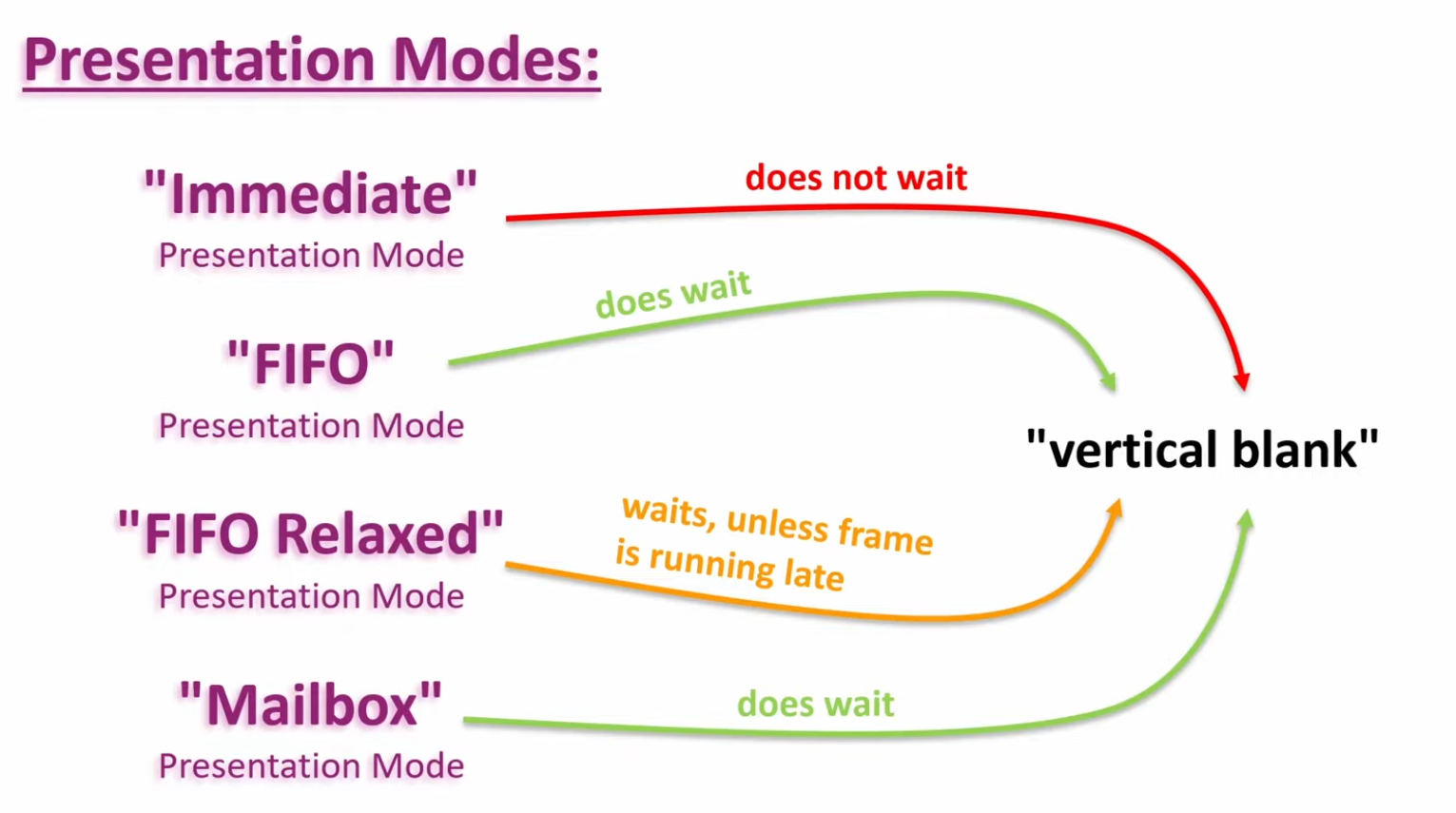
The presentation mode is arguably the most important setting for the Swapchain, because it represents the actual conditions for showing images to the screen. There are four possible modes available in Vulkan:
-
PRESENT_MODE_IMMEDIATE_KHR-
Images submitted by your application are transferred to the screen right away, which may result in tearing.
-
-
PRESENT_MODE_FIFO_KHR-
The Swapchain is a queue where the display takes an image from the front of the queue when the display is refreshed, and the program inserts rendered images at the back of the queue. If the queue is full, then the program has to wait. This is most similar to vertical sync as found in modern games. The moment that the display is refreshed is known as "vertical blank".
-
-
PRESENT_MODE_FIFO_RELAXED_KHR-
This mode only differs from the previous one if the application is late and the queue was empty at the last vertical blank. Instead of waiting for the next vertical blank, the image is transferred right away when it finally arrives. This may result in visible tearing.
-
-
PRESENT_MODE_MAILBOX_KHR-
This is another variation of the second mode. Instead of blocking the application when the queue is full, the images that are already queued are simply replaced with the newer ones. This mode can be used to render frames as fast as possible while still avoiding tearing, resulting in fewer latency issues than standard vertical sync. This is commonly known as "triple buffering," although the existence of three buffers alone does not necessarily mean that the framerate is unlocked.
-
-
-
Only the
PRESENT_MODE_FIFO_KHRmode is guaranteed to be available, so we’ll again have to write a function that looks for the best mode that is available: -
 .
.
-
Options :
-
I think that
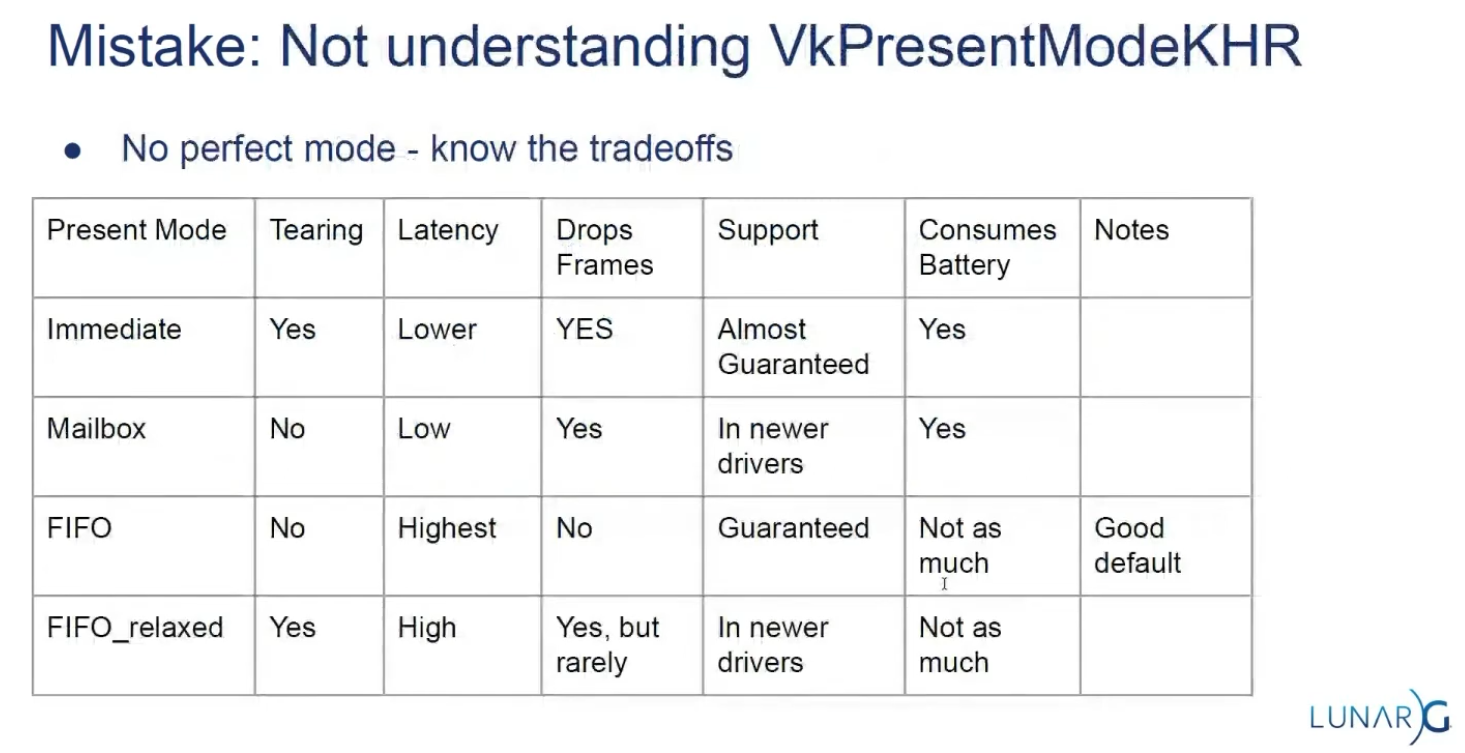
PRESENT_MODE_MAILBOX_KHRis a very nice trade-off if energy usage is not a concern. It allows us to avoid tearing while still maintaining fairly low latency by rendering new images that are as up to date as possible right until the vertical blank. -
On mobile devices, where energy usage is more important, you will probably want to use
PRESENT_MODE_FIFO_KHRinstead. -
 .
.
-
 .
.
-
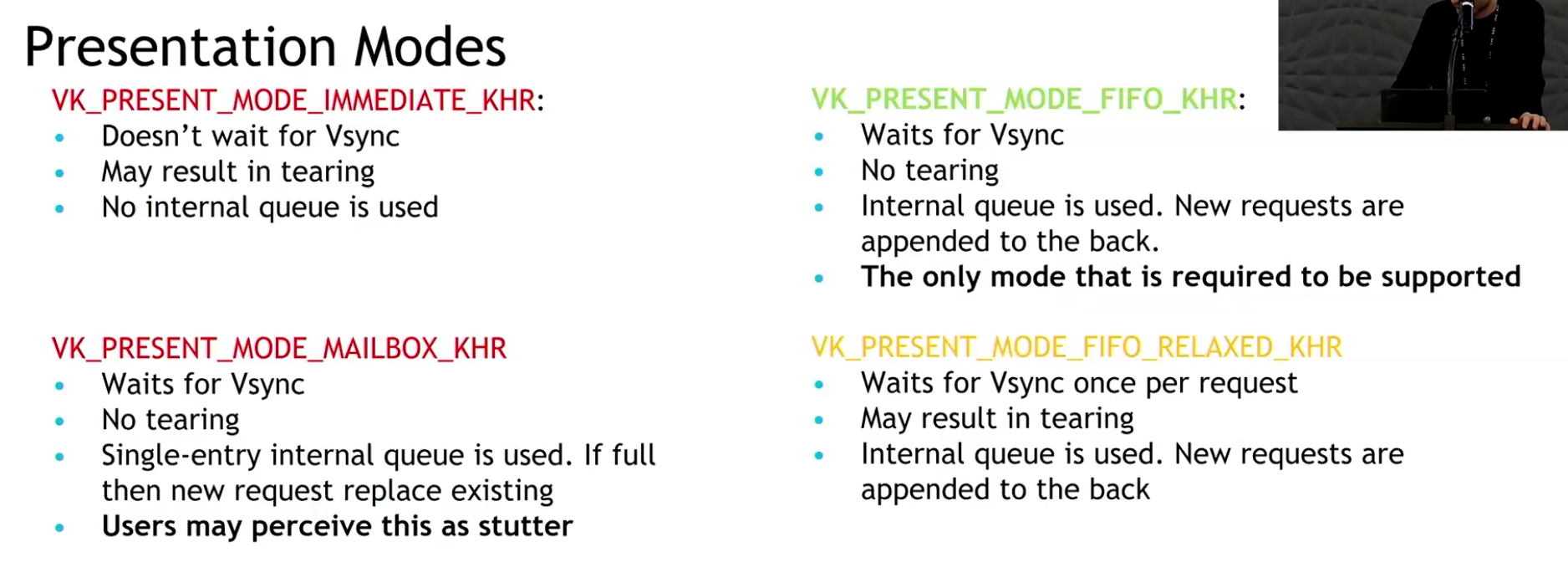
Slide from the Samsung talk on (2025-02-25).
-
It recommends FIFO and says that mailbox is not as good as it seems because it induces a lot of stutter.
-
-
Drawing directly to the Swapchain vs Blitting to the Swapchain
-
Source .
-
Drawing directly into the swapchain :
-
Is fine for many projects, and it can even be optimal in some cases such as phones.
-
Restrictions :
-
Their resolution is fixed to whatever your window size is.
-
If you want to have higher or lower resolution, and then do some scaling logic, you need to draw into a different image.
-
Swapchain image size (imageExtent / surface extent) is part of swapchain creation and is tied to the surface. If you want an internal render at a different resolution (supersampling, dynamic resolution, lower-res upscaling), you create an offscreen image/render-target at the desired size and then copy/blit/resolve/tone-map into the swapchain image for presentation. The spec and WSI notes treat imageExtent as the surface-presentable size.
-
-
The formats of the image used in the swapchain are not guaranteed.
-
Different OS, drivers, and windowing modes can have different optimal swapchain formats.
-
The WSI model exposes the surface’s supported formats to the application via
vkGetPhysicalDeviceSurfaceFormatsKHR(or equivalent WSI queries); the returned list is implementation- and surface-dependent, so you must choose from what the platform/driver exposes. That means formats available for swapchains vary by OS, driver, and surface. -
Vulkan explicitly states this via
VkSurfaceFormatKHRandvkGetPhysicalDeviceSurfaceFormatsKHR. The specification (Section 30.5 "WSI Swapchain", Vulkan 1.3.275) and tutorials emphasize that the application must query and choose from available formats supported by the surface/device combination. Android documentation (Vulkan on Android) and Windows (DXGI_FORMAT) similarly highlight platform-specific format requirements and HDR needs (e.g.,FORMAT_A2B10G10R10_UNORM_PACK32orDXGI_FORMAT_R10G10B10A2_UNORMfor HDR10). This variability makes direct rendering inflexible.
-
-
HDR support needs its own very specific formats.
-
HDR output requires specific color formats and color-space metadata (examples: 10-bit packed UNORM formats or explicit HDR color-space support such as ST2084/Perceptual Quantizer). WSI and sample repos treat HDR as a distinct case (e.g. A2B10G10 formats and HDR color spaces). Support is platform- and driver-dependent.
-
-
Swapchain formats are, for the most part, low precision.
-
Some platforms with High Dynamic Range rendering have higher precision formats, but you will often default to 8 bits per color.
-
So if you want high precision light calculations, systems that would prevent banding, or to be able to go past 1.0 on the normalized color range, you will need a separate image for drawing.
-
HDR/high-dynamic-range lighting typically uses floating-point or extended-range render targets (e.g.
R16G16B16A16_SFLOATor higher) for intermediate lighting accumulation; final tonemapping reduces values into the presentable format. Because presentable swapchain images are often limited (8-bit), the offscreen high-precision image plus a conversion/tonemap pass is the usual pattern.
-
-
Many surfaces expose 8-bit UNORM or sRGB formats (e.g.
B8G8R8A8_UNORM/SRGB) as commonly returned swapchain formats. Higher-precision formats (16-bit float per channel or 10-bit packed) exist and are used for HDR/high-precision pipelines, but they are not guaranteed by every surface/driver. Therefore applications that need high-precision lighting/accumulation commonly render into a 16-bit-float render target and tonemap/convert for presentation. -
Banding artifacts in gradients or low-light scenes are a well-known consequence of limited precision. High-precision rendering (HDR, complex lighting, deferred shading G-Buffers) requires formats like
FORMAT_R16G16B16A16_SFLOAT(RGBA16F) to store values outside the [0.0, 1.0] range and prevent banding. While some swapchains can support HDR formats (e.g., 10:10:10:2), they are less universally available and not the default. Using RGBA16F directly in a swapchain is often unsupported or inefficient for presentation.
-
-
-
-
Drawing to a different image and copying/blitting to the swapchain image :
-
Advantages :
-
Decouples tonemapping from presentation timing
-
Tonemap into an intermediate LDR image that you control. You can finish the tonemap pass earlier and defer the actual transfer/present of the swapchain image to a later point, reducing risk of stalling the present path or blocking on swapchain ownership.
-
-
Avoids writing directly to the swapchain
-
Writing directly into the swapchain can introduce stalls (wait-for-acquire or present-time synchronization). Using an intermediate LDR image lets you do the heavy work off-swapchain and only do a cheap transfer/present step when convenient.
-
-
Enables batching / chaining of postprocesses without touching the swapchain
-
If you need further LDR processing (dithering, temporal AA, UI composite, overlays, readback for screenshots, or additional filters), do those against the intermediate image. This allows composing multiple passes without repeatedly transitioning the swapchain.
-
-
Easier support for multiple outputs or different sizes/formats
-
You can tonemap once to an LDR image and then blit/copy to different-size or different-format targets (screenshots, streaming encoder, secondary displays) without re-running tonemap.
-
-
Allows use of transient/optimized memory for the intermediate
-
The intermediate image can be created as transient (e.g.,
MEMORY_PROPERTY_LAZILY_ALLOCATEDor tiled transient attachment) to reduce memory pressure and bandwidth compared with always keeping a full persistent LDR buffer.
-
-
Better control over final conversion semantics
-
In shader you control quantization, gamma conversion, ordered/temporal dithering, and color-space tagging. After producing the controlled LDR image you can choose the transfer method (exact copy vs scaled blit) that matches target capabilities, improving visual consistency across vendors.
-
-
Improved cross-queue / async workflows
-
You can produce the LDR image on a graphics/compute queue and then perform a transfer on a transfer-only queue (or use a dedicated present queue) with explicit ownership transfers, possibly improving throughput if hardware supports it.
-
-
Facilitates deterministic screenshots / capture
-
Saving an intermediate LDR image for file export is safer (format/bit-depth known) than capturing the swapchain which may have platform-specific transforms applied.
-
-
-
Trade-offs :
-
Extra GPU memory usage
-
You need memory for the intermediate LDR image (unless you use transient attachments), which increases resident memory footprint.
-
-
Extra GPU bandwidth and a copy step
-
Creating an LDR image then copying/blitting to the swapchain costs memory bandwidth and GPU cycles. This can increase frame time if the transfer is on the critical path.
-
-
More layout transitions and synchronization complexity
-
You must manage transitions and possibly ownership transfers (if different queues are used). Incorrect synchronization can cause stalls or correctness bugs.
-
-
Potential increased latency if done poorly
-
If the copy/blit is done synchronously right before present, it can add latency compared with rendering directly to the swapchain; the intended decoupling only helps if scheduling is arranged to avoid the critical path.
-
-
Implementation complexity
-
Managing an extra render target, transient allocation, and copy logic is more code than rendering directly to the swapchain.
-
-
-
Swapchain Recreation
When to recreate
-
If the window surface changed such that the Swapchain is no longer compatible with it.
-
If the window resizes.
-
If the window minimizes.
-
This case is special because it will result in a framebuffer size of
0. -
We can handle by waiting for the framebuffer size to be back to something greater than
0, indicating that the window is no longer minimized.
-
-
If the swapchain image format changed during an application's lifetime, for example, when moving a window from a standard range to a high dynamic range monitor.
Finding out that a recreation is needed
-
The
vkAcquireNextImageKHRandvkQueuePresentKHRfunctions can return the following special values to indicate this.-
ERROR_OUT_OF_DATE_KHR-
The Swapchain has become incompatible with the surface and can no longer be used for rendering. Usually happens after a window resize.
-
-
SUBOPTIMAL_KHR-
The Swapchain can still be used to successfully present to the surface, but the surface properties are no longer matched exactly.
-
You should ALWAYS recreate the swapchain if the result is suboptimal.
-
This result means that it's a "success" but there will be performance penalties.
-
Both
SUCCESSandSUBOPTIMAL_KHRare considered "success" return codes.
-
-
-
If the Swapchain turns out to be out of date when attempting to acquire an image, then it is no longer possible to present to it. Therefore, we should immediately recreate the Swapchain and try again in the next
drawFramecall. -
You could also decide to do that if the Swapchain is suboptimal, but I’ve chosen to proceed anyway in that case because we’ve already acquired an image.
result = presentQueue.presentKHR( presentInfoKHR );
if (result == vk::Result::eErrorOutOfDateKHR || result == vk::Result::eSuboptimalKHR) {
    framebufferResized = false;
    recreateSwapChain();
} else if (result != vk::Result::eSuccess) {
    throw std::runtime_error("failed to present Swapchain image!");
}

currentFrame = (currentFrame + 1) % MAX_FRAMES_IN_FLIGHT;
-
The
vkQueuePresentKHRfunction returns the same values with the same meaning. In this case, we will also recreate the Swapchain if it is suboptimal, because we want the best possible result. -
Finding out explicitly :
-
Although many drivers and platforms trigger
ERROR_OUT_OF_DATE_KHRautomatically after a window resize, it is not guaranteed to happen. -
That’s why we’ll add some extra code to also handle resizes explicitly:
glfw.SetWindowUserPointer(vulkan_context.glfw_window, vulkan_context) glfw.SetFramebufferSizeCallback(vulkan_context.glfw_window, proc "c" (window: glfw.WindowHandle, _, _: i32) {s vulkan_context := cast(^Vulkan_Context)glfw.GetWindowUserPointer(window) vulkan_context.glfw_framebuffer_resized = true }) -
"Usually it's not the best idea to depend on this".
-
Problems with multithreading.
-
You depend on the windowing system to notify changes correctly; this can be really tricky on mobile.
-
-
Recreating
void recreateSwapChain() {
    device.waitIdle();

    cleanupSwapChain();

    createSwapChain();
    createImageViews();
}
-
Synchronization :
-
~Flush and Recreate:
-
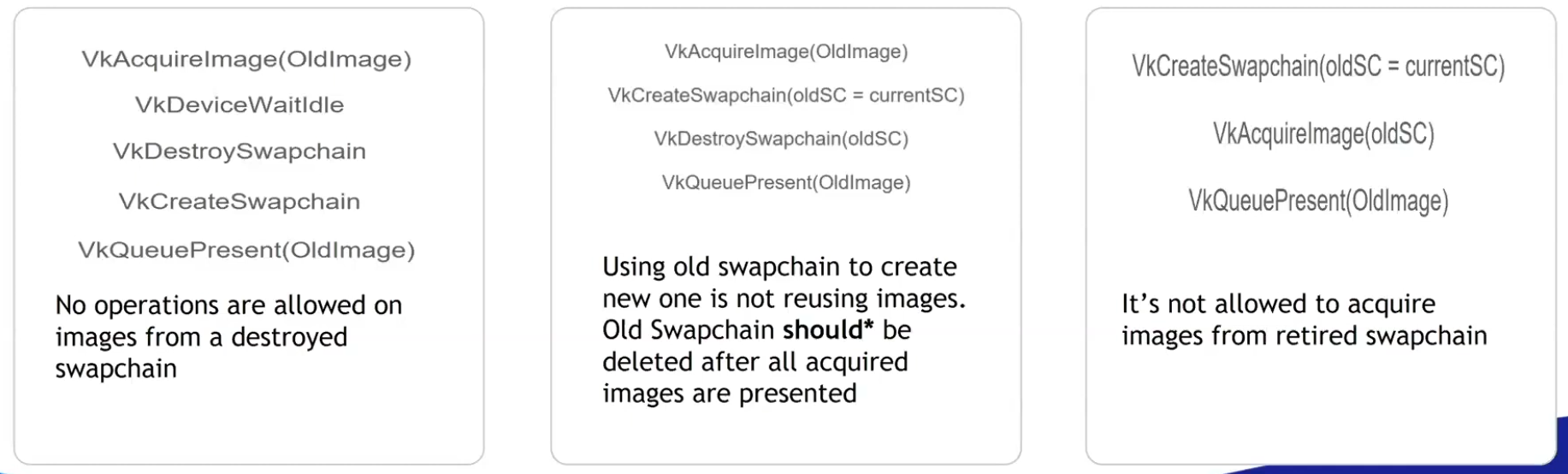
"We first call
vkDeviceWaitIdle, because just like in the last chapter, we shouldn’t touch resources that may still be in use."-
This is not enough.
-
 .
.
-
-
The whole app has to stop and wait for synchronization.
-
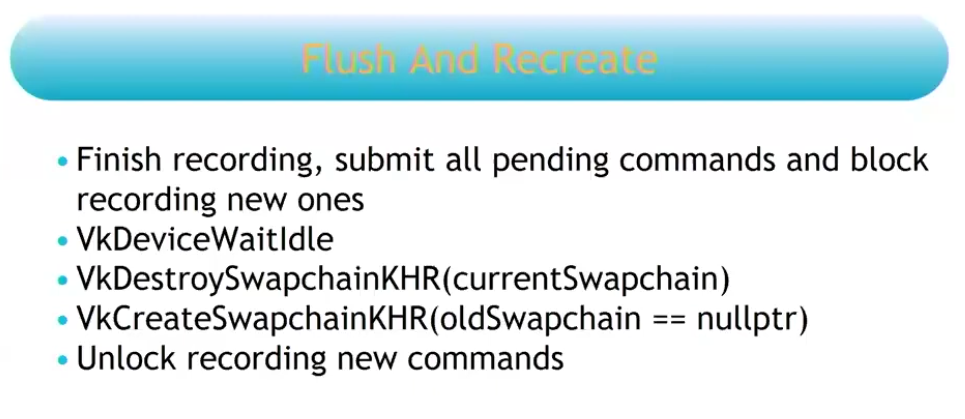 .
.
-
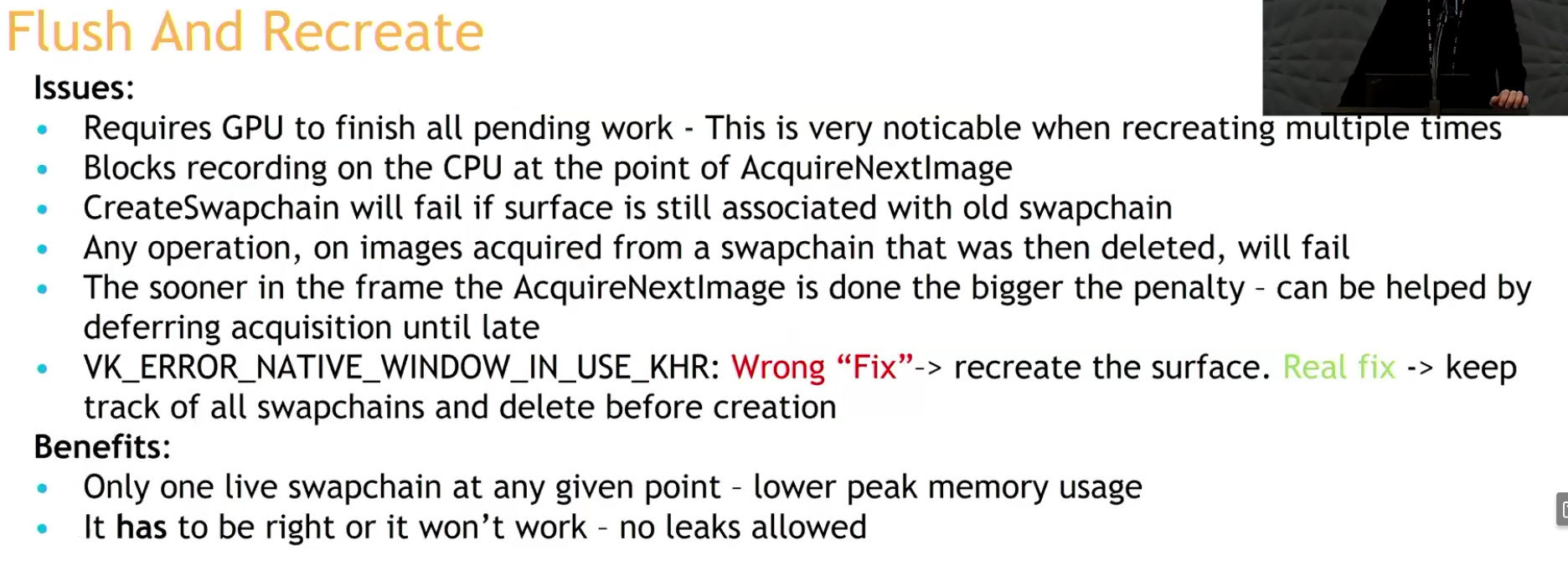 .
.
-
-
Recreate and check:
-
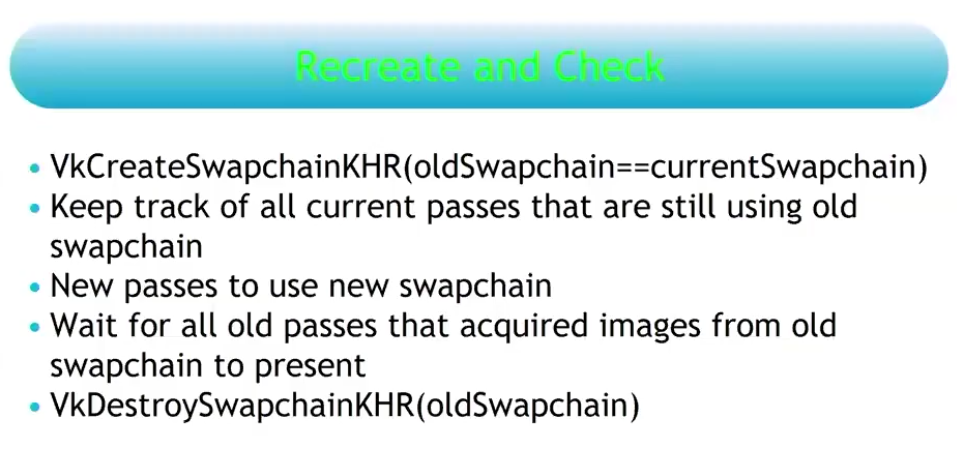 .
.
-
You do not need to stop your rendering at any given point.
-
The reason why you are allowed to pass the old swapchain when recreating the new swapchain, is due to this strategy.
-
This is the recommendation.
-
Strategy .
-
This issue is resolved by deferring the destruction of the old swapchain and its remaining present semaphores to the time when the semaphore corresponding to the first present of the new swapchain can be destroyed. Because once the first present semaphore of the new swapchain can be destroyed, the first present operation of the new swapchain is done, which means the old swapchain is no longer being presented.
-
The destruction of both old swapchains must now be deferred to when the first QP of the new swapchain has been processed. If an application resizes the window constantly and at a high rate, we would keep accumulating old swapchains and not free them until it stops.
-
This potentially accumulates a lot of memory, I think.
-
-
So what's the correct moment then? Only after the new swapchain has completed one full cycle of presentations, that is, when I acquire image index
0for the second time.
-
-
Analysis :
-
(2025-08-19)
-
Holy, now I understand the problem.
-
I cannot delete anything from the old swapchain until I am sure that everything from the previous one has been presented. I thought that by acquiring the first image of the new swapchain, that would already indicate that it was safe to delete the old swapchain, but that's not true; by doing that, I only guarantee that 1 (ONE) image from the old swapchain has been presented, but the old swapchain may have several images in the queue.
-
However, as made clear, that is not the case.
-
Dealing with this can be a nightmare. Potentially having to handle multiple old swapchains at the same time in case of very frequent resizes (smooth swapchain).
-
-
-
-
"You should always use this extension if available".
-
Support :
-
Introduced in 2023.
-
(2025-02-25)
-
Only 25% of Android devices and 20% of desktop GPUs use it.
-
It was added on Android 14.
-
-
-
Adds a collection of window system integration features that were intentionally left out or overlooked in the original
KHR_swapchainextension. -
Features :
-
Allow applications to release previously acquired images without presenting them.
-
Allow applications to defer swapchain memory allocation for improved startup time and memory footprint.
-
Specify a fence that will be signaled when the resources associated with a present operation can be safely destroyed.
-
Allow changing the present mode a swapchain is using at per-present granularity.
-
Allow applications to define the behavior when presenting a swapchain image to a surface with different dimensions than the image.
-
Using this feature may allow implementations to avoid returning
ERROR_OUT_OF_DATE_KHRin this situation.
-
-
This extension makes
vkQueuePresentKHRmore similar tovkQueueSubmit, allowing it to specify a fence that the application can wait on.
-
-
The problem with
vkDeviceWaitIdleorvkQueueWaitIdle:-
Typically, applications call these functions and assume it’s safe to delete swapchain semaphores and the swapchain itself.
-
The problem is that
WaitIdlefunctions are defined in terms of fences - they only wait for workloads submitted through functions that accept a fence. -
Unextended
vkQueuePresentdoes not provide a fence parameter. -
The
vkDeviceWaitIdlecan’t guarantee that it’s safe to delete swapchain resources.-
The validation layers don't trigger errors in this case, but it's just because so many people use it and there's no good alternative.
-
When
EXT_swapchain_maintenance1is enabled the validation layer will report an error if the application shutdown sequence relies onvkDeviceWaitIdleorvkQueueWaitIdleto release swapchain resources instead of using a presentation fence.
-
-
The extension fixes this problem.
-
By waiting on the presentation fence, the application can safely release swapchain resources.
-
-
-
To avoid a deadlock, only reset the fence if we are submitting work:
-
If reset is made right after wait for the fence, but the window was resized, then it will happen a deadlock.
-
The fence is opened by the signaling of
QueueSubmit, and closed by theResetFences.
vkWaitForFences(device, 1, &inFlightFences[currentFrame], TRUE, UINT64_MAX); uint32_t imageIndex; VkResult result = vkAcquireNextImageKHR(device, swapChain, UINT64_MAX, imageAvailableSemaphores[currentFrame], NULL_HANDLE, &imageIndex); if (result == ERROR_OUT_OF_DATE_KHR) { recreateSwapChain(); return; } else if (result != SUCCESS && result != SUBOPTIMAL_KHR) { throw std::runtime_error("failed to acquire Swapchain image!"); } // Only reset the fence if we are submitting work vkResetFences(device, 1, &inFlightFences[currentFrame]); -
-
-
What to recreate :
-
The image views need to be recreated because they are based directly on the Swapchain images.
-
-
Smooth Swapchain Resizing :
-
"Don't bother with smooth swapchain resizing, it's not worth it".
-
My experience :
-
(2025-08-04)
-
A callback
glfw.SetWindowRefreshCallbackallows the swapchain to be recreated while resizing. -
Synchronization :
-
Since the swapchain is recreated all the time, it becomes difficult to manage when the old swapchain should be destroyed along with its resources.
-
At the moment I'm handling the old_swapchain in a "bad" way, and I feel that recreating it every resize frame only worsens synchronization.-
It is not necessary to deal with the old_swapchain when using
vkDeviceWaitIdle().
-
-
-
My current implementation:
eng.window_init(1280, 720, "Expedição Hover", proc "c" (window: glfw.WindowHandle) {
    context = eng.global_context
    // fmt.printfln("REFRESHED")
    eng.swapchain_resize()
    game_draw(&game, game.cycle_draw.dt_cycles_s)
})
-
-
Updating resources after recreating
-
Destroy every image and view created from the old swapchain (the swapchain destroys its own images).
-
Update everything that holds a reference to either of those.
-
If anything was created using the swapchain's size you also have to destroy and recreate those and update anything that references them.
-
There's no getting around it.
-
Frames In-Flight
Motivation
-
The render loop has one glaring flaw: unnecessary idling of the host. We are required to wait on the previous frame to finish before we can start rendering the next.
-
To fix this we allow multiple frames to be in-flight at once, allowing the rendering of one frame to not interfere with the recording of the next.
-
This control over the number of frames in flight is another example of Vulkan being explicit.
Frame
-
There is no concept of a frame in Vulkan. This means that the way you render is entirely up to you. The only thing that matters is when you have to display the frame to the screen, which is done through a swapchain. But there is no fundamental difference between rendering and then sending the images over the network, or saving the images into a file, or displaying it on the screen through the swapchain.
-
This means it is possible to use Vulkan in an entirely headless mode, where nothing is displayed to the screen. You can render the images and then store them on disk (very useful for testing) or use Vulkan as a way to perform GPU calculations such as a raytracer or other compute tasks.
How many Frames In-Flight
-
We choose the number 2 because we don’t want the CPU to get too far ahead of the GPU.
-
With two frames in flight, the CPU and the GPU can be working on their own tasks at the same time. If the CPU finishes early, it will wait till the GPU finishes rendering before submitting more work.
-
With three or more frames in flight, the CPU could get ahead of the GPU, adding frames of latency. Generally, extra latency isn’t desired.
-
One Per Frame In-Flight
-
Duplicate :
-
Resources :
-
Uniform Buffers.
-
If modified while a previous frame uses it, corruption occurs.
-
-
Dynamic Storage Buffers.
-
GPU-computed results (e.g., particle positions). Writing to a buffer while an older frame reads it causes hazards.
-
-
Color/Depth Attachments.
-
Staging Buffers
-
If updated per frame (e.g.,
vkMapMemory), duplication avoids overwriting mid-transfer.
-
-
Compute Shader Output Buffers:
-
If frame
Nwrites, and frameN+1reads, duplicate to prevent read-before-write. -
Use ping-pong buffers (count = frames in-flight).
-
-
-
Command pool.
-
I have doubts about this; some people do it differently.
-
-
Command buffer.
-
'present_finished_semaphore'.
-
'render_finished_fence'.
-
-
Don't duplicate :
-
Resources :
-
Static Vertex/Index Buffers:
-
Initialized once, read-only. No per-frame updates.
-
-
Immutable Textures
-
Loaded once (e.g., via
VkDeviceMemory). -
Not mapped for change.
-
It's device local.
-
-
-
Static BRDF LUTs.
-
Initialized once, read by all frames.
-
-
Advancing a frame
void drawFrame() {
    ...

    currentFrame = (currentFrame + 1) % MAX_FRAMES_IN_FLIGHT;
}
-
By using the modulo (
%) operator, we ensure that the frame index loops around after everyMAX_FRAMES_IN_FLIGHTenqueued frames.
Acquire Next Image
-
vkWaitForFences()-
Waits on the previous frame.
-
Takes an array of fences and waits on the host for either any or all of the fences to be signaled before returning.
-
The
TRUEwe pass here indicates that we want to wait for all fences, but in the case of a single one it doesn’t matter. -
This function also has a timeout parameter that we set to the maximum value of a 64 bit unsigned integer,
UINT64_MAX, which effectively disables the timeout.
-
-
vkAcquireNextImageKHR()-
Acquire the index of an available image from the swapchain for rendering .
-
If an image was acquired, then it means that this image is idle (i.e., not currently being displayed or written to).
-
If no image is ready, the call blocks (or returns an error if non-blocking).
-
The returned image index is now " owned " by your app for rendering.
-
We only get a swapchain image index from the windowing present system.
-
A semaphore/fence is signaled when the image is safe to use.
-
timeout-
If the swapchain doesn’t have any image we can use, it will block the thread with a maximum for the timeout set.
-
The measurement unit is nanoseconds.
-
1 second is fine:
1_000_000_000.
-
-
semaphore-
Semaphore to signal.
-
-
fence-
Fence to signal.
-
It is possible to specify a semaphore, fence or both.
-
-
pImageIndex-
Specifies a variable to output the index of the Swapchain image that has become available to use.
-
The index refers to the
VkImagein theswapChainImagesarray.
-
-
Image Layout Transitions
-
See Vulkan#Images .
-
Before we can start rendering to an image, we need to transition its layout to one that is suitable for rendering.
-
Before rendering, we transition the image layout to
IMAGE_LAYOUT_COLOR_ATTACHMENT_OPTIMAL.
// Before starting rendering, transition the swapchain image to COLOR_ATTACHMENT_OPTIMAL
transition_image_layout(
    imageIndex,
    vk::ImageLayout::eUndefined,
    vk::ImageLayout::eColorAttachmentOptimal,
    {},                                                     // srcAccessMask (no need to wait for previous operations)
    vk::AccessFlagBits2::eColorAttachmentWrite,                // dstAccessMask
    vk::PipelineStageFlagBits2::eTopOfPipe,                   // srcStage
    vk::PipelineStageFlagBits2::eColorAttachmentOutput        // dstStage
);
-
After rendering, we need to transition the image layout back to
IMAGE_LAYOUT_PRESENT_SRC_KHRso it can be presented to the screen:
// After rendering, transition the swapchain image to PRESENT_SRC
transition_image_layout(
    imageIndex,
    vk::ImageLayout::eColorAttachmentOptimal,
    vk::ImageLayout::ePresentSrcKHR,
    vk::AccessFlagBits2::eColorAttachmentWrite,                 // srcAccessMask
    {},                                                      // dstAccessMask
    vk::PipelineStageFlagBits2::eColorAttachmentOutput,        // srcStage
    vk::PipelineStageFlagBits2::eBottomOfPipe                  // dstStage
);
Render Targets
Attachments
-
Nvidia: Use
storeOp = DONT_CARErather thanUNDEFINEDlayouts to skip unneeded render target writes. -
Nvidia: Don't transition color attachments from "safe" to "unsafe" unless required by the algorithm.
Transient Resources
-
Transient attachments (or Transient Resources) are render targets (like color/depth buffers) designed to exist only temporarily during a render pass, with their contents discarded afterward. They're optimized for fast on-chip memory access and avoid unnecessary memory operations.
Render Target
-
A Render Target is not a term in Vulkan but it's a term in graphics programming.
-
It's a term for an image you render into. In Vulkan this is an
VkImage+VkImageViewused as a color/depth attachment in a render pass or as a color attachment in dynamic rendering. -
Examples :
-
Vulkan#Drawing to a High Precision Image (
R16G16B16A16_SFLOAT) .-
It's a Render Target technique to draw into a high-precision image and then copy the result to an SDR image for the swapchain.
-
-
-
Drawing a UI :
-
The UI texture must preserve alpha in the areas you want to be transparent, for later compositing.
-
Draw UI directly to the final render target (swapchain image, or image to blit to the swapchain image) :
-
After tonemap, enable blending and draw UI.
-
Oni:
-
For the scene, I render into an RGBA16 image, then I draw on the swapchain with a tonemapper, then I draw the UI on the swapchain with blending enabled.
-
-
-
Composite in a shader :
-
Sample scene image and UI image, compute
out = scene * (1 - alpha_ui) + ui * alpha_ui(or use premultiplied alpha:out = scene + ui).-
Both ways work; premultiplied alpha avoids some edge artifacts if UI already uses premultiplied data.
-
-
-
-
Compositing :
-
Used to combine render targets, or any other images.
-
Fragment shader :
-
Render to an image and draw a full-screen triangle/quad that samples the HDR image and outputs LDR color.
-
Could be the swapchain image if supported, or an intermediate image then blit/copy to swapchain.
-
-
Pros :
-
Simple and guaranteed compatible with swapchain color attachment usage.
-
Useful if you want to draw the UI while making this final composition.
-
Seems like I'm mixing responsibilities, even though I'm reducing one render pass.
-
-
-
Cons :
-
Less flexible for arbitrary per-pixel work that requires many conditionals or random write patterns.
-
Need to issue a draw call and set up graphics pipeline.
-
-
-
Compute shader :
-
Sample HDR image(s), write the LDR pixels to an output image.
-
Could be the swapchain image if supported, or an intermediate image then blit/copy to swapchain.
-
-
Pros :
-
Flexible: can read multiple inputs and write arbitrary outputs (random writes, multiple passes) without needing geometry.
-
Easy to implement multi-image compositing in one dispatch (read N sampled images + write to storage image).
-
-
Cons :
-
On some GPUs a simple full-screen fragment pass can be faster due to fixed-function hardware for rasterization and blending.
-
#version 450

layout(local_size_x = 16, local_size_y = 16) in;
layout(set=0, binding=0) uniform sampler2D gameTex;
layout(set=0, binding=1) uniform sampler2D uiTex;
layout(set=0, binding=2, rgba8) uniform writeonly image2D swapchainImg;

void main() {
    ivec2 coord = ivec2(gl_GlobalInvocationID.xy);
    vec2 uv = vec2(coord) / textureSize(gameTex, 0);

    // Sample inputs
    vec3 game = texture(gameTex, uv).rgb;
    vec4 ui = texture(uiTex, uv);

    // Tonemap game (example: Reinhard)
    game = game / (game + vec3(1.0));

    // Composite: UI over game
    vec3 final = mix(game, ui.rgb, ui.a);

    // Write to swapchain
    imageStore(swapchainImg, coord, vec4(final, 1.0));
}
#version 450 layout(local_size_x = 16, local_size_y = 16) in; layout(binding = 0) uniform sampler2D uSceneHDR; layout(binding = 1) uniform sampler2D uUI; // optional layout(binding = 2, rgba8) writeonly uniform image2D outImage; // target LDR image (could be swapchain-compatible image) vec3 reinhardTonemap(vec3 c) { return c / (1.0 + c); } vec3 toSRGB(vec3 linear) { return pow(linear, vec3(1.0/2.2)); } void main() { ivec2 pix = ivec2(gl_GlobalInvocationID.xy); ivec2 size = imageSize(outImage); if (pix.x >= size.x || pix.y >= size.y) return; vec2 uv = (vec2(pix) + 0.5) / vec2(size); vec3 hdr = texture(uSceneHDR, uv).rgb; float exposure = 1.0; vec3 mapped = reinhardTonemap(hdr * exposure); mapped = toSRGB(mapped); // Optionally composite UI // vec4 ui = texture(uUI, uv); // vec3 outc = mix(mapped, ui.rgb, ui.a); imageStore(outImage, pix, vec4(mapped, 1.0)); }// Dispatch vkCmdBindPipeline(cmd, PIPELINE_BIND_POINT_COMPUTE, computePipe); vkCmdBindDescriptorSets(cmd, PIPELINE_BIND_POINT_COMPUTE, ...); vkCmdDispatch(cmd, swapchain_width/16, swapchain_height/16, 1); -
-
Dynamic Rendering
-
Support :
-
Dynamic Rendering Local Read .
-
Used for tiling GPUs.
-
-
Dynamic Rendering Unused Attachments .
-
Requires Vulkan 1.3+.
-
Proposal .
-
VkPhysicalDeviceDynamicRenderingUnusedAttachmentsFeaturesEXT .
-
It relaxes the strict matching rules so a rendering instance and the bound pipelines may disagree about an attachment being “unused” in one but not the other (and relaxes some format/NULL mixing rules described in the extension).
-
Support :
-
Pass VkPhysicalDeviceDynamicRenderingUnusedAttachmentsFeaturesEXT in the
pNextchain of the VkPhysicalDeviceFeatures2 structure passed to vkGetPhysicalDeviceFeatures2 . -
The struct will be filled in to indicate whether each corresponding feature is supported.
-
-
Enabling :
-
Enable the corresponding feature in
VkDeviceCreateInfo(viaVkPhysicalDeviceDynamicRenderingUnusedAttachmentsFeaturesEXT)
-
-
This extension lifts some restrictions in the KHR_dynamic_rendering extension to allow render pass instances and bound pipelines within those render pass instances to have an unused attachment specified in one but not the other. It also allows pipelines to use different formats in a render pass as long as the attachment is NULL.
-
-
Structure specifying attachment information
-
imageView-
Is the image view that will be used for rendering.
-
-
imageLayout-
Is the layout that
imageViewwill be in during rendering.
-
-
resolveMode-
Is a VkResolveModeFlagBits value defining how data written to
imageViewwill be resolved intoresolveImageView.
-
-
resolveImageView-
Is an image view used to write resolved data at the end of rendering.
-
-
resolveImageLayout-
Is the layout that
resolveImageViewwill be in during rendering.
-
-
loadOp-
Specifies what to do with the image before rendering.
-
Is a VkAttachmentLoadOp value defining the load operation for the attachment.
-
We’re using
ATTACHMENT_LOAD_OP_CLEARto clear the image to black before rendering.
-
-
storeOp-
Specifies what to do with the image after rendering.
-
Is a VkAttachmentStoreOp value defining the store operation for the attachment.
-
We're using
ATTACHMENT_STORE_OP_STOREto store the rendered image for later use.
-
-
clearValue-
Is a VkClearValue structure defining values used to clear
imageViewwhenloadOpisATTACHMENT_LOAD_OP_CLEAR.
-
-
-
-
Structure specifying render pass instance begin info.
-
Specifies the attachments to render to and the render area.
-
Combines the
RenderingAttachmentInfowith other rendering parameters. -
flags-
Is a bitmask of VkRenderingFlagBits .
-
-
renderArea-
Is the render area that is affected by the render pass instance.
-
Extent Requirements :
-
The
rendering_info.renderArea.extenthas to fit inside therendering_attachment.imageViewand hence the image.
-
-
If there is an instance of VkDeviceGroupRenderPassBeginInfo included in the
pNextchain and itsdeviceRenderAreaCountmember is not0, thenrenderAreais ignored, and the render area is defined per-device by that structure. -
CharlesG - LunarG:
-
Viewports & scissors let you specify a size smaller than the full image, as well as redefining the origin & scale to use. Whereas the renderArea is specifying the actual image dimensions to use. This allows flexibility in how the backing VkImage is used in contrast to the viewport/scissor needs of the rendering itself. In most cases they are going to be “full” so its not like it comes into play always
-
More clarity: viewport & scissor are inputs to the rasterization stage, while the render area is an input for the attachment read/write.
-
-
Caio:
-
So, when comparing these two cases:
-
1- I use a 1080p image for the
renderAreaand a640pviewport and center the offset -
2- I use a 640p image for the
renderAreaand a640pviewport and center the offset
-
-
Is there a difference between the quality and performance of these two? Or even, is there a visual difference?
-
-
CharlesG - LunarG:
-
I don't know tbh.
-
-
-
colorAttachmentCount-
Is the number of elements in
pColorAttachments.
-
-
pColorAttachments-
Is a pointer to an array of
colorAttachmentCountVkRenderingAttachmentInfo structures describing any color attachments used. -
Each element of the
pColorAttachmentsarray corresponds to an output location in the shader, i.e. if the shader declares an output variable decorated with aLocationvalue of X , then it uses the attachment provided inpColorAttachments[X]. -
If the
imageViewmember of any element ofpColorAttachmentsis NULL_HANDLE , andresolveModeis notRESOLVE_MODE_EXTERNAL_FORMAT_DOWNSAMPLE_ANDROID, writes to the corresponding location by a fragment are discarded.
-
-
pDepthAttachment-
Is a pointer to a VkRenderingAttachmentInfo structure describing a depth attachment.
-
-
pStencilAttachment-
Is a pointer to a VkRenderingAttachmentInfo structure describing a stencil attachment.
-
-
viewMask-
Is a bitfield of view indices describing which views are active during rendering, when it is not
0.
-
-
layerCount-
Is the number of layers rendered to in each attachment when
viewMaskis0. -
Specifies the number of layers to render to, which is 1 for a non-layered image.
-
-
Multi-view
-
If
VkRenderingInfo.viewMaskis not0, multiview is enabled. -
If multiview is enabled, and the
multiviewPerViewRenderAreasfeature is enabled, and there is an instance of VkMultiviewPerViewRenderAreasRenderPassBeginInfoQCOM included in thepNextchain withperViewRenderAreaCountnot equal to0, then the elements of VkMultiviewPerViewRenderAreasRenderPassBeginInfoQCOM ::pPerViewRenderAreasoverriderenderAreaand define a render area for each view. In this case,renderAreamust be an area at least as large as the union of all the per-view render areas.
Render Cmds
Drawing Options
Indexed Draw
-
An indexed draw only guarantees that the GPU will:
-
Read an index buffer
-
For each index → invoke the vertex shader
-
Provide gl_VertexIndex (the index value)
-
-
It does NOT require:
-
vertex attributes
-
vertex buffers bound via pipeline state
-
Draw Direct
-
Specify the Viewport and Scissor.
-
Bind the pipeline.
-
Bind the descriptor sets.
-
vkCmdDraw()-
vertexCount-
Even though we don’t have a vertex buffer, we technically still have 3 vertices to draw.
-
-
instanceCount-
Used for instanced rendering, use
1if you’re not doing that.
-
-
firstVertex-
Used as an offset into the vertex buffer, defines the lowest value of
SV_VertexId.
-
-
firstInstance-
Used as an offset for instanced rendering, defines the lowest value of
SV_InstanceID.
-
-
-
-
indexCount-
The number of vertices to draw.
-
-
instanceCount-
The number of instances to draw.
-
We’re not using instancing, so just specify
1instance.
-
-
firstIndex-
The base index within the index buffer.
-
Specifies an offset into the index buffer, using a value of
1would cause the graphics card to start reading at the second index.
-
-
vertexOffset-
The value added to the vertex index before indexing into the vertex buffer.
-
-
firstInstance-
The instance ID of the first instance to draw.
-
-
Draw Indirect
-
Indirect drawing is primarily about letting the GPU read draw parameters from a buffer instead of the CPU issuing many individual draw calls. The key benefit is reducing CPU overhead and enabling GPU-driven rendering.
-
Indirect is a way to move the draw parameters into GPU memory.
-
CPU does almost nothing
-
GPU decides
instanceCount
-
-
"In some ways, Indirect Rendering is a more advanced form of instancing".-
Not really.
-
Instancing = how many copies per draw
-
Indirect = who decides the draw exists at all
-
-
Key capabilities you only get with indirect:
-
GPU culling
-
Compute shader writes:
instanceCount = visibleCount;-
CPU never knows that number.
-
-
-
Zero CPU submission scaling
-
10 objects → same CPU cost as 1M objects
-
-
Fully GPU-driven pipelines
-
LOD selection
-
occlusion culling
-
clustering
-
meshlet systems
-
All feed directly into indirect buffers.
-
-
-
buffer + offset + (stride * index)-
"parameters taken from
bufferstarting atoffsetand increasing bystridebytes for each successive draw."
-
-
It does not carry vertex data itself — it only supplies counts and base indices/instances.
-
The actual vertex data and indices come from the buffers you previously bound with
vkCmdBindVertexBuffersandvkCmdBindIndexBuffer. -
All draws in a single
vkCmdDrawIndirect*call must share:-
same pipeline
-
same bound resources
-
compatible vertex/index buffers
-
-
Executing a draw-indirect call will be equivalent to doing this.
void FakeDrawIndirect(VkCommandBuffer commandBuffer,void* buffer,VkDeviceSize offset, uint32_t drawCount,uint32_t stride) { char* memory = (char*)buffer + offset; for(int i = 0; i < drawCount; i++) { VkDrawIndexedIndirectCommand* command = VkDrawIndexedIndirectCommand*(memory + (i * stride)); VkCmdDrawIndexed(commandBuffer, command->indexCount, command->instanceCount, command->firstIndex, command->vertexOffset, command->firstInstance); } } -
Packing Vertices into one big thing :
-
To move vertex and index buffers to bindless, generally you do it by merging the meshes into really big buffers. Instead of having 1 buffer per vertex buffer and index buffer pair, you have 1 buffer for all vertex buffers in a scene. When rendering, then you use
BaseVertexoffsets in the draw calls. -
In some engines, they remove vertex attributes from the pipelines entirely, and instead grab the vertex data from buffers in the vertex shader.
-
Doing that makes it much easier to keep 1 big vertex buffer for all draw calls in the engine even if they use different vertex attribute formats. It also allows some advanced unpacking/compression techniques, and it’s the main use case for Mesh Shaders.
-
-
We also change the way the meshes work. After loading a scene, we create a BIG vertex buffer, and stuff all of the meshes of the entire map into it. This way we will avoid having to rebind vertex buffers.
-
If you packed both meshes into one buffer:
[ quad vertices ][ circle vertices ] .firstVertex = quadOffset // for quads .firstVertex = circleOffset // for circles -
The GPU automatically fetches:
-
vertex = vertexBuffer[firstVertex + vertexIndex] -
You don’t manually index anything.
-
Internally:
finalVertexIndex = firstVertex + gl_VertexIndex
-
-
-
Implementation :
-
If the device supports multi-draw indirect (
VkPhysicalDeviceFeatures2::multiDrawIndirect), then the entire array of draw commands can be executed through a single call toVkDrawIndexedIndirectCommand. Otherwise, each draw call must be executed through a separate call toVkDrawIndexIndirectCommand((2026-04-06) I didn't find this one in the docs):// m_enable_mci: supports multiDrawIndirect if (m_enable_mci && m_supports_mci) { vkCmdDrawIndexedIndirect(draw_cmd_buffers[i], indirect_call_buffer->get_handle(), 0, cpu_commands.size(), sizeof(cpu_commands[0])); } else { for (size_t j = 0; j < cpu_commands.size(); ++j) { vkCmdDrawIndexedIndirect(draw_cmd_buffers[i], indirect_call_buffer->get_handle(), j * sizeof(cpu_commands[0]), 1, sizeof(cpu_commands[0])); } } -
-
vkCmdDrawIndexedIndirectbehaves similarly tovkCmdDrawIndexedexcept that the parameters are read by the device from a buffer during execution. drawCount draws are executed by the command, with parameters taken frombufferstarting atoffsetand increasing bystridebytes for each successive draw. The parameters of each draw are encoded in an array ofVkDrawIndexedIndirectCommandstructures. -
drawCountis fixed on the CPU. -
-
indexCount-
Is the number of vertices to draw.
-
-
instanceCount-
Is the number of instances to draw.
-
-
firstIndex-
Is the base index within the index buffer.
-
-
vertexOffset-
Is the value added to the vertex index before indexing into the vertex buffer.
-
-
firstInstance-
Is the instance ID of the first instance to draw.
-
-
-
-
-
The GPU reads the actual draw count from
countBuffer -
You only provide a maximum limit (
maxDrawCount) -
The real number of draws is decided by the compute shader
-
-
-
vkCmdDrawIndirectbehaves similarly tovkCmdDrawexcept that the parameters are read by the device from a buffer during execution.drawCountdraws are executed by the command, with parameters taken frombufferstarting atoffsetand increasing bystridebytes for each successive draw. The parameters of each draw are encoded in an array ofVkDrawIndirectCommandstructures. -
-
Provided by
VK_KHR_device_address_commands -
vkCmdDrawIndirect2KHRbehaves similarly tovkCmdDrawexcept that the parameters are read by the device from an address range during execution.pInfo->drawCountdraws are executed by the command, with parameters taken frompInfo->addressRangestarting ataddressRange.addressand increasing byaddressRange.stridebytes for each successive draw. The parameters of each draw are encoded in an array ofVkDrawIndirectCommandstructures.
-
-
commandBuffer-
Is the command buffer into which the command is recorded.
-
-
buffer-
Is the buffer containing draw parameters.
-
-
offset-
Is the byte offset into buffer where parameters begin.
-
-
drawCount-
Is the number of draws to execute, and can be zero.
-
-
stride-
Is the byte stride between successive sets of draw parameters.
-
-
-
The members of
VkDrawIndirectCommandhave the same meaning as the similarly named parameters ofvkCmdDraw. -
vertexCount-
Is the number of vertices to draw.
-
How many vertices to read from the vertex buffer.
-
-
instanceCount-
Is the number of instances to draw.
-
How many instances of the same geometry to draw.
-
-
firstVertex-
Is the index of the first vertex to draw.
-
Start reading vertices at index
firstVertex -
If you had multiple meshes in one buffer, this would select which one
-
-
firstInstance-
Is the instance ID of the first instance to draw.
-
Offset applied to instance index
-
A base offset added to
gl_InstanceIndex-
gl_InstanceIndex = firstInstance + instanceID;. -
instanceIDgoes from0→instanceCount - 1. -
If drawing only one instance:
instanceID = 0.
-
-
gl_DrawID-
which draw call
-
which indirect command you are in
-
-
gl_InstanceIndex-
which instance inside the draw
-
-
Ex:
.instanceCount = 100
.firstInstance = 200
uint id = gl_InstanceIndex; // goes 200 → 299 -
Why not just do
id = gl_DrawID + gl_InstanceIndex?-
Sure, but the GPU does not know:
-
how many instances previous draws had
-
how you packed your data
-
-
So using
firstInstanceis a way to get this global information during command recording. -
You’re trying to derive a global linear index across multiple draws, and that requires knowing how many instances came before the current draw.
-
-
-
-
-
-
vkCmdDrawIndirectCountbehaves similarly tovkCmdDrawIndirectexcept that the draw count is read by the device from a buffer during execution. The command will read an unsigned 32-bit integer fromcountBufferlocated atcountBufferOffsetand use this as the draw count.
-
-
-
Provided by
VK_KHR_device_address_commandswithVK_KHR_draw_indirect_countor VK_VERSION_1_2
-
-
vkCmdDrawIndexedIndirectCount.-
Behaves similarly to
vkCmdDrawIndexedIndirectexcept that the draw count is read by the device from a buffer during execution. The command will read an unsigned 32-bit integer from countBuffer located at countBufferOffset and use this as the draw count.
-
-
-
Textures :
-
Due to the fact that you want to have as much things on the GPU as possible, this pipeline maps very well if you combine it with “Bindless” techniques, where you stop needing to bind descriptor sets per material or changing vertex buffers. Having a bindless renderer also makes Raytracing much more performant and effective.
-
On this guide we will not use bindless textures as their support is limited, so we will do 1 draw-indirect call per material used.
-
To move textures into bindless, you use texture arrays.
-
With the correct extension, the size of the texture array can be unbounded in the shader, like when you use SSBOs.
-
Then, when accessing the textures in the shader, you access them by index which you grab from another buffer. If you don’t use the Descriptor Indexing extensions, you can still use texture arrays, but they will need a bounded size. Check your device limits to see how big can that be.
-
To make materials bindless, you need to stop having 1 pipeline per material. Instead, you want to move the material parameters into SSBOs, and go with an ubershader approach.
-
In the Doom engines, they have a very low amount of pipelines for the entire game. Doom eternal has less than 500 pipelines, while Unreal Engine games often have 100.000+ pipelines. If you use ubershaders to massively lower the amount of unique pipelines, you will be able to increase efficiency in a huge way, as VkCmdBindPipeline is one of the most expensive calls when drawing objects in vulkan.
-
-
Push Constants :
-
Push Constants and Dynamic Descriptors can be used, but they have to be “global”. Using push constants for things like camera location is perfectly fine, but you cant use them for object ID as that’s a per-object call and you specifically want to draw as many objects as possible in 1 draw.
-
Multithreading Rendering
-
I'm not sure, I don't think it's necessary.
-
From what I understand, it's about using multiple CPU threads to handle submissions and presentations, etc.
-
It has nothing to do with frames in flight, btw.
-
-
The video explains okay, but nah.
-
-> In the next video he says it wasn't exactly a good idea and reverted what he did in that video.
-
"It was technically slower and more confusing to do synchronizations".
-
-
Render Passes and Framebuffers
Dynamic Rendering: Features and differences from Render Passes
-
Replaces
VkRenderPassand Framebuffers.-
Instead, we can specify the color, depth, and stencil attachments directly when we begin rendering.
-
-
Describe renderpasses inline with command buffer recording.
-
Provides more flexibility by allowing us to change the attachments we’re rendering to without creating new render pass objects.
-
Greatly simplifies application architecture.
-
Synchronization still needs to be done, but now it's even more explicit, truer to its stated nature.
-
We had to do that with Render Passes, but that was bound up in the Render Pass creation.
-
Now, the synchronization is more explicit.
-
-
Tiling GPUs aren't left behind.
-
The v1.4
dynamicRenderingLocalRead,KHR_dynamic_rendering_local_readbrings tiling GPUs to the same capabilities, and they don't need to state the Render Passes.
-
-
I wouldn't say that "You should use Render Passes if your hardware isn't new enough", because it isn't fun.
-
Better compatibility with modern rendering techniques.
-
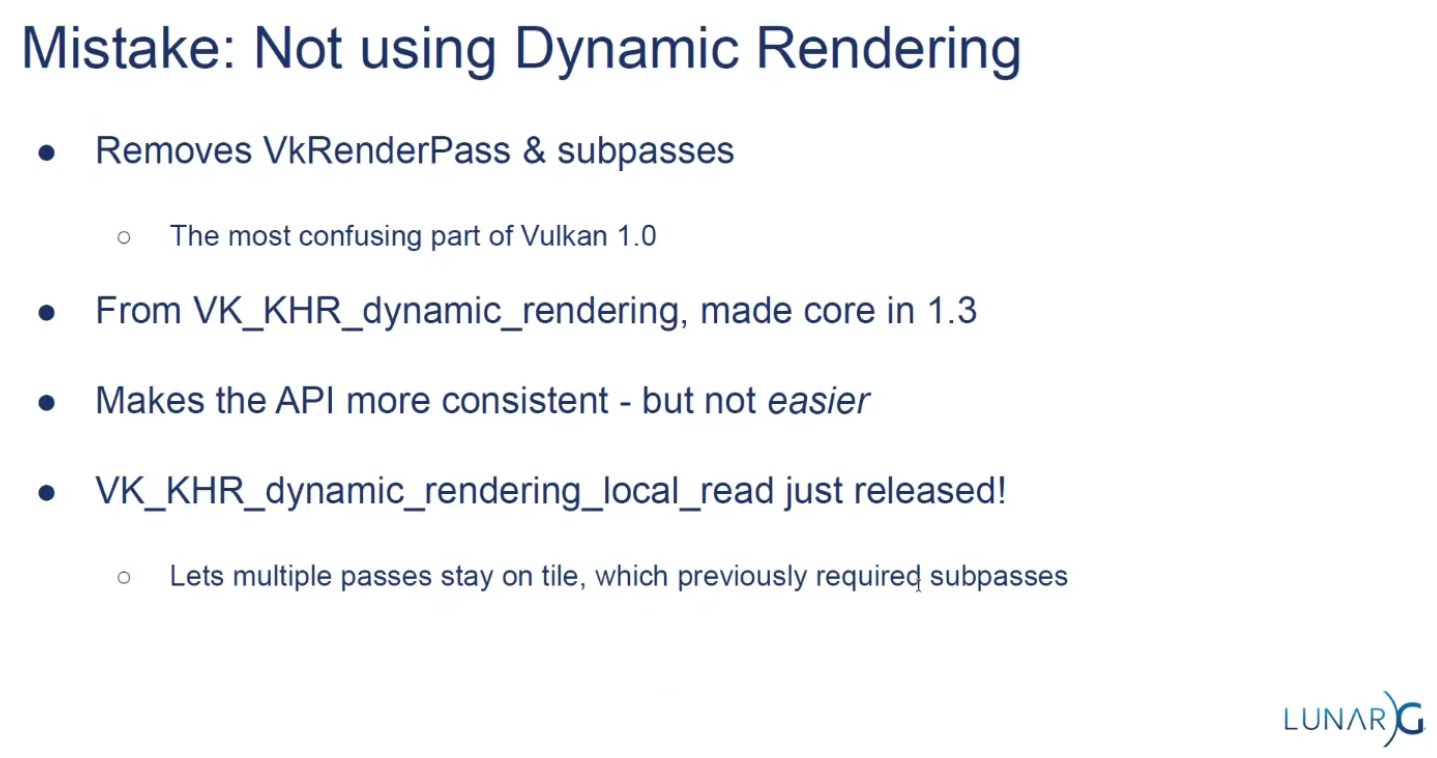 .
.
Subpasses
-
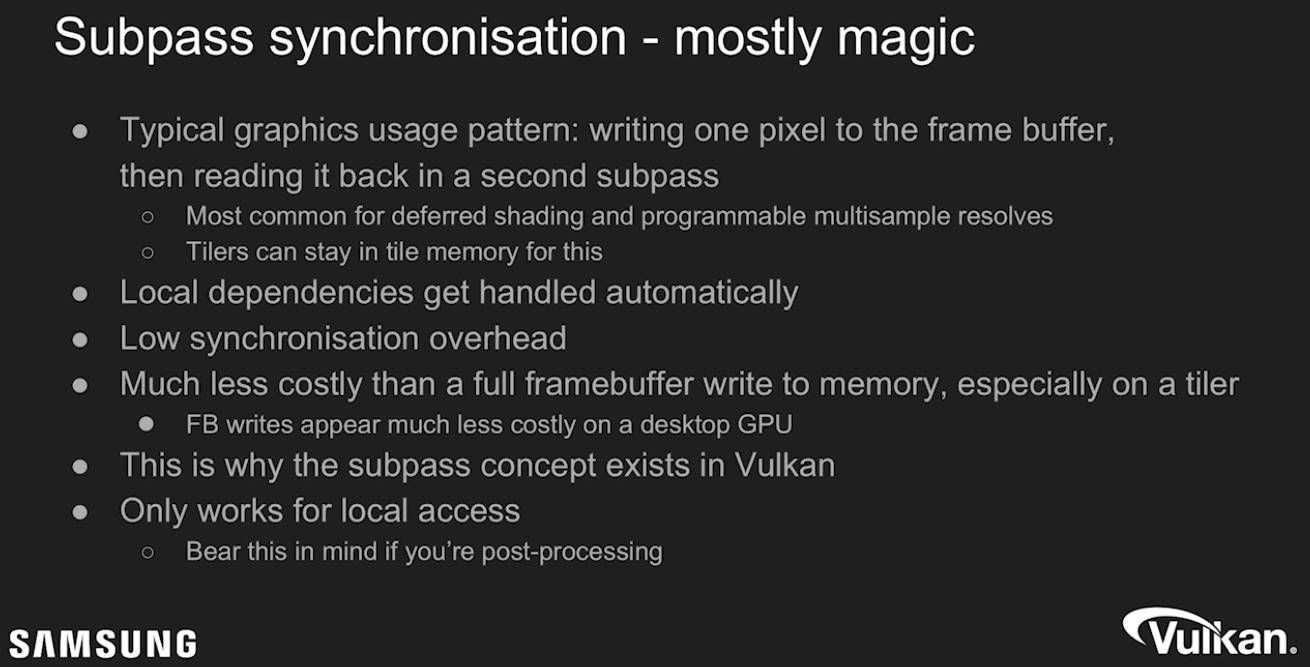 .
.
-
External subpass dependencies:-
Explained by TheMaister 2019; he is part of the Khronos Group.
-
The main purpose of external subpass dependencies is to deal with initialLayout and finalLayout of an attachment reference. If initialLayout != layout used in the first subpass, the render pass is forced to perform a layout transition.
-
If you don’t specify anything else, that layout transition will wait for nothing before it performs the transition. Or rather, the driver will inject a dummy subpass dependency for you with srcStageMask = TOP_OF_PIPE. This is not what you want since it’s almost certainly going to be a race condition. You can set up a subpass dependency with the appropriate srcStageMask and srcAccessMask.
-
The external subpass dependency is basically just a vkCmdPipelineBarrier injected for you by the driver.
-
The whole premise here is that it’s theoretically better to do it this way because the driver has more information, but this is questionable, at least on current hardware and drivers.
-
There is a very similar external subpass dependency setup for finalLayout. If finalLayout differs from the last use in a subpass, driver will transition into the final layout automatically. Here you get to change
dstStageMask/dstAccessMask. If you do nothing here, you getBOTTOM_OF_PIPE, which can actually be just fine. A prime use case here is swapchain images which havefinalLayout = PRESENT_SRC_KHR. -
Essentially, you can ignore external subpass dependencies .
-
Their added complexity gives very little gain. Render pass compatibility rules also imply that if you change even minor things like which stages to wait for, you need to create new pipelines!
-
This is dumb, and will hopefully be fixed at some point in the spec.
-
However, while the usefulness of external subpass dependencies is questionable, they have some convenient use cases I’d like to go over:
-
Automatically transitioning
TRANSIENT_ATTACHMENTimages :-
If you’re on mobile, you should be using transient images where possible. When using these attachments in a render pass, it makes sense to always have them as initialLayout = UNDEFINED. Since we know that these images can only ever be used in
COLOR_ATTACHMENT_OUTPUTorEARLY/LATE_FRAGMENT_TESTstages depending on their image format, the external subpass dependency writes itself, and we can just use transient attachments without having to think too hard about how to synchronize them. This is what I do in my Granite engine, and it’s quite useful. Of course, we could just inject a pipeline barrier for this exact same purpose, but that’s more boilerplate.
-
-
Automatically transitioning swapchain images :
-
Typically, swapchain images are always just used once per frame, and we can deal with all synchronization using external subpass dependencies. We want
initialLayout = UNDEFINED, andfinalLayout = PRESENT_SRC_KHR. -
srcStageMaskisCOLOR_ATTACHMENT_OUTPUTwhich lets us link up with the swapchain acquire semaphore. For this case, we will need an external subpass dependency. For thefinalLayouttransition after the render pass, we are fine withBOTTOM_OF_PIPEbeing used. We’re going to use semaphores here anyways. -
I also do this in Granite.
-
-
-
Framebuffers
-
VkFrameBuffer-
Holds the target images for a renderpass.
-
Only used in legacy tutorials.
-
-
Just wrappers to image views.
-
The attachments of a Framebuffer are the Image Views.
-
The Framebuffers are used within a Render Pass.
-
LunarG / Vulkan: "Kinda of a bad name, it's just a couple of image views".
-
Only exists to combine images and renderpasses.
Render Passes
-
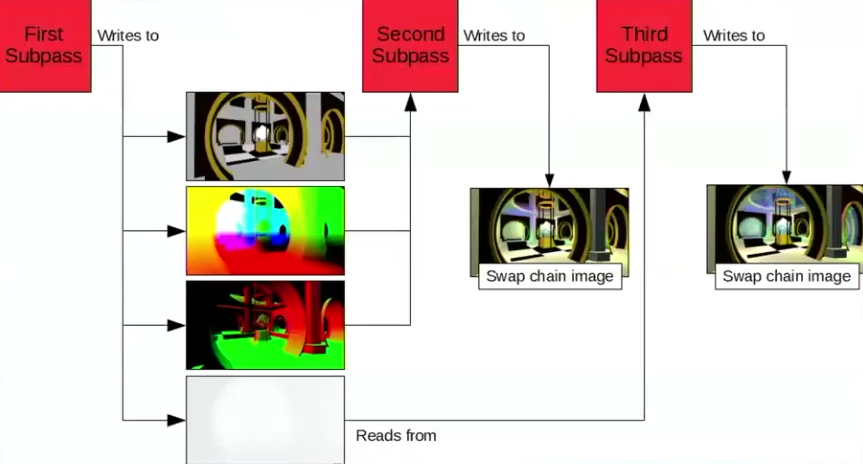
VkRenderPass-
Holds information about the images you are rendering into. All drawing commands have to be done inside a renderpass.
-
Only used in legacy tutorials.
-
-
Render passes in Vulkan describe the type of images that are used during rendering operations, how they will be used, and how their contents should be treated.
-
All drawing commands happen inside a "render pass".
-
Acts as pseudo render graph.
-
Allows tiling GPUs to use memory efficiently.
-
Efficient scheduling.
-
-
Describe images attachments.
-
Defines the subpasses.
-
Declare dependencies between subpasses.
-
Require
VkFrameBuffers.-
Whereas a render pass only describes the type of images, a
VkFramebufferactually binds specific images to these slots.
-
-
 .
.
-
Problem :
-
Great in theory, not so great to use in practice.
-
Single object with many responsibilities.
-
Made the API harder to reason about when looking at the code.
-
-
Hard to architect into a renderer.
-
Yet another input for pipelines.
-
-
The main benefit is for tiling based GPUs.
-
Commonly found in mobile.
-
-
"Use Dynamic Rendering, it's much better".
-
Submit
-
Submits the Command Buffers recorded.
-
vkSubmitInfo-
The first three parameters specify which semaphores to wait on before execution begins and in which stage(s) of the pipeline to wait.
-
We want to wait for writing colors to the image until it’s available, so we’re specifying the stage of the graphics pipeline that writes to the color attachment.
-
That means that theoretically, the implementation can already start executing our vertex shader and such while the image is not yet available.
-
Each entry in the
waitStagesarray corresponds to the semaphore with the same index inpWaitSemaphores. -
pCommandBuffers-
Specifies which command buffers to actually submit for execution. We simply submit the single command buffer we have.
-
-
pSignalSemaphores-
Specifies which semaphores to signal once the command buffer(s) have finished execution.
-
In our case we’re using the
renderFinishedSemaphorefor that purpose.
-
-
-
vkQueueSubmit()-
fence-
Is an optional handle to a fence to be signaled once all submitted command buffers have completed execution.
-
-
The function takes an array of
VkSubmitInfostructures as argument for efficiency when the workload is much larger. -
The last parameter references an optional fence that will be signaled when the command buffers finish execution.
-
This allows us to know when it is safe for the command buffer to be reused, thus we want to give it
drawFence. Now we want the CPU to wait while the GPU finishes rendering that frame we just submitted:
-
Presentation
-
The last step of drawing a frame is submitting the result back to the Swapchain to have it eventually show up on the screen.
-
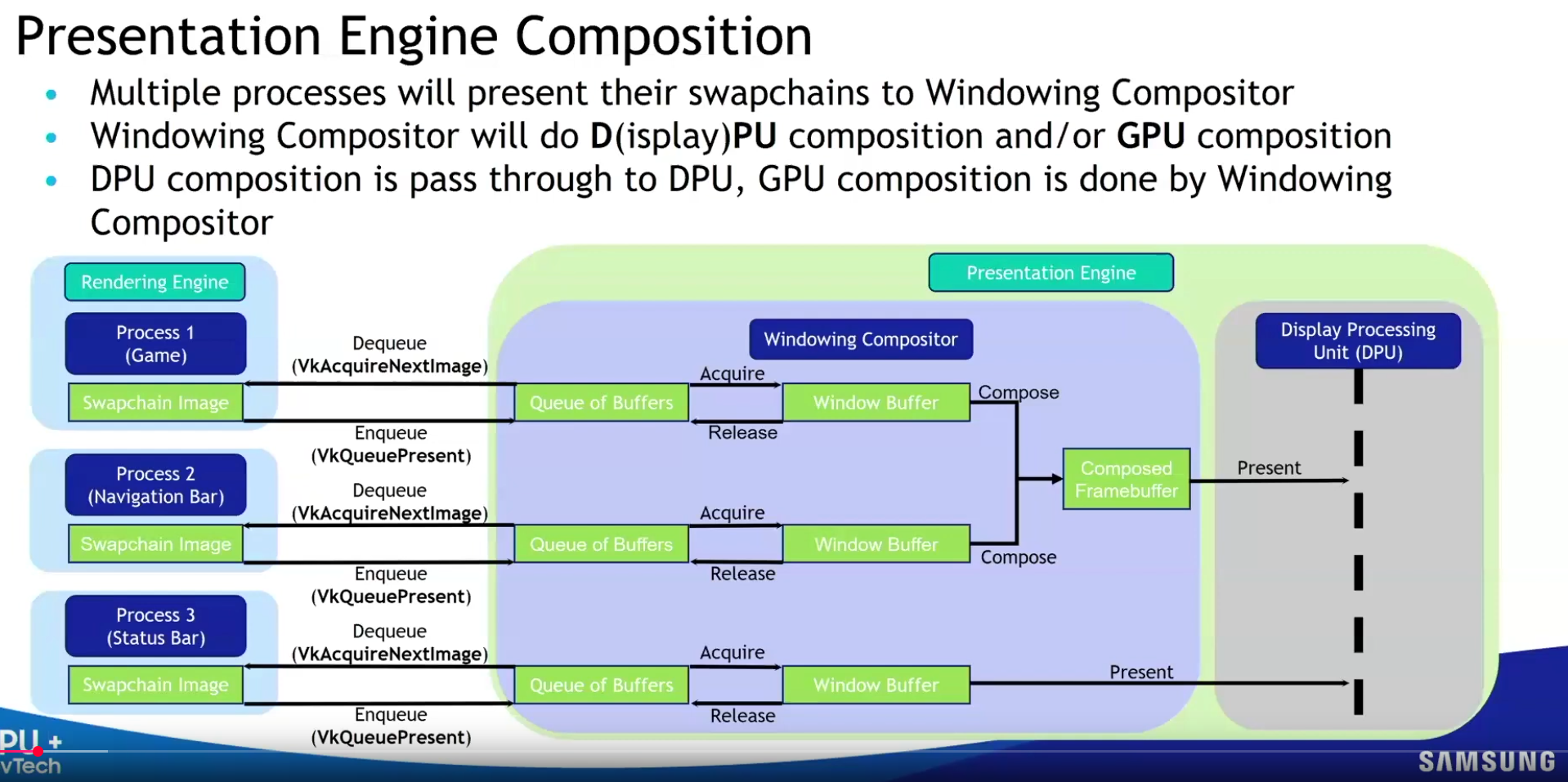
Presentation Engine :
-
 .
.
-
-
VkPresentInfoKHR-
pWaitSemaphores-
Which semaphores to wait on before presentation can happen, just like
VkSubmitInfo. -
Since we want to wait on the command buffer to finish execution, thus our triangle being drawn, we take the semaphores which will be signaled and wait on them, thus we use
signalSemaphores.
-
-
The next two parameters specify the Swapchains to present images to and the index of the image for each Swapchain.
-
This will almost always be single.
-
pResults-
It allows you to specify an array of
VkResultvalues to check for every Swapchain if presentation was successful. -
It’s not necessary if you’re only using a single Swapchain, because you can use the return value of the present function.
-
-
-
QueuePresentKHR()-
Submits a rendered image to the presentation queue.
-
Used after queueing all rendering commands and transitioning the image to the correct layout.
-
Vulkan transfers ownership of the image to the 'presentation engine'.
-
-
How a presentation happens :
-
Who :
-
The GPU (via the display controller/hardware), orchestrated by the OS/window system .
-
-
When :
-
At the next vertical blanking interval ( Vblank ).
-
Vblank is the moment between screen refreshes (e.g., at 60 Hz, every 16.67 ms).
-
-
In a Vulkan workflow, we can be sure that the presentation happened between the
QueuePresentKHR()and thevkAcquireNextImageKHR().-
The job of the
present_complete_semaphoreis to hold this information.
-
-
-
How :
-
The GPU's display controller reads the image from GPU memory.
-
The OS/window system (e.g., X11/Wayland on Linux, Win32 on Windows) composites the image into the application window.
-
The final output is scanned out to the display.
-
-
-
Image recycling :
-
After presentation, the image is released back to the swapchain.
-
It becomes available for re-acquisition via
vkAcquireNextImageKHR(after the next vblank).
-