Info
-
-
Talk by AMD.
-
Shows no code.
-
The video is useful.
-
Memory Heaps, Memory Types.
-
Memory Blocks.
-
Suballocations.
-
Dos and Don'ts.
-
VMA.
-
VmaDumpVis.py to visualize the json file dumped by VMA.
-
-
-
Sounds more technical; I only saw parts of the talk.
-
Talk by AMD.
-
Shows code.
-
Memory Heaps, Memory Types.
-
Dos and Don'ts.
-
VMA.
-
-
There is additional level of indirection:
VkDeviceMemoryis allocated separately from creatingVkBuffer/VkImageand they must be bound together. -
Driver must be queried for supported memory heaps and memory types. Different GPU vendors provide different types of it.
-
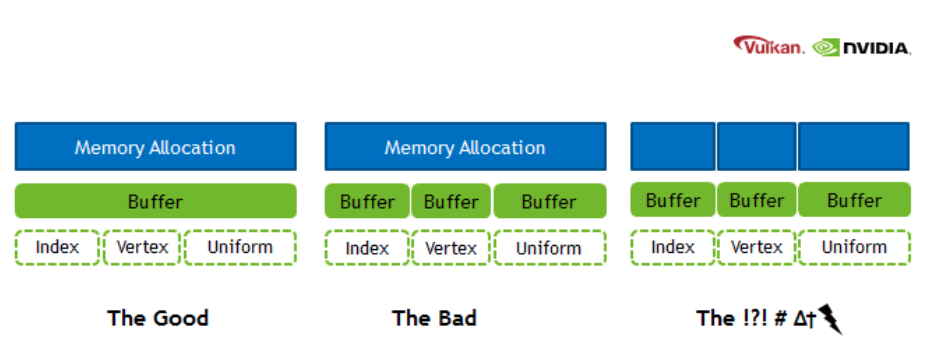
It is recommended to allocate bigger chunks of memory and assign parts of them to particular resources, as there is a limit on maximum number of memory blocks that can be allocated.
-
When memory is over-committed on Windows, the OS memory manager may move allocations from video memory to system memory, the OS also may temporarily suspend a process from the GPU runlist in order to page out its allocations to make room for a different process’ allocations. There is no OS memory manager on Linux that mitigates over-commitment by automatically performing paging operations on memory objects.
-
Use
EXT_pageable_device_local_memoryto avoid demotion of critical resources by assigning memory priority. It’s also a good idea to set low priority to non-critical resources such as vertex and index buffers; the app can verify the performance impact by placing the resources in system memory. -
Use
EXT_pageable_device_local_memoryto also disable automatic promotion of allocations from system memory to video memory. -
Use dedicated memory allocations (
KHR_dedicated_allocation, core in VK 1.1) when appropriate. -
Using dedicated memory may improve performance for color and depth attachments, especially on pre-Turing GPUs.
-
Use
KHR_get_memory_requirements2(core in VK 1.1) to check whether an image/buffer requires dedicated allocation. -
Use host visible video memory to write data directly to video memory from the CPU. Such heap can be detected using
DEVICE_LOCAL | HOST_VISIBLE. Take into account that CPU writes to such memory may be slower compared to normal memory. CPU reads are significantly slower. Check BAR1 traffic using Nsight Systems for possible issues. -
Explicitly look for the
MEMORY_PROPERTY_DEVICE_LOCALwhen picking a memory type for resources, which should be stored in video memory. -
Don’t assume fixed heap configuration, always query and use the memory properties using
vkGetPhysicalDeviceMemoryProperties(). -
Don’t assume memory requirements of an image/buffer, use
vkGet*MemoryRequirements(). -
Don’t put every resource into a Dedicated Allocation.
-
For memory objects that are intended to be in device-local, do not just pick the first memory type. Pick one that is actually device-local.
-
The benefit is that we avoid CPU memory costs for lots of tiny buffers, as well as cache misses by using just the same buffer object and varying the offset.
-
This optimization applies to all buffers, but in the previous blog post on shader resource binding it was mentioned that the offsets are particularly good for uniform buffers.
-
Software developers use custom memory management for various reasons:
-
Making allocations often involves the operating system which is rather costly.
-
It is usually faster to re-use existing allocations rather than to free and reallocate new ones.
-
Objects that live in a continuous chunk of memory can enjoy better cache utilization.
-
Data that is aligned well for the hardware can be processed faster.
-
-
Memory is a precious resource, and it can involve several indirect costs by the operating systems. For example some operating systems have a linear cost over the number of allocations for each submission to a Vulkan Queue. Another scenario is that the operating system also handles the paging state of allocations depending on other proceses, we therefore encourage not using too many allocations and organizing them “wisely”.
-
Device Memory: This memory is used for buffers and images and the developer is responsible for their content.
-
Resource Pools: Objects such as CommandBuffers and DescriptorSets are allocated from pools, the actual content is indirectly written by the driver.
-
Custom Host Allocators: Depending on your control-freak level you may also want to provide your own host allocator that the driver can use for the api objects.
-
Heap: Depending on the hardware and platform, the device will expose a fixed number of heaps, from which you can allocate certain amount of memory in total. Discrete GPUs with dedicated memory will be different to mobile or integrated solutions that share memory with the CPU. Heaps support different memory types which must be queried from the device.
-
Memory type: When creating a resource such as a buffer, Vulkan will provide information about which memory types are compatible with the resource. Depending on additional usage flags, the developer must pick the right type, and based on the type, the appropriate heap.
-
Memory property flags: These flags encode caching behavior and whether we can map the memory to the host (CPU), or if the GPU has fast access to the memory.
-
Memory: This object represents an allocation from a certain heap with a user-defined size.
-
Resource (Buffer/Image): After querying for the memory requirements and picking a compatible allocation, the memory is associated with the resource at a certain offset. This offset must fulfill the provided alignment requirements. After this we can start using our resource for actual work.
-
Sub-Resource (Offsets/View): It is not required to use a resource only in its full extent, just like in OpenGL we can bind ranges (e.g. varying the starting offset of a vertex-buffer) or make use of views (e.g. individual slice and mipmap of a texture array).
-
The fact that we can manually bind resources to actual memory addresses, gives rise to the following points:
-
Resources may alias (share) the same region of memory.
-
Alignment requirements for offsets into an allocation must be manually managed.
-
-
Store multiple buffers, like the vertex and index buffer, into a single
VkBufferand use offsets in commands likevkCmdBindVertexBuffers. -
The advantage is that your data is more cache friendly in that case, because it’s closer together. It is even possible to reuse the same chunk of memory for multiple resources if they are not used during the same render operations, provided that their data is refreshed, of course.
-
This is known as aliasing and some Vulkan functions have explicit flags to specify that you want to do this.
-
Uniform Buffer Binding: As part of a DescriptorSet this would be the equivalent of an arbitrary glBindBufferRange(GL_UNIFORM_BUFFER, dset.binding, dset.bufferOffset, dset.bufferSize) in OpenGL. All information for the actual binding by the CommandBuffer is stored within the DescriptorSet itself.
-
Uniform Buffer Dynamic Binding: Similar as above, but with the ability to provide the bufferOffset later when recording the CommandBuffer, a bit like this pseudo code: CommandBuffer->BindDescriptorSet(setNumber, descriptorSet, &offset). It is very practical to use when sub-allocating uniform buffers from a larger buffer allocation.
-
Push Constants: PushConstants are uniform values that are stored within the CommandBuffer and can be accessed from the shaders similar to a single global uniform buffer. They provide enough bytes to hold some matrices or index values and the interpretation of the raw data is up the shader. You may recall glProgramEnvParameter from OpenGL providing something similar. The values are recorded with the CommandBuffer and cannot be altered afterwards: CommandBuffer->PushConstant(offset, size, &data)
-
Dynamic offsets are very fast for NVIDIA hardware. Re-using the same DescriptorSet with just different offsets is rather CPU-cache friendly as well compared to using and managing many DescriptorSets. NVIDIA’s OpenGL driver actually also optimizes uniform buffer binds where just the range changes for a binding unit.
Sub-allocation
-
In a real world application, you’re not supposed to actually call
vkAllocateMemoryfor every individual buffer. -
The maximum number of simultaneous memory allocations is limited by the
maxMemoryAllocationCountphysical device limit, which may be as low as4096even on high end hardware like an NVIDIA GTX 1080. -
The right way to allocate memory for a large number of objects at the same time is to create a custom allocator that splits up a single allocation among many different objects by using the
offsetparameters that we’ve seen in many functions. -
You can either implement such an allocator yourself, or use the VMA library provided by the GPUOpen initiative.
-
Sub-allocation is a first-class approach when working in Vulkan.
-
Memory is allocated in pages with a fixed size; sub-allocation reduces the number of OS-level allocations.
-
You should use memory sub-allocation.
-
Memory allocation and deallocation at OS/driver level is expensive.
-
vkAllocateMemory()is costly on the CPU. -
Cost can be reduced by suballocating from a large memory object.
-
Also note the
maxMemoryAllocationCountlimit which constrains the number of simultaneous allocations an application can have. -
A Vulkan app should aim to create large allocations and then manage them itself.
-
Arenas
Discussion around the availability of arenas in Vulkan
-
(2025-12-07)
-
Caio:
-
hello, is it possible to create a memory arena, placing all new objects in this region, and then freeing all this region without having to call the vkDestroyX functions? I'm having the impression that Vulkan memory management is rooted in RAII, which I don't like. All my games are managed through arenas, which I think is perfect, but for Vulkan I'm having to track each individual allocation and free each one at a time. I'm already treating memory as a big arena, but I'm having the overhead of calling the destruction of each resource separately.
-
-
CharlesG:
-
You don’t own the memory that backs vulkan objects. For command buffers and descriptors there are pools so the driver can do a good job with the backing memory scheme.
-
For VkDeviceMemory, you decide how to sub allocate them
-
-
Caio:
-
do I need to call destroy for objects like vkPipeline, VkPipelineLayout, VkDescriptorSetLayout, VkShaderModule, VkRenderPass, etc? I have lots of objects that should die exacly at the same time, but I'm having to free them one by one. I heard about suballocations for buffers and images, but what about these types of objects I mentioned?
-
-
VkIpotrick:
-
they require actualy cleanup, they are not just some memory
-
they might be referenced within other internal structures of the driver and have to be removed from those for example
-
-
CharlesG:
-
anything that you vkCreate must be vkDestroyed; Except command buffers and descriptors where it is sufficient to just destroy the pools.
-
Using Vulkan is a lot like networking with a remote server, lots of driver internals have implementation requirements that make arenas not the “obvious choice” (otherwise we’d see more of them)
-
-
Caio:
-
Is there a future in Vulkan where the decision of how to free the memory is not bound to the driver, but for the programmer? You mentioned how this is limited by what the driver allows, but could this change in the future and move towards being more low-level?
-
-
VkIpotrick:
-
no. i dont think that is feasable.
-
that would handcuff drivers so bad that you would be too low level. At that point a propper spec could be impossibly hard to create and maintain between vendors
-
vulkan drivers still have to do a loooot of things internally. its still highish level api
-
-
CharlesG:
-
I concur.
-
I want to reiterate that drivers deal with much more than host memory allocations, but device memory, external memory (to the process), OS api’s, display hardware, shader compilers. Some objects don’t actually DO anything on deletion (sampler come to mind because the handle stores the entire state for some implementations, when the private data ext isnt active)
-
Drivers get to ask the os on your behalf to map device memory into the host address space. And deal with you forgetting to unmap it during shutdown (though the OS is more likely to also clean up after user lode drivers…)
-
I mention that some objects are “free” to leak cause they didn’t allocate anything internally because that is an implementation detail that isnt possible on all hardware, so the API cant guarantee “free” sampler cleanup without screwing over some hardware. And it just ties their hands when it is no longer possible to put all the state into the handle any more in the future with extensions to the API
-
-
Caio:
-
well, I imagine this was the case, but still, I was hopeful there was some alternative for bulk deletion. Currently I just wrapped around the concept of shared lifetimes and created a pseudo-arena, which internally frees all the memory for me by calling each respective destructor. Still, it annoys me a bit knowing the design could be faster if I could bulk delete the content instead of being bound by what the driver exposes
-
I understand why it's not possible due to the current design by drivers, but I wish it were
-
my concern now is not the performance per se, but more about the freedom of having the option of managing memory in a way that could logically be faster (logically, as freeing a memory region is quite obviously faster than having to manage the state of different objects before deleting each of them individually). I'm not currently bound by the deletion times of those calls. I'm speaking more from a philosophical standpoint.
-
-
CharlesG:
-
Inb4 going all in on bindless and gpu driven where there just arent as many vulkan objects to manage
-
Fences and semaphores come to mind as prime examples of not just memory
-
-
Caio:
-
I'm trying to move it that way after trying bindful for a while, it's being much nicer and aligns with the vision I have of how memory is better managed;
-
-
CharlesG:
-
Suggestions for the API can be made in the vulkan-pain-points channel (although itd be good to link to this convo) and an issue can be made in the Vulkan-Docs github repo as thats the home of the specification. That said, this ask is not easily actionable so hard to quantify what “success” means.
-
All good, and going towards bindless is definitely going to suite your tastes better!
-
-
VkIpotrick:
-
bindless is simply better at this point
-
descriptor sets, layouts, pools etc made sense for old hardware, but now they are just very clunky oddly behaving abstractions
-
also with bindless you can have one static allocation for all descriptors
-
the ultimate memory management is static lifetime after all.
-
Alternatives and half-solutions
-
You cannot safely get the behavior you want — i.e. allocate many Vulkan resources and then legally free one big memory region while leaving the Vulkan object handles alive and never calling their destruction; on a conformant Vulkan implementation. Freeing VkDeviceMemory that backs resources while those resources are still live or still in use is undefined behavior / validation errors unless you guarantee the resources are never used again and the driver allows that. The Vulkan spec requires you to manage object lifetimes; drivers may have internal bookkeeping tied to those object handles that won’t be cleaned just by freeing the raw memory.
-
That said, you can achieve the practical “free everything by freeing a small number of objects/regions” without peppering vkDestroy* calls everywhere by changing how you structure resources. options that actually give you region-like semantics:
-
Mega-backings (buffers)
-
Never creating one Vulkan resource handle per logical allocation. In practice that means: create a small number of real Vulkan resources (big backing buffers / big images or sparse resources), suballocate from them, and operate using offsets/array-layer indices. When the region should die you destroy the backing objects (a few destroys) and free their VkDeviceMemory. No per-suballocation vkDestroy* calls are necessary because there are no per-suballocation Vulkan handles to destroy.
-
Create a small set of large backing VkDeviceMemory + VkBuffer objects (one per memory type/usage class you need).
-
Suballocate ranges from those big buffers and use offsets everywhere:
-
For vertex/index bindings: vkCmdBindVertexBuffers(..., firstBinding, 1, &bigBuffer, &offset).
-
For descriptors: VkDescriptorBufferInfo{ bigBuffer, offset, range } — descriptors can point at a buffer + offset without creating new VkBuffer handles.
-
When you’re done, you only need to vkDestroyBuffer / vkFreeMemory for a few big buffers, not for every tiny allocation.
-
Constraints: alignment, memoryRequirements and usage flags must be compatible for all suballocations placed in a given big buffer. If two allocations need different usage flags or memory types, they must go into different backing buffers.
-
-
Texture atlases / arrays (images)
-
Replace many small VkImage objects with a single large image (or texture array/array layers / atlas) and pack multiple textures into it. Use UV/array-layer indices in shader, or use VkImageView / descriptor indexing accordingly.
-
You then destroy and free one big image rather than many small ones. Tradeoffs: packing, mipmapping, filtering artifacts, and sampler/view creation.
-
Host Memory
Amount of allocations
-
(2026-03-24) Caio: In a custom vulkan engine, why am I getting extremely frequent allocations, with only 4 bytes? I seem to be getting 1 allocation in the beginning of the frame and 1 at the end. The memory allocation only lives for a few nanoseconds (around 700 ns).
-
Tests with no change :
-
Only monitor validation layer.
-
No validation layers.
-
-
Given:
-
Only 2 allocations per frame
-
Lifetime ~700 ns
-
Size = 4 bytes
-
-
4 bytes usually indicates:
-
A flag / enum / small struct
-
Alignment rounding or allocator bucket size
-
Internal handle tracking (e.g., IDs, indices)
-
-
This is completely negligible:
-
No fragmentation concern
-
No measurable performance impact
-
-
If you have VK_LAYER_KHRONOS_validation enabled, it performs a lot of tiny, short-lived allocations internally.
-
Happens once or a few times per frame
-
Very small sizes (4–64 bytes is common)
-
Extremely short lifetime (sub-microsecond)
-
Often at predictable points (frame begin/end, submit, present)
-
-
Even without validation layers, the Vulkan loader or driver may allocate tiny temporary structures for dispatch tables or call marshalling.
-
Especially around:
-
vkQueueSubmit -
vkAcquireNextImageKHR -
vkQueuePresentKHR
-
-
These allocations, are expected, are usually unavoidable and are very cheap (your ~700 ns confirms that).
-
-
Allocator (
VkAllocationCallbacks
)
-
VkAllocationCallbacksonly control host (CPU) allocations the loader/driver makes for Vulkan bookkeeping and temporary object. -
They do not give you a direct view or control of device (GPU) memory payloads.
-
Passing a non-NULL
pAllocatorto avkCreateXfunction causes the driver to call your callbacks for those host allocations. They do not switch the driver from using device heaps to host malloc; they only replace the host allocator functions used by the implementation. The allocation scope rules determine whether the allocation is command-scoped or object-scoped. -
Passing a custom
VkAllocationCallbackstovkCreateBufferlets you intercept and control the host memory the driver uses to represent the buffer object — but it does not tell you how many bytes of GPU heap were (or will be) consumed by the buffer’s storage. For the latter you must intercept device allocations (see below). -
To track real GPU memory you must track
vkAllocateMemory/vkFreeMemory(and any driver-internal device allocations) and/or useVK_EXT_memory_report/VK_EXT_memory_budgetto observe what the driver actually commits. -
Examples :
-
vkCreateBuffer(...):-
This call creates a buffer object handle and the driver's host-side bookkeeping for that object (descriptor, small metadata).
-
Those host allocations are the things
pAllocatoronvkCreateBuffercontrols. -
The call does not allocate GPU payload memory for the buffer contents.
-
The buffer becomes usable on the device only after you allocate
VkDeviceMemoryand bind it (or the driver performs some implicit allocation in non-standard implementations). -
The implementation goes as:
-
vk.CreateBuffer-
Create buffer. Host Visible handle. CPU Memory.
vk_check(vk.CreateBuffer(_device.handle, &buffer_create_info, &arena.gpu_alloc, &buffer_handle)) -
-
vk.GetBufferMemoryRequirements-
Prepare allocation_info for VkDeviceMemory. Choose a memoryTypeIndex with the desired properties
-
allocationSize and memoryTypeIndex determine whether the allocation will be device-local, host-visible, coherent, etc.
-
This properties decide if the memory is mappable from the CPU.
-
This call doesn't allocate anything.
mem_requirements: vk.MemoryRequirements vk.GetBufferMemoryRequirements(_device.handle, buffer_handle, &mem_requirements) mem_allocation_info := vk.MemoryAllocateInfo{ sType = .MEMORY_ALLOCATE_INFO, allocationSize = mem_requirements.size, memoryTypeIndex = device_find_memory_type(mem_requirements.memoryTypeBits, properties), } -
-
vk.AllocateMemory-
This is the call that requests a
VkDeviceMemoryallocation from a particular memory type/heap. -
Memory type is
HOST_VISIBLE:-
The driver will allocate from the heap that provides host mappings (which is typically system RAM or a host-visible region).
-
Effect: device payload is created — the
VkDeviceMemoryobject represents committed device memory (counts against the heap’s budget). -
On discrete GPUs this is often a segment of system memory that is mapped by the driver, or on integrated GPUs it may be the same physical RAM but treated as both host- and device-accessible.
-
The
pAllocatoryou pass to vkAllocateMemory only affects host-side allocations the driver does while processing the call; it does not change whether the allocation consumes device heap bytes.
-
-
Memory type is
DEVICE_LOCAL:-
Driver allocates a VkDeviceMemory from the device-local heap (on discrete GPUs this is the GPU VRAM heap). That is the device payload and consumes heap budget. The allocation is not host-visible, so you cannot vkMapMemory this memory.
-
Note: on integrated GPUs device-local may still be mappable because physical memory is shared — but that depends entirely on memory type flags exposed by the driver.
-
-
Memory type is
HOST VISIBLE + DEVICE_LOCAL:-
The allocation is created in a heap that the driver marks both device-local and host-visible. Physically this can mean: shared system RAM (integrated GPU) or a special heap the driver exposes that is accessible by both CPU and GPU. The VkDeviceMemory is committed and counts against that heap’s budget.
-
You may be able to
vkMapMemorythis memory because it is host-visible. Performance characteristics vary: host-visible+device-local memory can be slower to CPU-access than pure host memory or slower to GPU-access than pure device-local VRAM. -
On PC discrete GPUs this commonly corresponds to the GPU memory that is accessible through the PCIe BAR (Resizible-BAR / ReBAR) or a special small window the driver exposes. Allocation behavior: vkAllocateMemory allocates from that BAR-exposed heap (it consumes VRAM or a BAR-mapped window of VRAM).
-
vk_check(vk.AllocateMemory(_device.handle, &mem_allocation_info, nil, &buffer_memory)) -
-
vk.BindBufferMemory-
Binds one with the other (memory aliasing). Doesn't allocate anything
-
Binds the previously allocated device memory to the buffer object. Binding itself normally does not allocate additional device heap bytes; it just associates that payload region with the buffer handle.
-
After bind the buffer is usable for CPU mapping (if host-visible) and/or device operations.
vk_check(vk.BindBufferMemory(_device.handle, buffer_handle, buffer_memory, 0)) -
-
-
-
vkCreateGraphicsPipelines(...)-
Pipeline creation can be expensive and opaque.
-
During pipeline creation the driver may:
-
allocate host-side structures for the pipeline object (controlled by
pAllocatorpassed tovkCreateGraphicsPipelines), -
compile/optimize shaders, build internal representations,
-
and may allocate internal device resources (driver-controlled device memory, shader/kernel upload, caches) that are not the same as application
VkDeviceMemoryallocations. The spec explicitly allows drivers to perform internal device allocations for things like pipelines; those allocations are not controlled byVkAllocationCallbacks. If you need to see them, useVK_EXT_device_memory_report.
-
-
-
Allocation, Reallocation, Free, Internal Alloc, Internal Free
-
pfnAllocationorpfnReallocationmay be called in the following situations:-
Allocations scoped to a
VkDeviceorVkInstancemay be allocated from any API command. -
Allocations scoped to a command may be allocated from any API command.
-
Allocations scoped to a
VkPipelineCachemay only be allocated from:-
vkCreatePipelineCache -
vkMergePipelineCachesfordstCache -
vkCreateGraphicsPipelinesforpipelineCache -
vkCreateComputePipelinesforpipelineCache
-
-
Allocations scoped to a
VkValidationCacheEXTmay only be allocated from:-
vkCreateValidationCacheEXT -
vkMergeValidationCachesEXTfordstCache -
vkCreateShaderModulefor validationCache inVkShaderModuleValidationCacheCreateInfoEXT
-
-
Allocations scoped to a
VkDescriptorPoolmay only be allocated from:-
any command that takes the pool as a direct argument
-
vkAllocateDescriptorSetsfor thedescriptorPoolmember of itspAllocateInfoparameter -
vkCreateDescriptorPool
-
-
Allocations scoped to a
VkCommandPoolmay only be allocated from:-
any command that takes the pool as a direct argument
-
vkCreateCommandPool -
vkAllocateCommandBuffersfor thecommandPoolmember of itspAllocateInfoparameter -
any
vkCmd*command whosecommandBufferwas allocated from thatVkCommandPool
-
-
Allocations scoped to any other object may only be allocated in that object’s
vkCreate*command.
-
-
pfnFree, orpfnReallocationwith zero size, may be called in the following situations:-
Allocations scoped to a
VkDeviceor VkInstance may be freed from any API command. -
Allocations scoped to a command must be freed by any API command which allocates such memory.
-
Allocations scoped to a
VkPipelineCachemay be freed fromvkDestroyPipelineCache. -
Allocations scoped to a
VkValidationCacheEXTmay be freed fromvkDestroyValidationCacheEXT. -
Allocations scoped to a
VkDescriptorPoolmay be freed from-
any command that takes the pool as a direct argument
-
-
Allocations scoped to a
VkCommandPoolmay be freed from:-
any command that takes the pool as a direct argument
-
vkResetCommandBufferwhosecommandBufferwas allocated from thatVkCommandPool
-
-
Allocations scoped to any other object may be freed in that object’s
vkDestroy*command. -
Any command that allocates host memory may also free host memory of the same scope.
-
-
pfnAllocation-
If
pfnAllocationis unable to allocate the requested memory, it must return NULL. -
If the allocation was successful, it must return a valid pointer to memory allocation containing at least
sizebytes, and with the pointer value being a multiple ofalignment.
-
-
`pfnReallocation``
-
If the reallocation was successful,
pfnReallocationmust return an allocation with enough space for size bytes, and the contents of the original allocation from bytes zero to min(original size, new size) - 1 must be preserved in the returned allocation. -
If size is larger than the old size, the contents of the additional space are undefined .
-
If satisfying these requirements involves creating a new allocation, then the old allocation should be freed.
-
If
pOriginalis NULL, thenpfnReallocationmust behave equivalently to a call toPFN_vkAllocationFunctionwith the same parameter values (withoutpOriginal). -
If
sizeis zero, thenpfnReallocationmust behave equivalently to a call toPFN_vkFreeFunctionwith the samepUserDataparameter value, andpMemoryequal topOriginal. -
If
pOriginalis non-NULL, the implementation must ensure thatalignmentis equal to thealignmentused to originally allocatepOriginal. -
If this function fails and
pOriginalis non-NULL the application must not free the old allocation.
-
-
pfnFree-
May be
NULL, which the callback must handle safely. -
If
pMemoryis non-NULL, it must be a pointer previously allocated bypfnAllocationorpfnReallocation. -
The application should free this memory.
-
-
pfnInternalAllocation-
Upon allocation of executable memory,
pfnInternalAllocationwill be called. -
This is a purely informational callback.
-
-
pfnInternalFree-
Upon freeing executable memory,
pfnInternalFreewill be called. -
This is a purely informational callback.
-
-
If either of
pfnInternalAllocationorpfnInternalFreeis not NULL, both must be valid callbacks
Creating the allocator
-
VkAllocationCallbacksare for host-side allocations the Vulkan loader/driver makes (CPU memory for driver bookkeeping, staging buffers, etc.). -
Using
malloc/free:-
Is common and acceptable for many apps — but you must meet Vulkan’s callback semantics (alignment, reallocation behavior, thread-safety) and consider performance.
-
This is a normal, valid approach. It satisfies most apps and is what many people do in practice.
-
Caviats :
-
Alignment:
-
Vulkan allocators must return memory suitably aligned for any type the driver might need. Use posix_memalign/aligned_alloc on POSIX, _aligned_malloc on Windows, or otherwise ensure alignment. The Vulkan spec expects allocation functions to behave like platform allocators.
-
-
Reallocation semantics:
-
pfnReallocationmust implement C-like realloc semantics (grow/shrink, preserve contents if requested). If your platform realloc does not support required alignment, implement reallocation by allocating new aligned memory, copying the old contents, freeing the old pointer.
-
-
Thread-safety & performance:
-
Drivers can call the callbacks from multiple threads. The system malloc is usually thread-safe but can have global locks and contention. For high-frequency allocation patterns, a custom pool or thread-local allocator can reduce contention and improve predictable performance.
-
-
Internal allocation tracking:
-
VkAllocationCallbacksprovidepUserDataso you can route allocations to a custom pool/context for tracking or to implement more efficient pooling per object type.
-
-
-
-
The GPU VkDeviceMemory allocations (the ones created with vkAllocateMemory) are a separate resource and must be managed with Vulkan APIs and counted against the appropriate memory heap
-
If you use malloc for
VkAllocationCallbacks, you are only providing host-allocator behavior for driver/loader-side allocations.
Scope
-
Each allocation has an allocation scope defining its lifetime and which object it is associated with. Possible values passed to the allocationScope parameter of the callback functions specified by
VkAllocationCallbacks, indicating the allocation scope, are: -
COMMAND-
Specifies that the allocation is scoped to the duration of the Vulkan command.
-
The most specific allocator available is used (
DEVICE, elseINSTANCE).
-
-
OBJECT-
Specifies that the allocation is scoped to the lifetime of the Vulkan object that is being created or used.
-
The most specific allocator available is used (
OBJECT, elseDEVICE, elseINSTANCE).
-
-
CACHE-
Specifies that the allocation is scoped to the lifetime of a
VkPipelineCacheorVkValidationCacheEXTobject. -
If an allocation is associated with a
VkValidationCacheEXTorVkPipelineCacheobject, the allocator will use theCACHEallocation scope. -
The most specific allocator available is used (
CACHE, elseDEVICE, elseINSTANCE).
-
-
DEVICE-
Specifies that the allocation is scoped to the lifetime of the Vulkan device.
-
If an allocation is scoped to the lifetime of a device, the allocator will use an allocation scope of
DEVICE. -
The most specific allocator available is used (
DEVICE, elseINSTANCE).
-
-
INSTANCE-
Specifies that the allocation is scoped to the lifetime of the Vulkan instance.
-
If the allocation is scoped to the lifetime of an instance and the instance has an allocator, its allocator will be used with an allocation scope of
INSTANCE. -
Otherwise an implementation will allocate memory through an alternative mechanism that is unspecified.
-
-
Most Vulkan commands operate on a single object, or there is a sole object that is being created or manipulated. When an allocation uses an allocation scope of
OBJECTorCACHE, the allocation is scoped to the object being created or manipulated. -
When an implementation requires host memory, it will make callbacks to the application using the most specific allocator and allocation scope available:
-
Pools :
-
Objects that are allocated from pools do not specify their own allocator. When an implementation requires host memory for such an object, that memory is sourced from the object’s parent pool’s allocator.
-
Device Memory
-
Device memory is memory that is visible to the device — for example the contents of the image or buffer objects, which can be natively used by the device.
-
A Vulkan device operates on data in device memory via memory objects that are represented in the API by a
VkDeviceMemoryhandle. -
VkDeviceMemory.-
Opaque handle to a device memory object.
-
Properties
-
Memory properties of a physical device describe the memory heaps and memory types available.
-
To query memory properties, call
vkGetPhysicalDeviceMemoryProperties. -
VkPhysicalDeviceMemoryProperties-
Describes a number of memory heaps as well as a number of memory types that can be used to access memory allocated in those heaps.
-
Each heap describes a memory resource of a particular size, and each memory type describes a set of memory properties (e.g. host cached vs. uncached) that can be used with a given memory heap. Allocations using a particular memory type will consume resources from the heap indicated by that memory type’s heap index. More than one memory type may share each heap, and the heaps and memory types provide a mechanism to advertise an accurate size of the physical memory resources while allowing the memory to be used with a variety of different properties.
-
At least one heap must include
MEMORY_HEAP_DEVICE_LOCALinVkMemoryHeap.flags -
memoryTypeCountis the number of valid elements in thememoryTypesarray. -
memoryTypesis an array ofMAX_MEMORY_TYPESVkMemoryTypestructures describing the memory types that can be used to access memory allocated from the heaps specified by memoryHeaps. -
memoryHeapCountis the number of valid elements in thememoryHeapsarray. -
memoryHeapsis an array ofMAX_MEMORY_HEAPSVkMemoryHeapstructures describing the memory heaps from which memory can be allocated.
-
Device Memory Allocation
-
Memory requirements :
-
vkGetBufferMemoryRequirements-
Returns the memory requirements for specified Vulkan object
-
device-
Is the logical device that owns the buffer.
-
-
buffer-
Is the buffer to query.
-
-
pMemoryRequirements-
Is a pointer to a
VkMemoryRequirementsstructure in which the memory requirements of the buffer object are returned.
-
-
-
VkMemoryRequirements-
size-
Is the size, in bytes, of the memory allocation required for the resource.
-
The size of the required memory in bytes may differ from
bufferInfo.size.
-
-
alignment-
The offset in bytes where the buffer begins in the allocated region of memory, depends on
bufferInfo.usageandbufferInfo.flags.
-
-
memoryTypeBits-
Bit field of the memory types that are suitable for the buffer.
-
Bit
iis set if and only if the memory typeiin theVkPhysicalDeviceMemoryPropertiesstructure for the physical device is supported for the resource.
-
-
-
vkGetPhysicalDeviceMemoryProperties-
Reports memory information for the specified physical device
-
We'll use it to find a memory type that is suitable for the buffer itself.
-
vkGetPhysicalDeviceMemoryProperties2behaves similarly to vkGetPhysicalDeviceMemoryProperties , with the ability to return extended information in apNextchain of output structures. -
memoryHeaps-
Are distinct memory resources like dedicated VRAM and swap space in RAM for when VRAM runs out.
-
The different types of memory exist within these heaps.
-
Right now we’ll only concern ourselves with the type of memory and not the heap it comes from, but you can imagine that this can affect performance.
-
-
memoryTypes-
Consists of
VkMemoryTypestructs that specify the heap and properties of each memory type. -
The properties define special features of the memory, like being able to map it so we can write to it from the CPU.
-
VkMemoryType-
Structure specifying memory type
-
heapIndex-
Describes which memory heap this memory type corresponds to, and must be less than
memoryHeapCountfrom the VkPhysicalDeviceMemoryProperties structure.
-
-
propertyFlags-
Is a bitmask of VkMemoryPropertyFlagBits of properties for this memory type.
-
-
The most optimal memory has the
MEMORY_PROPERTY_DEVICE_LOCALflag and is usually not accessible by the CPU on dedicated graphics cards.
-
-
-
-
-
typeFilter-
Specify the bit field of memory types that are suitable.
-
That means that we can find the index of a suitable memory type by simply iterating over them and checking if the corresponding bit is set to
1. -
However, we’re not just interested in a memory type that is suitable for the vertex buffer.
-
We also need to be able to write our vertex data to that memory.
-
-
We may have more than one desirable property, so we should check if the result of the bitwise AND is not just non-zero, but equal to the desired properties bit field. If there is a memory type suitable for the buffer that also has all the properties we need, then we return its index, otherwise we throw an exception.
-
-
-
Allocation :
-
VkMemoryAllocateInfo-
allocationSize-
Is the size of the allocation in bytes.
-
-
memoryTypeIndex-
Is an index identifying a memory type from the
memoryTypesarray of thevkGetPhysicalDeviceMemoryPropertiesstruct, as defined in the 'memory requirements'.
-
-
-
vkAllocateMemory.-
To allocate memory objects.
-
device-
Is the logical device that owns the memory.
-
-
pAllocateInfo-
Is a pointer to a
VkMemoryAllocateInfostructure describing parameters of the allocation. A successfully returned allocation must use the requested parameters — no substitution is permitted by the implementation.
-
-
pAllocator-
Controls host memory allocation.
-
-
pMemory-
Is a pointer to a
VkDeviceMemoryhandle in which information about the allocated memory is returned.
-
-
-
Allocations returned by
vkAllocateMemoryare guaranteed to meet any alignment requirement of the implementation. For example, if an implementation requires 128 byte alignment for images and 64 byte alignment for buffers, the device memory returned through this mechanism would be 128-byte aligned. This ensures that applications can correctly suballocate objects of different types (with potentially different alignment requirements) in the same memory object. -
When memory is allocated, its contents are undefined with the following constraint:
-
The contents of unprotected memory must not be a function of the contents of data protected memory objects, even if those memory objects were previously freed.
-
The contents of memory allocated by one application should not be a function of data from protected memory objects of another application, even if those memory objects were previously freed.
-
-
The maximum number of valid memory allocations that can exist simultaneously within a VkDevice may be restricted by implementation- or platform-dependent limits. The maxMemoryAllocationCount feature describes the number of allocations that can exist simultaneously before encountering these internal limits.
-
-
Freeing :
-
To free a memory object, call
vkFreeMemory. -
Before freeing a memory object, an application must ensure the memory object is no longer in use by the device — for example by command buffers in the pending state. Memory can be freed whilst still bound to resources, but those resources must not be used afterwards. Freeing a memory object releases the reference it held, if any, to its payload. If there are still any bound images or buffers, the memory object’s payload may not be immediately released by the implementation, but must be released by the time all bound images and buffers have been destroyed. Once all references to a payload are released, it is returned to the heap from which it was allocated.
-
How memory objects are bound to Images and Buffers is described in detail in the [Resource Memory Association] section.
-
If a memory object is mapped at the time it is freed, it is implicitly unmapped.
-
Host writes are not implicitly flushed when the memory object is unmapped, but the implementation must guarantee that writes that have not been flushed do not affect any other memory.
-
Resource Memory Association
-
Resources are initially created as virtual allocations with no backing memory. Device memory is allocated separately and then associated with the resource. This association is done differently for sparse and non-sparse resources.
-
Resources created with any of the sparse creation flags are considered sparse resources. Resources created without these flags are non-sparse. The details on resource memory association for sparse resources is described in Sparse Resources.
-
Non-sparse resources must be bound completely and contiguously to a single VkDeviceMemory object before the resource is passed as a parameter to any of the following operations:
-
creating buffer, image, or tensor views
-
updating descriptor sets
-
recording commands in a command buffer
-
-
Once bound, the memory binding is immutable for the lifetime of the resource.
-
In a logical device representing more than one physical device, buffer and image resources exist on all physical devices but can be bound to memory differently on each. Each such replicated resource is an instance of the resource. For sparse resources, each instance can be bound to memory arbitrarily differently. For non-sparse resources, each instance can either be bound to the local or a peer instance of the memory, or for images can be bound to rectangular regions from the local and/or peer instances. When a resource is used in a descriptor set, each physical device interprets the descriptor according to its own instance’s binding to memory.
-
Sparse resources let you create
VkBufferandVkImageobjects which are bound non-contiguously to one or moreVkDeviceMemoryallocations.
Host Access
-
Also check GPU .
-
Memory objects created with
vkAllocateMemoryare not directly host accessible. -
Memory objects created with the memory property
MEMORY_PROPERTY_HOST_VISIBLEare considered mappable. Memory objects must be mappable in order to be successfully mapped on the host. -
vkMapMemory-
This function allows us to access a region of the specified memory resource defined by an offset and size.
-
Used to retrieve a host virtual address pointer to a region of a mappable memory object.
-
It is also possible to specify the special value
WHOLE_SIZEto map all of the memory. -
device-
Is the logical device that owns the memory.
-
-
memory-
Is the
VkDeviceMemoryobject to be mapped.
-
-
offset-
Is a zero-based byte offset from the beginning of the memory object.
-
-
size-
Is the size of the memory range to map, or
WHOLE_SIZEto map from offset to the end of the allocation.
-
-
flags-
Is a bitmask of
VkMemoryMapFlagBitsspecifying additional parameters of the memory map operation.
-
-
ppData-
Is a pointer to a
void*variable in which a host-accessible pointer to the beginning of the mapped range is returned. The value of the returned pointer minus offset must be aligned toVkPhysicalDeviceLimits.minMemoryMapAlignment. -
Acts like regular RAM, but physically points to GPU memory.
-
-
-
After a successful call to
vkMapMemorythe memory object memory is considered to be currently host mapped. -
It is an application error to call vkMapMemory on a memory object that is already host mapped.
-
vkMapMemorydoes not check whether the device memory is currently in use before returning the host-accessible pointer. -
If the device memory was allocated without the
MEMORY_PROPERTY_HOST_COHERENTset, these guarantees must be made for an extended range: the application must round down the start of the range to the nearest multiple ofVkPhysicalDeviceLimits.nonCoherentAtomSize, and round the end of the range up to the nearest multiple ofVkPhysicalDeviceLimits.nonCoherentAtomSize. -
Problem :
-
The driver may not immediately copy the data into the buffer memory, for example, because of caching.
-
It is also possible that writes to the buffer are not visible in the mapped memory yet.
-
There are two ways to deal with that problem:
-
Use a memory heap that is host coherent, indicated with
MEMORY_PROPERTY_HOST_COHERENT -
Call
vkFlushMappedMemoryRangesafter writing to the mapped memory, and callvkInvalidateMappedMemoryRangesbefore reading from the mapped memory.
-
-
Flushing memory ranges or using a coherent memory heap means that the driver will be aware of our writings to the buffer, but it doesn’t mean that they are actually visible on the GPU yet. The transfer of data to the GPU is an operation that happens in the background, and the specification simply tells us that it is guaranteed to be complete as of the next call to
vkQueueSubmit.
-
-
Minimum Alignment :
-
-
minMemoryMapAlignment-
Is the minimum required alignment, in bytes, of host visible memory allocations within the host address space.
-
When mapping a memory allocation with vkMapMemory , subtracting
offsetbytes from the returned pointer will always produce an integer multiple of this limit. -
See https://registry.khronos.org/vulkan/specs/latest/html/vkspec.html#memory-device-hostaccess .
-
The value must be a power of two.
-
-
nonCoherentAtomSize-
Is the size and alignment in bytes that bounds concurrent access to host-mapped device memory .
-
The value must be a power of two.
-
-
-
ChatGPT:
-
Dynamic offsets:
-
If you used
DESCRIPTOR_TYPE_UNIFORM_BUFFER_DYNAMICorDESCRIPTOR_TYPE_STORAGE_BUFFER_DYNAMICin yourVkDescriptorSetLayoutBinding.-
That is the definition of a dynamic descriptor.
-
-
If you call
vkCmdBindDescriptorSets(..., dynamicOffsetCount, pDynamicOffsets). IfdynamicOffsetCount > 0andpDynamicOffsetsis non-null you are supplying dynamic offsets at bind time.
-
-
How offsets are applied:
-
Non-dynamic descriptor:
-
The
VkDescriptorBufferInfo.offsetyou gave tovkUpdateDescriptorSetsis baked into the descriptor. -
That
offsetmust be a multiple ofminUniformBufferOffsetAlignment.
-
-
Dynamic descriptor:
-
The descriptor stores a base
offset/range, and the runtime adds the dynamic offset(s) you pass tovkCmdBindDescriptorSets. -
Each dynamic offset must be a multiple of
minUniformBufferOffsetAlignment.
-
-
-
If you are not using Dynamic Offsets in the
vkCmdBindDescriptorSets, nor using offsets in theVkDescriptorBufferInfo, then you don't need to worry about this limit.
-
-
Staging buffer
-
Use a host visible buffer as temporary buffer and use a device local buffer as actual buffer.
-
The host visible buffer should have use
BUFFER_USAGE_TRANSFER_SRC, and the device local buffer should have useBUFFER_USAGE_TRANSFER_DST. -
The contents of the host visible buffer is copied to the device local buffer using
vkCmdCopyBuffer. -
 .
.
-
Buffer copy requirements :
-
Requires a queue family that supports transfer operations, which is indicated using
QUEUE_TRANSFER.-
Any queue family with
QUEUE_GRAPHICSorQUEUE_COMPUTEcapabilities already implicitly supportQUEUE_TRANSFERoperations. -
A different queue family specifically for transfer operations could be used.
-
It will require you to make the following modifications to your program:
-
Modify
QueueFamilyIndicesandfindQueueFamiliesto explicitly look for a queue family with theQUEUE_TRANSFERbit, but not theQUEUE_GRAPHICS. -
Modify
createLogicalDeviceto request a handle to the transfer queue -
Create a second command pool for command buffers that are submitted on the transfer queue family
-
Change the
sharingModeof resources to beSHARING_MODE_CONCURRENTand specify both the graphics and transfer queue families -
Submit any transfer commands like
vkCmdCopyBuffer(which we’ll be using in this chapter) to the transfer queue instead of the graphics queue
-
-
-
This will teach you a lot about how resources are shared between queue families.
-
Caio: Ok, but what's the benefits of using different queues? I don't know.
-
-
BAR (Base Address Register)
-
See GPU .
Memory Aliasing
-
A range of a VkDeviceMemory allocation is aliased if it is bound to multiple resources simultaneously, as described below, via
vkBindImageMemory,vkBindBufferMemory,vkBindAccelerationStructureMemoryNV,vkBindTensorMemoryARM, via sparse memory bindings, or by binding the memory to resources in multiple Vulkan instances or external APIs using external memory handle export and import mechanisms. -
Consider two resources, resourceA and resourceB, bound respectively to memory rangeA and rangeB. Let paddedRangeA and paddedRangeB be, respectively, rangeA and rangeB aligned to bufferImageGranularity. If the resources are both linear or both non-linear (as defined in the Glossary), then the resources alias the memory in the intersection of rangeA and rangeB. If one resource is linear and the other is non-linear, then the resources alias the memory in the intersection of paddedRangeA and paddedRangeB.
-
The implementation-dependent limit bufferImageGranularity also applies to tensor resources.
-
Memory aliasing can be useful to reduce the total device memory footprint of an application, if some large resources are used for disjoint periods of time.
-
vkBindBufferMemory().-
If memory allocation was successful, then we can now associate this memory with the buffer using this function.
-
offset-
Offset within the region of memory.
-
Since this memory is allocated specifically for this the vertex buffer, the offset is simply
0. -
If the offset is non-zero, then it is required to be divisible by
memRequirements.alignment.
-
-
Lazily Allocated Memory
-
If the memory object is allocated from a heap with the
MEMORY_PROPERTY_LAZILY_ALLOCATEDbit set, that object’s backing memory may be provided by the implementation lazily. The actual committed size of the memory may initially be as small as zero (or as large as the requested size), and monotonically increases as additional memory is needed. -
A memory type with this flag set is only allowed to be bound to a VkImage whose usage flags include
IMAGE_USAGE_TRANSIENT_ATTACHMENT.
Protected Memory
-
Protected memory divides device memory into protected device memory and unprotected device memory.
-
Unprotected Device Memory :
-
Unprotected device memory, which can be visible to the device and can be visible to the host
-
Unprotected images, unprotected tensors, and unprotected buffers, to which unprotected memory can be bound
-
Unprotected command buffers, which can be submitted to a device queue to execute unprotected queue operations
-
Unprotected device queues, to which unprotected command buffers can be submitted
-
Unprotected queue submissions, through which unprotected command buffers can be submitted
-
Unprotected queue operations
-
-
Protected Device Memory :
-
Protected device memory, which can be visible to the device but must not be visible to the host
-
Protected images, protected tensors, and protected buffers, to which protected memory can be bound
-
Protected command buffers, which can be submitted to a protected-capable device queue to execute protected queue operations
-
Protected-capable device queues, to which unprotected command buffers or protected command buffers can be submitted
-
Protected queue submissions, through which protected command buffers can be submitted
-
Protected queue operations
-
Tracking GPU Memory
-
Vulkan does not expose fixed per-object byte counts for most objects — exact memory use is implementation and driver-dependent. Some objects (
VkImage,VkBuffer) must be bound toVkDeviceMemoryyou allocate (so you can know their size). Many other objects (pipelines, command buffers, descriptor sets, semaphores, imageviews, pipeline layouts, etc.) often cause hidden driver allocations that may live in host memory, device memory, or both — and those allocations’ size and placement vary by driver and GPU.
By object
-
VkInstance/VkPhysicalDevice/VkDevice(handles):-
Small host-side allocations (process RAM). Measure via your VkAllocationCallbacks or by tracking driver host allocations. These are host-visible (they are just process memory)
-
-
VkImageView/VkBufferView/VkSampler:-
Lightweight, usually host memory (small driver structures). They rarely allocate large device memory; they may cause small host allocations. Implementation dependent but small (tens to a few hundred bytes each in many drivers).
-
-
VkDescriptorSetLayout/VkPipelineLayout/VkDescriptorSet(layout vs sets):-
Layout and pipeline layout are small host structures (host memory). Descriptor sets and descriptor pools may be implemented in host memory or device memory; larger descriptor usage (large arrays, inline uniform blocks, inline immutable samplers, or driver internal structures) can cause real device allocations. Behavior is driver dependent.
-
-
VkPipeline(graphics/compute):-
Creation can cause hidden device and/or host allocations (compiled device binaries, GPU resident state). The spec explicitly allows implementations to allocate device memory during pipeline creation; the pipeline cache and pipeline executable properties APIs can help quantify some of this. Pipeline objects range from a few KB to multiple MB depending on driver, the number/complexity of shaders, and whether the driver stores compiled GPU blobs. Use
VK_KHR_pipeline_executable_propertiesand pipeline cache queries to inspect pipeline internals.
-
-
VkPipelineCache:-
Contains data you can query with
vkGetPipelineCacheData— that returns host-visible data you can size and persist.
-
-
VkCommandPool/VkCommandBuffer:-
Command buffers are allocated from a pool; actual memory holding recorded commands is driver-managed and may be placed in device local memory (GPU command stream) or host memory, depending on driver and OS. Sizes vary widely and are not exposed directly; instrument via driver callbacks or
VK_EXT_device_memory_report.
-
-
VkSemaphore/VkFence:-
Binary semaphores and fences may use kernel/OS constructs or small host/device allocations; timeline semaphores hold a 64-bit value and may be backed by device memory on some implementations. Typically small (a few bytes to some KB) but driver dependent.
-
-
VkSwapchainKHRand presentable images:-
Swapchain images are VkImage objects with memory managed by the WSI/driver; they are typically DEVICE_LOCAL and can live in special presentable heaps. Their size equals image size × format bits × layers/levels plus padding (obtainable from
vkGetImageMemoryRequirementsfor images you allocate yourself; for WSI images use provided queries andVK_EXT_memory_budgetto monitor heap consumption).
-
-
Typical magnitude examples (illustrative only)
-
Instance / layouts / view objects: tens to hundreds of bytes each (host).
-
Small buffers (uniform buffers) / small images: KBs to MBs, depending on dimensions and format — these are the allocations you make explicitly.
-
Pipelines: KBs → multiple MBs (depends on shader complexity and driver caching). Use pipeline executable queries to get an estimate.
-
Command buffer pools / driver command memory: KBs → MBs per many command buffers; driver dependent.
-
These numbers must be measured on your target hardware — they are not constant across drivers.
-
Tracking
-
Centralize and wrap all
vkAllocateMemory/vkFreeMemorycalls.-
Record:
VkDeviceMemoryhandle,VkMemoryAllocateInfosize/flags, chosen memory type index, and optionally theVkDeviceSizeand offset for any suballocator logic. Suballocation (oneVkDeviceMemoryused for many buffers/images) means you must additionally record your suballocations. Use this table as the authoritative committed GPU bytes. (Spec:vkAllocateMemoryproduces the device memory payload.)
-
-
Track suballocation bookkeeping in your allocator.
-
If you allocate large
VkDeviceMemoryblocks and suballocate slices for many buffers/images, account the slices into your counters (otherwise counting onlyVkDeviceMemoryhandles will under- or over-count usage).
-
-
Hook creation / bind points to attribute usage.
-
When you
vkBindBufferMemory/vkBindImageMemory, attach which application object is consuming which suballocation — this lets you produce per-buffer/per-image committed usage.
-
-
Use
VK_EXT_memory_budgetfor driver-reported heap usage/budgets.-
Query
VkPhysicalDeviceMemoryBudgetPropertiesEXTviavkGetPhysicalDeviceMemoryProperties2to getheapBudgetandheapUsagevalues per heap. -
These are implementation-provided and reflect other processes and driver internal usage; use them as cross-checks and to warn when you approach limits.
-
Use it to see heap usage and budget per heap (useful to spot overall device local vs host mapped heap pressure). This is not per-object, but shows total heap usage and remaining budget. Combine with device_memory_report events to attribute heap changes to objects.
-
-
Enable
VK_EXT_device_memory_reportfor visibility into driver-internal allocations.-
This extension gives callbacks for driver-side device memory events (allocate/free/import) including allocations not exposed as VkDeviceMemory (for example, allocations made internally during pipeline creation). Use it for debugging and to catch allocations that your vkAllocateMemory wrapper would miss.
-
-
Account for dedicated allocations and imports.
-
You can use
VK_KHR_dedicated_allocationto force one allocation per resource. If you allocate oneVkDeviceMemoryper resource you know exactly how many bytes each resource consumes. -
If an allocation is made with
VkMemoryDedicatedAllocateInfoor via external memory import, count that device memory appropriately — it typically represents a whole allocation tied to a single image/buffer.
-
-
Use
VK_KHR_pipeline_executable_propertiesfor pipeline internals.-
Create the pipeline with the capture flag (
VK_PIPELINE_CREATE_CAPTURE_STATISTICS_BIT_KHR) and callvkGetPipelineExecutablePropertiesKHR/vkGetPipelineExecutableStatisticsKHRto obtain compile-time statistics and sizes for pipeline executables that the driver produced. This helps measure how much space pipeline compilation produced (but it may not show every byte the driver reserved at runtime).
-
-
Vendor tools + RenderDoc / NSight / Radeon GPU Profiler.
-
These tools often show GPU memory usage, allocations, and sometimes attribute memory to API objects. Use them to validate your in-process accounting.
-
Device Memory Report (
VK_EXT_device_memory_report
)
-
Last updated (2021-01-06).
-
Info .
-
Allows registration of device memory event callbacks upon device creation, so that applications or middleware can obtain detailed information about memory usage and how memory is associated with Vulkan objects. This extension exposes the actual underlying device memory usage, including allocations that are not normally visible to the application, such as memory consumed by
vkCreateGraphicsPipelines. It is intended primarily for use by debug tooling rather than for production applications.
Memory Budget (
EXT_memory_budget
)
-
Last updated (2018-10-08).
-
Coverage .
-
Not good on android, but the rest is 80%+.
-
-
Query video memory budget for the process from the OS memory manager.
-
It’s important to keep usage below the budget to avoid stutters caused by demotion of video memory allocations.
-
While running a Vulkan application, other processes on the machine might also be attempting to use the same device memory, which can pose problems.
-
This extension adds support for querying the amount of memory used and the total memory budget for a memory heap. The values returned by this query are implementation-dependent and can depend on a variety of factors including operating system and system load.
-
The
VkPhysicalDeviceMemoryBudgetPropertiesEXT.heapBudgetvalues can be used as a guideline for how much total memory from each heap the current process can use at any given time, before allocations may start failing or causing performance degradation. The values may change based on other activity in the system that is outside the scope and control of the Vulkan implementation. -
The
VkPhysicalDeviceMemoryBudgetPropertiesEXT.heapUsagewill display the current process estimated heap usage. -
With this information, the idea is for an application at some interval (once per frame, per few seconds, etc) to query heapBudget and heapUsage. From here the application can notice if it is over budget and decide how it wants to handle the memory situation (free it, move to host memory, changing mipmap levels, etc).
-
This extension is designed to be used in concert with
VK_EXT_memory_priorityto help with this part of memory management.
Vulkan Memory Allocator (VMA)
-
Implements memory allocators for Vulkan, header only. In Vulkan, the user has to deal with the memory allocation of buffers, images, and other resources on their own. This can be very difficult to get right in a performant and safe way. Vulkan Memory Allocator does it for us and allows us to simplify the creation of images and other resources. Widely used in personal Vulkan engines or smaller scale projects like emulators. Very high end projects like Unreal Engine or AAA engines write their own memory allocators.
-
There are cases like the PCSX3 emulator project, where they replaced their attempt at allocation to VMA, and won 20% extra framerate.
-
Critiques :
-
 .
.
-