-
Commands in Vulkan, like drawing operations and memory transfers, are not executed directly using function calls. You have to record all the operations you want to perform in command buffer objects.
-
The advantage of this is that when we are ready to tell Vulkan what we want to do, all the commands are submitted together. Vulkan can more efficiently process the commands since all of them are available together.
-
In addition, this allows command recording to happen in multiple threads if so desired.
Command Pools
-
Create and allocate Command Buffers.
-
Command pools are opaque objects that command buffer memory is allocated from, and which allow the implementation to amortize the cost of resource creation across multiple command buffers.
Creation
-
-
device-
Is the logical device that creates the command pool.
-
-
pAllocator-
Controls host memory allocation as described in the Memory Allocation chapter.
-
-
pCommandPool-
Is a pointer to a VkCommandPool handle in which the created pool is returned.
-
-
pCreateInfo-
queueFamilyIndex-
Designates a queue family as described in section Queue Family Properties . All command buffers allocated from this command pool must be submitted on queues from the same queue family.
-
Command buffers are executed by submitting them on one of the device queues (graphics and presentation queues, for example).
-
Each command pool can only allocate command buffers that are submitted on a single type of queue.
-
-
flags-
Is a bitmask indicating usage behavior for the pool and command buffers allocated from it.
-
COMMAND_POOL_CREATE_TRANSIENT-
Hint that command buffers are rerecorded with new commands very often (may change memory allocation behavior)
-
-
COMMAND_POOL_CREATE_RESET_COMMAND_BUFFER-
Allow command buffers to be rerecorded individually, without this flag they all have to be reset together
-
If we record a command buffer every frame, we want to be able to reset and rerecord over it, thus, this flag should be enabled so a command buffer can be reset individually.
-
-
COMMAND_POOL_CREATE_PROTECTED-
Specifies that command buffers allocated from the pool are protected command buffers.
-
-
-
Management
-
Manages the memory that is used to store the buffers and command buffers are allocated from them.
-
Destroying a Command Pool, destroys the Command Buffers associated.
-
Reset the whole Command Pool :
-
-
Resetting a command pool recycles all of the resources from all of the command buffers allocated from the command pool back to the command pool. All command buffers that have been allocated from the command pool are put in the initial state .
-
Any primary command buffer allocated from another VkCommandPool that is in the recording or executable state and has a secondary command buffer allocated from
commandPoolrecorded into it, becomes invalid .
-
-
-
Free individual Command Buffers :
-
-
device-
Is the logical device that owns the command pool.
-
-
commandPool-
Is the command pool from which the command buffers were allocated.
-
-
commandBufferCount-
Is the length of the
pCommandBuffersarray.
-
-
pCommandBuffers-
Is a pointer to an array of handles of command buffers to free.
-
-
Any primary command buffer that is in the recording or executable state and has any element of
pCommandBuffersrecorded into it, becomes invalid .
-
-
Command Buffer
Creation / Allocation
-
-
Encodes GPU commands.
-
All execution that is performed on the GPU itself (not in the driver) has to be encoded in a command buffer.
-
-
-
pAllocateInfo-
commandPool-
Is the command pool from which the command buffers are allocated.
-
-
level-
Specifies if the allocated command buffers are primary or secondary command buffers.
-
`COMMAND_BUFFER_LEVEL_PRIMARY
-
Command Buffer Primary.
-
-
`COMMAND_BUFFER_LEVEL_SECONDARY
-
Command Buffer Secondary.
-
-
commandBufferCount-
Is the number of command buffers to allocate from the pool.
-
-
pCommandBuffers-
Is a pointer to an array of Command Buffer handles in which the resulting command buffer objects are returned. The array must be at least the length specified by the
commandBufferCountmember ofpAllocateInfo. Each allocated command buffer begins in the initial state.
-
-
Lifecycle
-
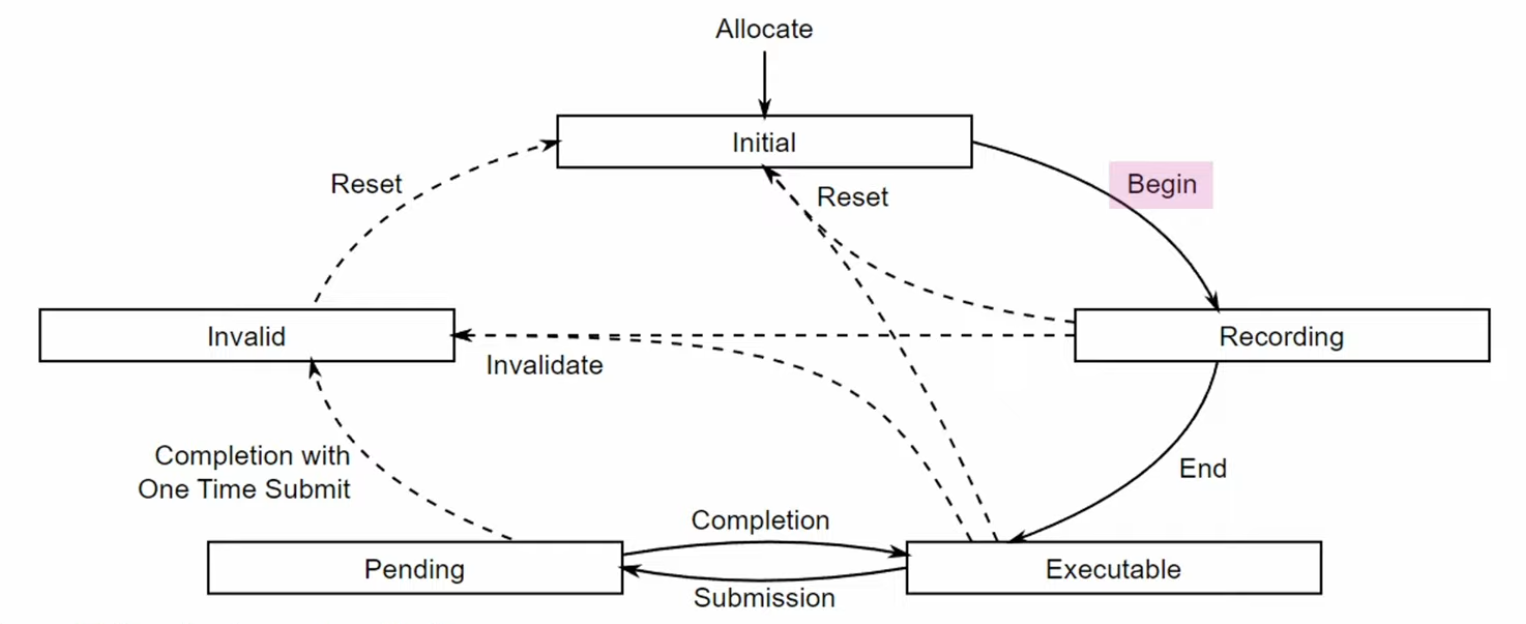 .
.
-
Reset an single Command Buffer :
-
Once a command buffer has been submitted, it’s still “alive”, and being consumed by the GPU, at this point it is NOT safe to reset the command buffer yet. You need to make sure that the GPU has finished executing all of the commands from that command buffer until you can reset and reuse it.
-
-
commandBuffer-
Is the command buffer to reset. The command buffer can be in any state other than pending , and is moved into the initial state .
-
-
flags-
Is a bitmask of VkCommandBufferResetFlagBits controlling the reset operation.
-
-
Any primary command buffer that is in the recording or executable state and has
commandBufferrecorded into it, becomes invalid . -
After a command buffer is reset, any objects or memory specified by commands recorded into the command buffer must no longer be accessed when the command buffer is accessed by the implementation.
-
-
If the command buffer was already recorded once, then a call to it will implicitly reset it.
-
Levels
-
Primary :
-
Only these can be submitted to queues for execution.
-
Cannot be called from other command buffers.
-
-
Secondary :
-
Cannot be submitted directly, but can be called from primary command buffers.
-
"We won’t make use of the secondary command buffer functionality here, but you can imagine that it’s helpful to reuse common operations from primary command buffers."
-
-
A primary command buffer would use this to execute a secondary command buffer.
-
-
Re-recording :
-
If a secondary moves to the invalid state or the initial state, then all primary buffers it is recorded in move to the invalid state. A primary moving to any other state does not affect the state of a secondary recorded in it.
-
So, when a secondary command is re-recorded, the primary becomes invalid.
-
Eve: "It is not capturing a reference to a command buffer, it is going through and copying all the commands in the command buffer into itself."
-
-
Command Types
-
Action-Type, State-Type, Sync-Type.
-
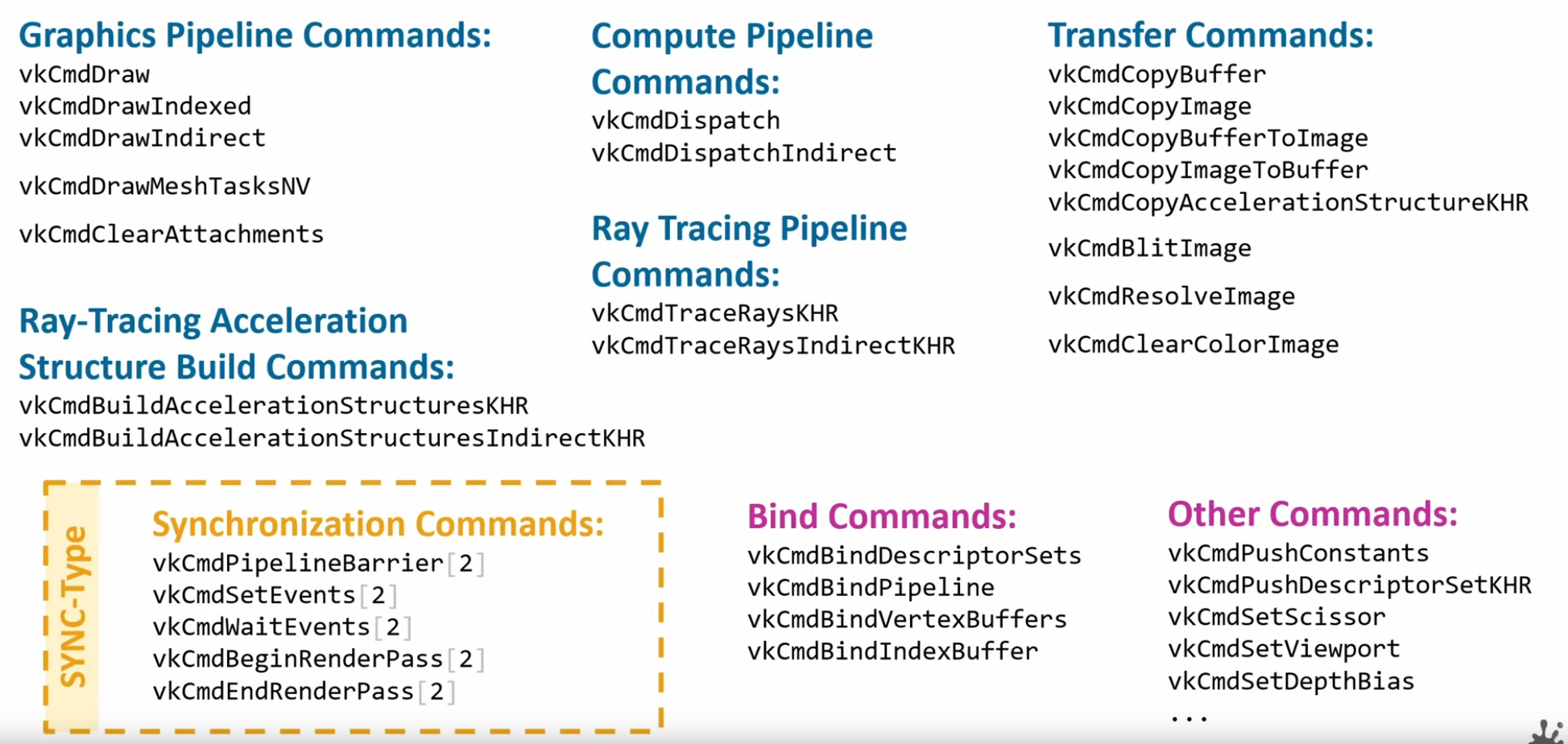 .
.
Command Buffer Recording
-
Writes the commands we want to execute into a command buffer.
-
It’s not possible to append commands to a buffer at a later time.
-
-
commandBuffer-
Is the handle of the command buffer which is to be put in the recording state.
-
-
pBeginInfo-
Specifies some details about the usage of this specific command buffer.
-
flags-
Specifies how we’re going to use the command buffer.
-
COMMAND_BUFFER_USAGE_ONE_TIME_SUBMIT-
The command buffer will be rerecorded right after executing it once.
-
-
COMMAND_BUFFER_USAGE_RENDER_PASS_CONTINUE-
This is a secondary command buffer that will be entirely within a single render pass.
-
-
COMMAND_BUFFER_USAGE_SIMULTANEOUS_USE-
The command buffer can be resubmitted while it is also already pending execution.
-
-
None of these flags are applicable for us right now.
-
pInheritanceInfo-
VkCommandBufferInheritanceInfo.-
If the command buffer is a secondary command buffer, then the
VkCommandBufferInheritanceInfostructure defines any state that will be inherited from the primary command buffer:
-
-
Used if
commandBufferis a secondary command buffer. If this is a primary command buffer, then this value is ignored. -
It specifies which state to inherit from the calling primary command buffers.
-
-
-
-
The command buffer must have been in the recording state , and, if successful, is moved to the executable state .
-
If there was an error during recording, the application will be notified by an unsuccessful return code returned by
vkEndCommandBuffer, and the command buffer will be moved to the invalid state .
-
Pre-recording
-
"Many early Vulkan tutorials and documents recommended writing a command buffer once and re-using it wherever possible. In practice however re-use rarely has the advertized performance benefit while incurring a non-trivial development burden due to the complexity of implementation. While it may appear counterintuitive, as re-using computed data is a common optimization, managing a scene with objects being added and removed as well as techniques such as frustum culling which vary the draw calls issued on a per frame basis make reusing command buffers a serious design challenge. It requires a caching scheme to manage command buffers and maintaining state for determining if and when re-recording becomes necessary. Instead, prefer to re-record fresh command buffers every frame. If performance is a problem, recording can be multithreaded as well as using secondary command buffers for non-variable draw calls, like post processing."
-
Source .
-
Multi-threading Recording
-
Usage of secondary command buffers for Vulkan Multithreaded Recording .
-
Usage of secondary command buffers for Vulkan Multithreaded Recording .
-
There's a example code section.
-
-
External synchronization
-
A type of synchronization required of the application, where parameters defined to be externally synchronized must not be used simultaneously in multiple threads.
-
-
Internal Synchronization
-
A type of synchronization required of the implementation, where parameters not defined to be externally synchronized may require internal mutexing to avoid multithreaded race conditions.
-
-
Any object parameters that are not labeled as externally synchronized are either not mutated by the command or are internally synchronized.
-
Additionally, certain objects related to a command’s parameters (e.g. command pools and descriptor pools) may be affected by a command, and must also be externally synchronized.
Queues
-
Only a single thread can be submitting to a given queue at any time. If you want multiple threads doing
VkQueueSubmit, then you need to create multiple queues. -
As the number of queues can be as low as 1 in some devices, what engines tend to do for this is to do something similar to the pipeline compile thread or the OpenGL api call thread, and have a thread dedicated to just doing
VkQueueSubmit. -
As
VkQueueSubmitis a very expensive operation, this can bring a very nice speedup as the time spent executing that call is done in a second thread and the main logic of the engine doesn’t have to stop. -
Data upload is another section that is very often multithreaded. In here, you have a dedicated IO thread that will load assets to disk, and said IO thread will have its own queue and command allocators, hopefully a transfer queue. This way it is possible to upload assets at a speed completely separated from the main frame loop, so if it takes half a second to upload a set of big textures, you don’t have a hitch. To do that, you need to create a transfer or async-compute queue (if available), and dedicate that one to the loader thread. Once you have that, it’s similar to what was commented on the pipeline compiler thread, and you have an IO thread that communicates through a parallel queue with the main simulation loop to upload data in an asynchronous way. Once a transfer has been uploaded, and checked that it has finished with a Fence, then the IO thread can send the info to the main loop, and then the engine can connect the new textures or models into the renderer.
Command Pools
-
When you record command buffers, their command pools can only be used from one thread at a time. While you can create multiple command buffers from a command pool, you cant fill those commands from multiple threads. If you want to record command buffers from multiple threads, then you will need more command pools, one per thread.
-
Secondary Command Buffers :
-
Vulkan command buffers have a system for primary and secondary command buffers. The primary buffers are the ones that open and close RenderPasses, and can get directly submitted to a queue. Secondary command buffers are used as “child” command buffers that execute as part of a primary one.
-
Their main purpose is multithreading.
-
Secondary command buffers cant be submitted into a queue on their own.
-
-
Command Pools are a system to allow recording command buffers across multiple threads.
-
They enable different threads to use different allocators, without internal synchronization on each use.
-
-
A single command pool must be externally synchronized ; it must not be accessed simultaneously from multiple threads.
-
That includes use via recording commands on any command buffers allocated from the pool, as well as operations that allocate, free, and reset command buffers or the pool itself.
-
-
If you want multithreaded command recording, you need more
VkCommandPoolobjects. By using a separate command pool in each host-thread the application can create multiple command buffers in parallel without any costly locks.-
For that reason, we will pair a command buffer with its command allocator.
-
-
You can allocate as many
VkCommandBufferas you want from a given pool, but you can only record commands from one thread at a time. -
Command buffers can be recorded on multiple threads while having a relatively light thread handle the submissions.
-
If two commands access the same object or memory and at least one of the commands declares the object to be externally synchronized, then the caller must guarantee not only that the commands do not execute simultaneously, but also that the two commands are separated by an appropriate memory barrier (if needed).
-
Similarly, if a Vulkan command accesses a non-const memory parameter and the application also accesses that memory, or if the application writes to that memory and the command accesses it as a const memory parameter, the application must ensure the accesses are properly synchronized with a memory barrier if needed.
-
Memory barriers are particularly relevant for hosts based on the ARM CPU architecture, which is more weakly ordered than many developers are accustomed to from x86/x64 programming. Fortunately, most higher-level synchronization primitives (like the pthread library) perform memory barriers as a part of mutual exclusion, so mutexing Vulkan objects via these primitives will have the desired effect.