Vulkan
-
Vulkan .
-
Open Source Open Standard.
-
Type:
-
Low-level graphics API
-
-
Platforms:
-
Windows, Linux, Android.
-
No native support for Web, needs WebAssembly.
-
-
Backend:
-
Vulkan
-
-
Focus:
-
High-performance games, advanced 3D graphics
-
-
Advantages:
-
Cross-platform (Windows, Linux, Android)
-
Better performance than OpenGL due to control over the GPU
-
Better management of multiple threads and parallel rendering
-
-
Disadvantages:
-
Complex and difficult to program (similar to DX12).
-
Requires more code and manual memory management
-
More recent support on some platforms (e.g., on macOS, only via layers like MoltenVK)
-
WebGPU
-
WebGPU is an open standard created by the W3C to offer GPU-accelerated graphics and computation within browsers.
-
It is designed to replace WebGL, offering a more modern and efficient API based on Vulkan, Metal, and DirectX 12.
-
Currently, it is being implemented natively in Chrome, Edge, and Firefox.
-
Platforms :
-
Web.
-
Only in browsers compatible with WebGPU.
-
It is not an independent library, but a standard that browsers implement.
-
-
-
Who maintains it :
-
The W3C, in collaboration with major companies like Google, Mozilla, Microsoft, and Apple.
-
-
wgpu :
-
Open-source MIT.
-
It is a native implementation of the WebGPU standard, designed to work both in the browser and in desktop applications.
-
It serves as a cross-platform wrapper that can use different graphics APIs depending on the operating system.
-
Therefore, although WebGPU is a standard for the Web, wgpu is an implementation of that standard that can also run natively outside of browsers.
-
Written in Rust, C/C++, etc.
-
Type:
-
Mid-level graphics API
-
-
Platforms:
-
Windows, Linux, macOS.
-
Web, via WebGPU.
-
-
Supported Backends:
-
Vulkan, DX12, Metal, OpenGL (selected automatically)
-
-
Focus:
-
Cross-platform, WebGPU, ease of use (Rust, C/C++)
-
-
Advantages:
-
Cross-platform and compatible with WebGPU
-
Easier to use than Vulkan/DX12
-
Memory safety and stability
-
-
Disadvantages:
-
Less control over GPU optimizations
-
Still in development, fewer tools than Vulkan/DX12
-
-
-
wgpu vs WebGPU :
-
If you are developing for the Web, you will use WebGPU directly.
-
If you want to use WebGPU also in native apps, wgpu is the right choice, as it allows running the same code both in the browser and on desktops.
-
-
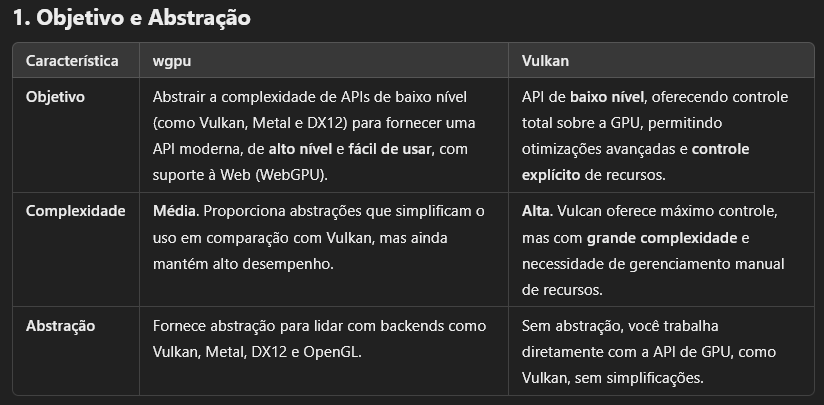
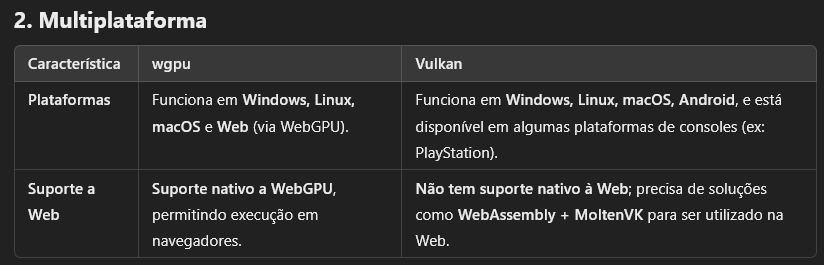
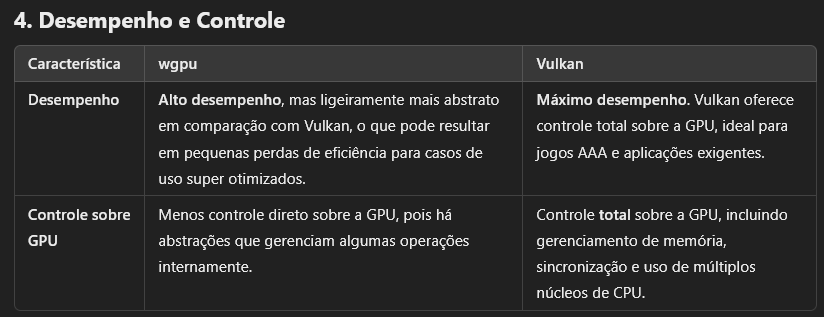
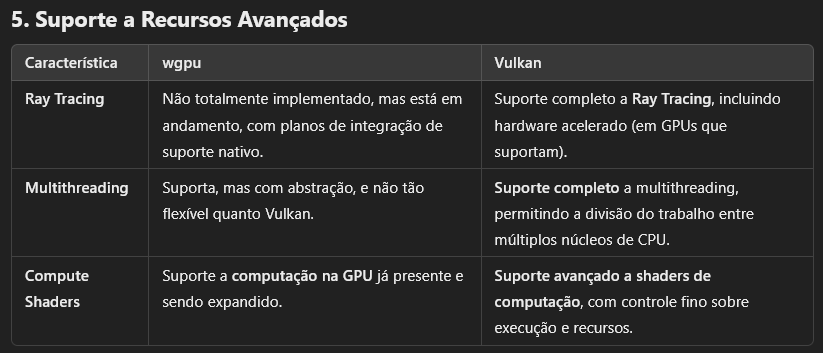
wgpu vs Vulkan :
-
 .
.
-
 .
.
-
 .
.
-
 .
.
-
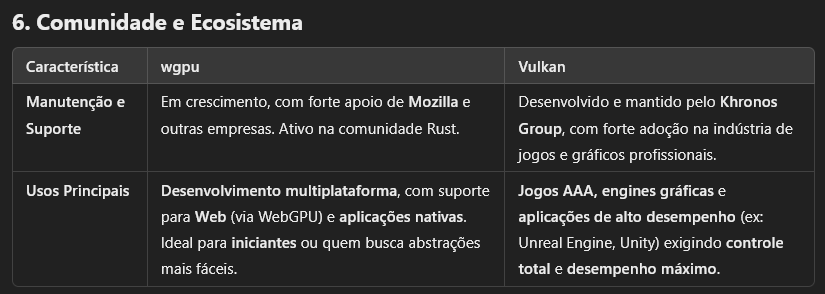 .
.
-
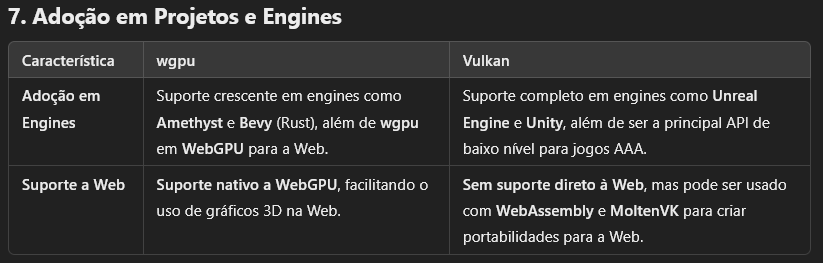 .
.
-
OpenGL
-
OpenGL .
-
Open Source Open Standard.
-
OpenGL itself has not been officially "deprecated" globally, but it is obsolete in many contexts and being replaced by more modern APIs, such as Vulkan.
-
ES 3.x versions are still used on mobile, but Vulkan is the future.
-
-
Type:
-
Mid-level graphics API
-
-
Platforms:
-
Windows, Linux, macOS.
-
Support for Web via WebGL.
-
-
Backend:
-
OpenGL
-
-
Focus:
-
3D graphics for games, graphics engines, scientific applications
-
-
Advantages:
-
Cross-platform and widely supported
-
Easy to use compared to DX12/Vulkan
-
Good documentation and strong community
-
-
Disadvantages:
-
Old API, not optimized for modern GPUs
-
Less control over memory and graphics pipeline
-
Limited support on macOS (Apple uses Metal)
-
WebGL
-
Open Source Open Standard.
-
It is based on OpenGL ES 2.0, which is a simplified version of OpenGL for mobile and embedded devices.
-
WebGPU is the official successor to WebGL.
-
WebGL is still functional, but it is not recommended for new projects.
-
(2025-03-09) There is no official date for removal from browsers.
-
Type:
-
High-level graphics API
-
-
Platforms:
-
Web
-
-
Backend:
-
Based on OpenGL ES 2.0
-
-
Focus:
-
3D rendering on the web
-
-
Advantages:
-
Works directly in the browser, without the need for plugins
-
Easy to learn and integrate into web applications
-
Wide support, compatible with almost all browsers
-
-
Disadvantages:
-
Based on OpenGL ES 2.0, older and less efficient technology
-
No native support for modern features like Ray Tracing and Compute Shaders
-
May have lower performance than WebGPU
-
DirectX 12
-
Closed-source, from Microsoft.
-
Type:
-
Low-level graphics API.
-
-
Platforms:
-
Windows and Xbox
-
-
Backend:
-
Direct3D 12
-
-
Focus:
-
AAA games, high-performance applications
-
-
Advantages:
-
Direct control over the GPU
-
Support for Ray Tracing via DXR
-
Advanced Microsoft tools (PIX, RenderDoc)
-
-
Disadvantages:
-
Only for Windows and Xbox
-
High complexity, requires manual memory management and synchronization.
-
Metal
-
Closed-source, from Apple.
-
Low level and high performance :
-
Reduces CPU overhead, allowing better use of the GPU.
-
-
Support for parallel computation :
-
Includes an API for general computation on the GPU (similar to CUDA or OpenCL).
-
-
Platforms :
-
Exclusive to the Apple ecosystem.
-
Apple discontinued official support for OpenGL and encourages the use of Metal.
-
-
-
Support for Ray Tracing (since Metal 3).