Parametrization
-
To simplify the implementation, all luminous powers will converted to luminous intensities () before being sent to the shader. The conversion is light dependent and is explained in the previous sections.
-
Type :
-
Directional, point, spot or area
-
Can be inferred from other parameters (e.g. a point light has a length, radius, inner angle and outer angle of 0).
-
-
Direction :
-
Used for directional lights, spot lights, photometric point lights, and linear and tubular area lights (orientation)
-
-
Color :
-
The color of emitted light, as a linear RGB color. Can be specified as an sRGB color or a color temperature in the tools
-
-
Intensity :
-
The light's brightness. The unit depends on the type of light
-
-
Falloff radius :
-
Maximum distance of influence
-
-
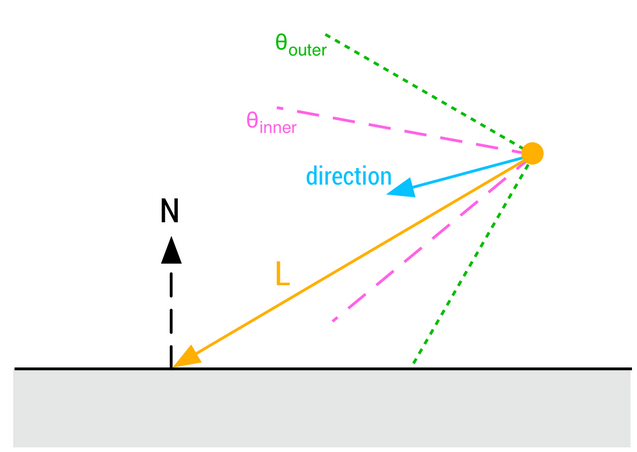
Inner angle :
-
Angle of the inner cone for spot lights, in degrees
-
-
Outer angle :
-
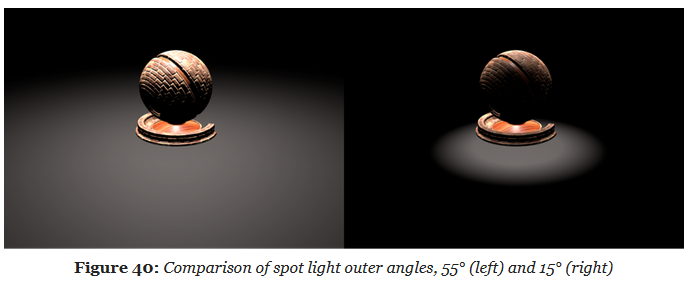
Angle of the outer cone for spot lights, in degrees
-
-
Length :
-
Length of the area light, used to create linear or tubular lights
-
-
Radius :
-
Radius of the area light, used to create spherical or tubular lights
-
-
Photometric profile :
-
Texture representing a photometric light profile, works only for punctual lights
-
-
Masked profile :
-
Boolean indicating whether the IES profile is used as a mask or not. When used as a mask, the light's brightness will be multiplied by the ratio between the user specified intensity and the integrated IES profile intensity. When not used as a mask, the user specified intensity is ignored but the IES multiplier is used instead
-
-
Photometric multiplier :
-
Brightness multiplier for photometric lights (if IES as mask is turned off)
-
Color Temperature
-
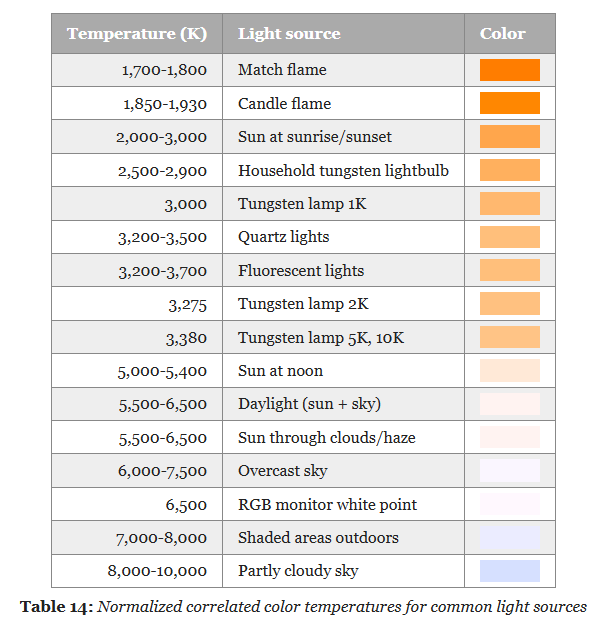 .
.
-
I got a little lost about this. See this session .
-
Convert from the XYZ space to linear RGB with a simple 3×3 matrix.
-
Conversion using the inverse matrix for the sRGB color space:
-
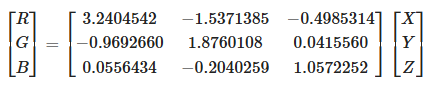 .
.
-
-
The result of these operations is a linear RGB triplet in the sRGB color space.
-
Since we care about the chromaticity of the results, we must apply a normalization step to avoid clamping values greater than 1.0 and distort resulting colors:
-
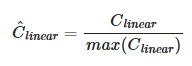 .
.
-
We must finally apply the sRGB opto-electronic conversion function (OECF) to obtain a displayable value (the value should remain linear if passed to the renderer for shading).
-
 .
.
Directional Lights
-
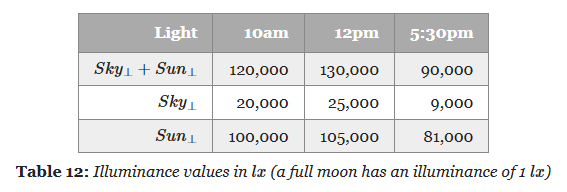
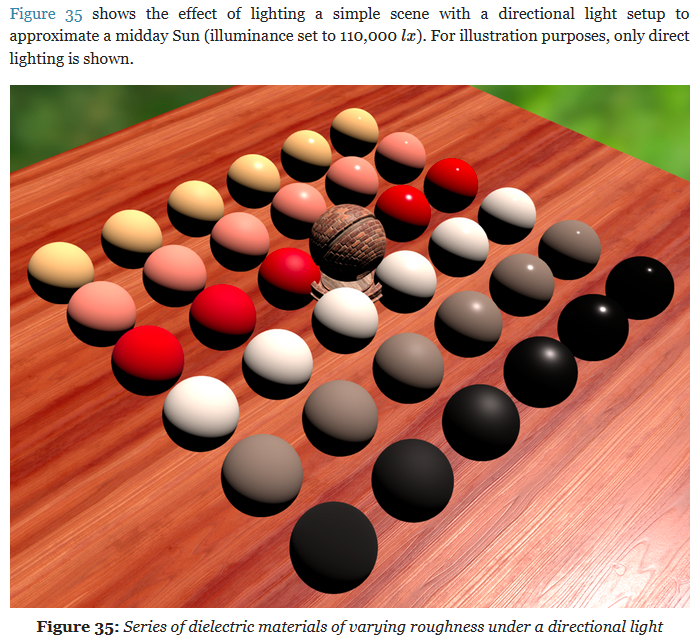
The main purpose of directional lights is to recreate important light sources for outdoor environment, i.e. the sun and/or the moon. While directional lights do not truly exist in the physical world, any light source sufficiently far from the light receptor can be assumed to be directional
-
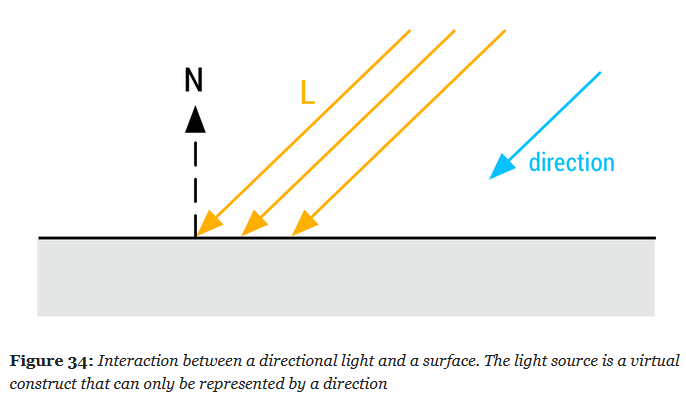 .
.
-
 .
.
-
Illuminance is measured with the unit Lux ($lx$); $lx$ is the symbol, like $W$ for Watts .
 .
.
-
-
Dynamic directional lights are particularly cheap to evaluate at runtime.
vec3 l = normalize(-lightDirection);
float NoL = clamp(dot(n, l), 0.0, 1.0);
// lightIntensity is the illuminance
// at perpendicular incidence in lux
float illuminance = lightIntensity * NoL;
vec3 luminance = BSDF(v, l) * illuminance;
Punctual Lights
-
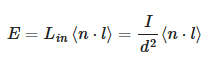
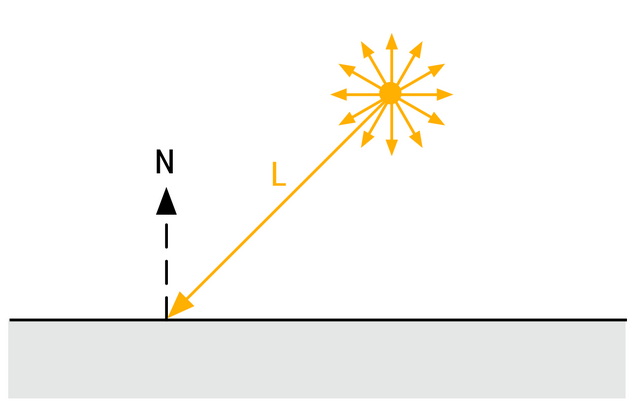
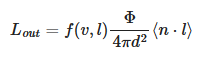
For punctual lights following the inverse square law, we use:
-
 .
.
-
Where $d$ is the distance from a point at the surface to the light.
Point Lights
-
 .
.
-
 .
.
-
 .
.
-
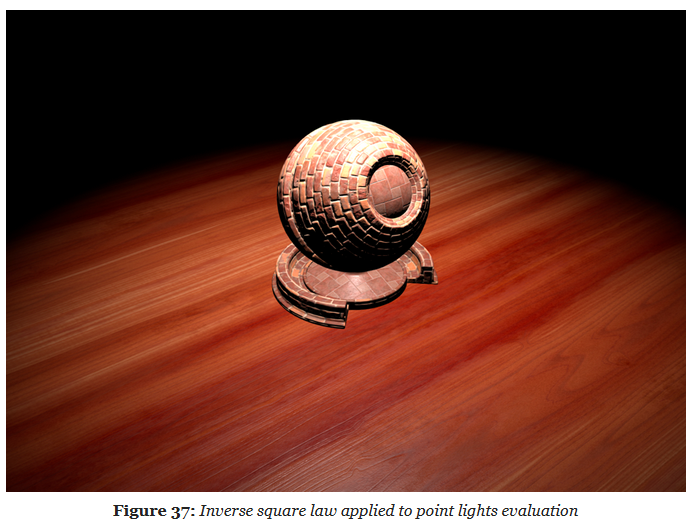
Physically based punctual lights :
-
Note that the light intensity used in this piece of code is the luminous intensity in , converted from the luminous power CPU-side. This snippet is not optimized and some of the computations can be offloaded to the CPU (for instance the square of the light's inverse falloff radius, or the spot scale and angle).
float getSquareFalloffAttenuation(vec3 posToLight, float lightInvRadius) { float distanceSquare = dot(posToLight, posToLight); float factor = distanceSquare * lightInvRadius * lightInvRadius; float smoothFactor = max(1.0 - factor * factor, 0.0); return (smoothFactor * smoothFactor) / max(distanceSquare, 1e-4); } float getSpotAngleAttenuation(vec3 l, vec3 lightDir, float innerAngle, float outerAngle) { // the scale and offset computations can be done CPU-side float cosOuter = cos(outerAngle); float spotScale = 1.0 / max(cos(innerAngle) - cosOuter, 1e-4) float spotOffset = -cosOuter * spotScale float cd = dot(normalize(-lightDir), l); float attenuation = clamp(cd * spotScale + spotOffset, 0.0, 1.0); return attenuation * attenuation; } vec3 evaluatePunctualLight() { vec3 l = normalize(posToLight); float NoL = clamp(dot(n, l), 0.0, 1.0); vec3 posToLight = lightPosition - worldPosition; float attenuation; attenuation = getSquareFalloffAttenuation(posToLight, lightInvRadius); attenuation *= getSpotAngleAttenuation(l, lightDir, innerAngle, outerAngle); vec3 luminance = (BSDF(v, l) * lightIntensity * attenuation * NoL) * lightColor; return luminance; } vec3 l = normalize(-lightDirection); float NoL = clamp(dot(n, l), 0.0, 1.0); // lightIntensity is the illuminance // at perpendicular incidence in lux float illuminance = lightIntensity * NoL; vec3 luminance = BSDF(v, l) * illuminance; -
Spot Lights
-
 .
.
-
-
 .
.
Photometric Lights
-
 .
.
-
 .
.
-
Implementation:
float getPhotometricAttenuation(vec3 posToLight, vec3 lightDir) {
    float cosTheta = dot(-posToLight, lightDir);
    float angle = acos(cosTheta) * (1.0 / PI);
    return texture2DLodEXT(lightProfileMap, vec2(angle, 0.0), 0.0).r;
}

vec3 evaluatePunctualLight() {
    vec3 l = normalize(posToLight);
    float NoL = clamp(dot(n, l), 0.0, 1.0);
    vec3 posToLight = lightPosition - worldPosition;

    float attenuation;
    attenuation  = getSquareFalloffAttenuation(posToLight, lightInvRadius);
    attenuation *= getSpotAngleAttenuation(l, lightDirection, innerAngle, outerAngle);
    attenuation *= getPhotometricAttenuation(l, lightDirection);
        // This is the addition to the Punctual Light. It requires a lightProfileMap, etc.

    float luminance = (BSDF(v, l) * lightIntensity * attenuation * NoL) * lightColor;
    return luminance;
}
-
The light intensity is computed CPU-side and depends on whether the photometric profile is used as a mask.
float multiplier;
// Photometric profile used as a mask
if (photometricLight.isMasked()) {
    // The desired intensity is set by the artist
    // The integrated intensity comes from a Monte-Carlo
    // integration over the unit sphere around the luminaire
    multiplier = photometricLight.getDesiredIntensity() /
            photometricLight.getIntegratedIntensity();
} else {
    // Multiplier provided for convenience, set to 1.0 by default
    multiplier = photometricLight.getMultiplier();
}

// The max intensity in cd comes from the IES profile
float lightIntensity = photometricLight.getMaxIntensity() * multiplier;
Mobile Adaptations
Pre-Expose Lights
-
"How to store and handle the large range of values produced by the lighting code?"
-
Assuming computations performed at full precision in the shaders, we still want to be able to store the linear output of the lighting pass in a reasonably sized buffer (
RGB16For equivalent). -
The most obvious and easiest way to achieve this is to simply apply the camera exposure before writing out the result of the lighting pass.
-
Pre-exposing lights allows the entire shading pipeline to use half precision floats.
-
In practice we pre-expose the following lights:
-
Punctual lights (point and spot):
-
on the GPU
-
-
Directional light:
-
on the CPU
-
-
IBLs:
-
on the CPU
-
-
Material emissive:
-
on the GPU
-
-
-
This can be easily done with:
fragColor = luminance * camera.exposure;
-
But, this requires intermediate computations to be performed with single precision floats.
-
We would instead prefer to perform all (or at least most) of the lighting work using half precision floats instead.
-
Doing so can greatly improve performance and power usage, particularly on mobile devices. Half precision floats are however ill-suited for this kind of work as common illuminance and luminance values (for the sun for instance) can exceed their range.
-
The solution is to simply pre-expose the lights themselves instead of the result of the lighting pass.
-
This can be done efficiently on the CPU if updating a light's constant buffer is cheap.
-
This can also be done on the GPU , like so:
// The inputs must be highp/single precision,
// both for range (intensity) and precision (exposure)
// The output is mediump/half precision
float computePreExposedIntensity(highp float intensity, highp float exposure) {
    return intensity * exposure;
}

Light getPointLight(uint index) {
    Light light;
    uint lightIndex = // fetch light index;

    // the intensity must be highp/single precision
    highp vec4 colorIntensity  = lightsUniforms.lights[lightIndex][1];

    // pre-expose the light
    light.colorIntensity.w = computePreExposedIntensity(
            colorIntensity.w, frameUniforms.exposure);

    return light;
}