Color
Modular / change Node color (
modulate
and
Color8()
)
-
Color using RGB:
$Player.modulate = Color8(1530, 964, 367, 255)
$Player.modulate = Color8(255, 255, 255, 255) -
Color using RAW values (same as above):
$Player.modulate = Color8(6, 3.78, 1.44, 1)
YSort and Ordering
-
The YSort option can be enabled in the Ordering tab of any CanvasItem. When enabled, it will sort all the children of that node with YSort, but the node itself will not be sorted.
For tilemaps
-
In the case of Tilemaps, I noticed that you must enable both the Ordering option on the CanvasItem and the 'YSort Enabled' option in the Tilemap's 'Layers' section. If you fail to enable one of these options, YSort will not work as intended.
Tilemap
Animation/Columns of the TileSet
-
"you don't need to set the column value if your tiles are all in a row. The column value determines on how many columns your animation has if you need to go one line down at some point. For example, setting it to 1 means your tiles are laid out vertically, and setting it to two means you have two tiles per row, but you can have more than 2 frames, as the next frames will simply end up in another row. If the value is zero, then it considers tiles in a single, endless row."
Instantiations vs TileMap
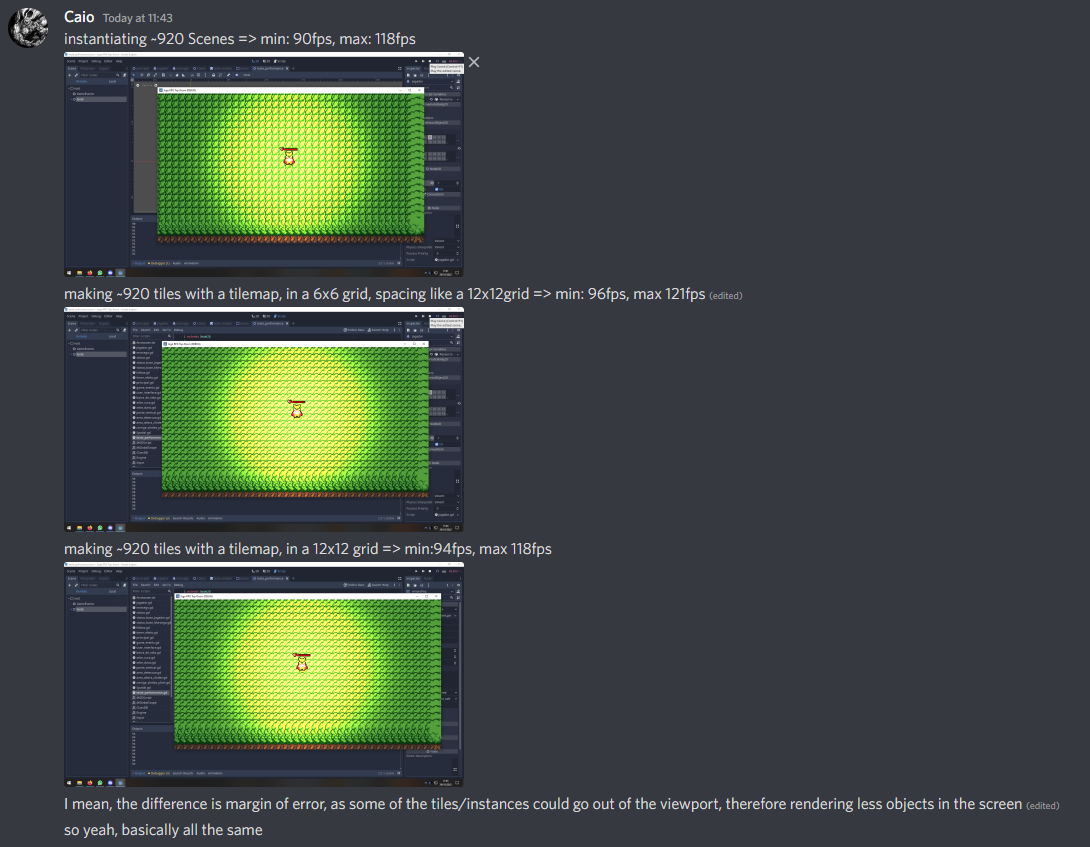
In Code
-
Change
PhysicsLayer_LayerandPhysicsLayer_Mask:
var INT_BIT_VALUE : int = 7  ## Corresponds to the total Bitwise layer value. Value 7 symbolizes that Layers {1,2,3} will be active.
my_tile_map.get_tileset().set_physics_layer_collision_layer(layer, INT_BIT_VALUE)
Parallax
Viewport, Camera, Screen
-
The purpose of a viewport is to show what is happening with the viewport's children, like a "video" or like an "image".
-
My understanding is that:
-
A
Viewportis a "window" that renders things from the world (world_2d), without necessarily showing those things to the player, unless they choose to display that Viewport on their screen;Camera2Donly changes which segment of the world (world_2d) will be shown to the player through the selected Viewport. -
Each Viewport can have multiple Camera2Ds, while necessarily each
Viewportcan only have 1Camera2Dset as 'Current' at a time. -
I don't know what belongs to '
world_2d', or even what 'world_2d' is. -
To work, the Viewport must have a defined size, and it may also require a
ViewportContainernode to see its content. -
ViewportTextureis a texture used in a Sprite that shows the image obtained from the selectedViewport. This allows seeing the image of a 'secondary'Viewportinside a 'main'Viewport.
-
-
Window: Tip to get a 'Pixel-look' for PixelArt games {2:57 -> 3:50} .
-
SubViewport: Place a 3D object in a 2D scene .
-
It is not necessary to script constant texture updates for the Sprite2D, just use the Subviewport as the Sprite2D texture in the inspector.
-
The only thing that must be changed is to enable the Transparent Background option on the Subviewport.
-
Note: I had issues with the WorldEnv Default of the 3D scene, so I had to override the World3D in the Subviewport.
-
-
Camera: Move an object based on the camera position, but in a segmented way .
-
Viewport .
-
Viewport: Split Screen (ugly solution for the 'BUG' above) .
VisibleOnScreenNotifier2D and VisibleOnScreenEnabler2D
-
Used to check if something is being shown on screen.
-
I saw both nodes useful to improve game performance by toggling visibility of nodes outside the screen, as shown in the video: CerbereGames video .
Particles and effects
Decal
-
Decal .
Forced Low-resolution
-
Walkthrough: Dungeon Environment .
-
The video is quite rushed and with a tired voice, but you can learn a lot.
-
Uses Laighter, Blender and Photoshop / Krita.
-
-
Walkthrough: Forest Environment with Campfire .
-
The video is quite rushed and with a tired voice, but you can learn a lot.
-
Uses Laighter, Blender and Photoshop / Krita.
-