-
The larger the state machine, the harder it is to manage the state machine.
-
Not widely used because it is known to be problematic for any kind of expansion.
-
It is quite deterministic and not emergent.
-
Can have a maximum complexity of "O"($n^2$) when considering that each node must be "connected" to all other nodes.
-
*Care with State Machines:
-
Only use a State Machine when the defined State can be used in other places, making sense to treat it as a Component.
-
Avoid defining States that might want to run simultaneously; ideally define States as diametrically opposed behaviors (COMBAT x DIALOG, AIRBORNE x GROUNDED).
-
Use a State Machine only when the situation calls for a State Machine. Avoid using States for everything, because that induces difficulty accessing behaviors by "locking" everything behind 'if/else's.
-
Do not define a State Machine as the core of an entire object; "does it make sense that the first thing the entity tries to execute is a sequence of 'if/else' conditionals?". It does not sound healthy for the code to induce conditionals right away. Overuse of State Machines makes the system exponentially harder to debug as complexity grows.
-
Because of the likely confusion created by this design pattern, it is useful to make a States x Actions table, as done in ChristopherOkhravi's video.
-
Games that use it
-
-
Good video. Useful to understand a bit about FSMs. Demonstrates FSM problems.
-
-
-
Human enemies:
-
Skills (States):
-
-
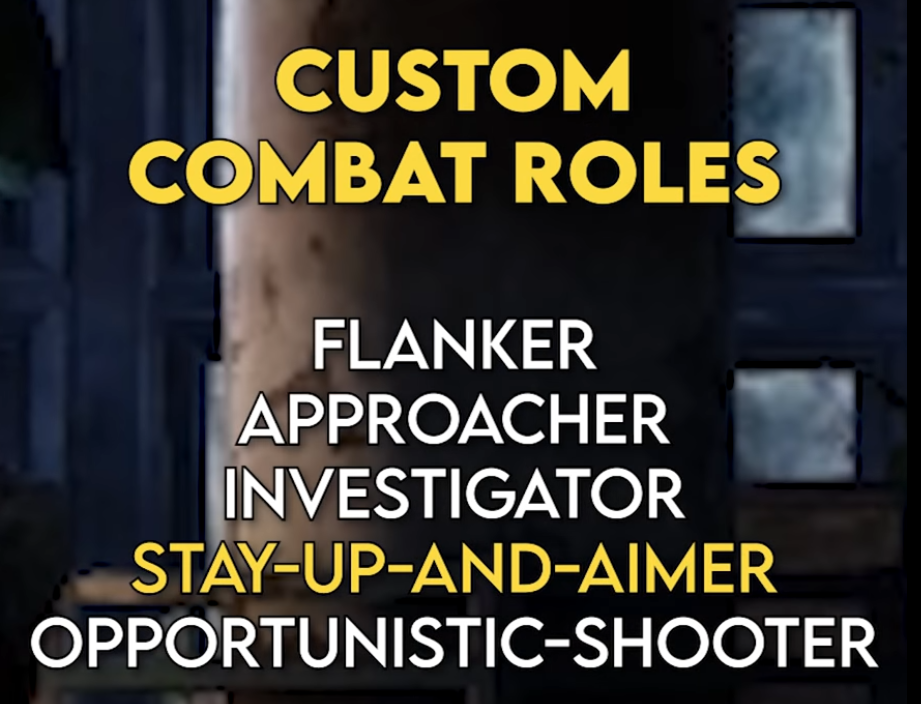
Roles:
-
-
The entire game's AI system is highly dependent on environment configuration, since many times there is no space for an enemy to execute its "role".
-
The system also suffers in open or highly vertical areas.
-
-
-
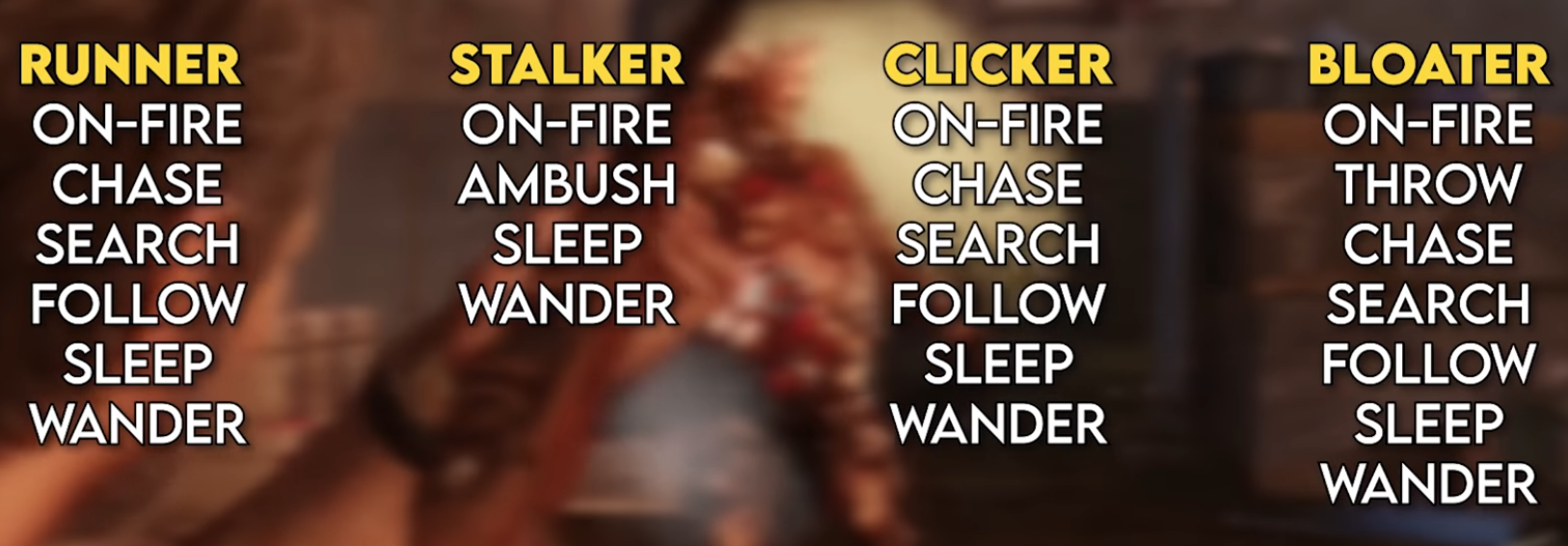
Zombies:
-
Skills (States):
-
 .
.
-
-
-
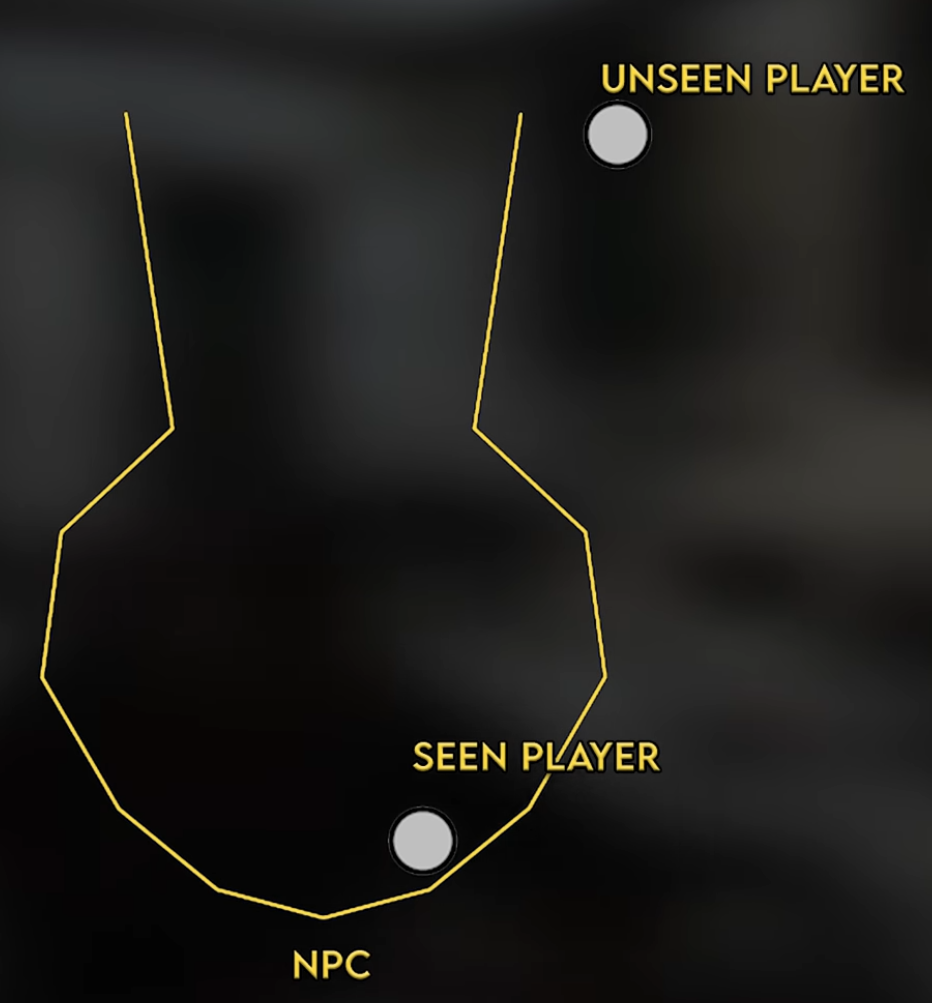
Vision:
-
This geometric shape is used instead of the generic "cone" because it makes much more sense.
-
 .
.
-
-
-
-
Same system as The Last of Us 1, with small tweaks.
-
The first game's video explains the systems better.
-
-
Metal Gear Solid (1998)
-
Halo: Combat Evolved (2001)
-
Batman Arkham Asylum (2009)
-
Doom (2016)
-
Hollow Knight
-
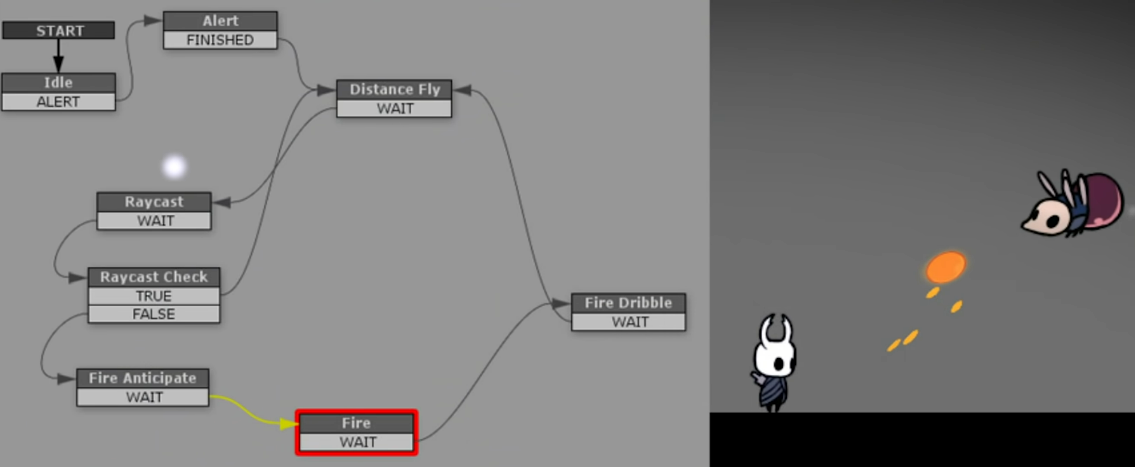
Hollow Knight - PlayMakerFSM .
-
Official tool used to visualize FSMs when building mods.
-
-
 .
.
-

Explanations
-
-
{8:35}
-
He draws a table with permutations between States x Actions (he doesn't use signals for this). This is very useful.
-
-
{37:50}
-
The video finally starts.
-
-
{50:40}
-
The end of the UML diagram is interesting, indicating that States have references to the 'gate' (State Machine in the example), and that functions are defined in the State Machine, in IState and its derived States.
-
-
{1:09:17}
-
He summarizes the code made for 'Gate' (StateMachine), 'GateState' (State Interface) and 'OpenGateState' (State derived from the Interface).
-
The reference to the State Machine is passed in the State's constructor.
-
-
*Review:
-
I liked that he made a States x Actions table; it's useful.
-
He uses a pattern where each State manages the change to another State by calling a function inside the StateMachine.
-
The way it's done, however, he uses 'new State_Name' in the call to 'change_state(_)', which is better for abstraction but raises the question whether "creating 'new' every time you want to change state causes duplicate instance problems?"
-
-
I also had the question:
-
"who calls 'payOk()' on the StateMachine?" which was not well explained.
-
-
-
-
Understanding State Machines and implementation in Godot .
-
Short, well-produced and interesting video.
-
Gives good ideas, although some are questionable, they are interesting for reflection.
-
-
Understanding State Machines and creating 'Wander' and 'Follow' states in Godot .
-
Review:
-
The video is confusing and could have been better explained.
-
Highly questionable design decisions:
-
Use of 'groups' to find the player.
-
A state worries about which state it should change to by emitting a signal containing a string, as shown at {6:55}.
-
Storing states by their names using dictionaries and strings.
-
-
-
State Class:
-
Used as a pseudo-Interface to ensure each 'state' has the 4 main functions defined.
-
The general idea is that 'Update' and 'PhysicsUpdate' are called only if that 'state' is the 'currentState'.
-
Enter:
-
pseudo-ready().
-
Should be called 'OnEnter()', since it is only called as a consequence of entry, without executing the entry.
-
-
Update:
-
pseudo-process().
-
-
PhysicsUpdate:
-
pseudo-physics_process().
-
-
Exit:
-
on leaving the state.
-
Should be called 'OnExit()', since it is only called as a consequence of exit, without executing the exit.
-
-
-
State management and transitions:
-
The StateMachine node only manages:
-
Storage of all available States in a dictionary via '_ready'.
-
Calling 'Update' and 'PhysicsUpdate' of the current state.
-
Receiving the 'Transitioned' signal to do: 'old_state.exit()', 'new_state.enter()' and 'current_state = new_state'.
-
-
State change is done inside the current state's 'Update' or 'PhysicsUpdate' by emitting the signal 'Transitioned.emit(self, "~new_state")'.
-
-
States:
-
The way 'Follow state' was defined is compromising, not using areas or raycasts, simply searching for the 'Player' with 'get_tree().get_first_node_in_group('Player')', which ignores physical collision interactions and can hinder interactions with other entities and break a stealth system.
-
-
-
-
*Review:
-
The video is explained in a rushed manner and with zero context for those who do not understand C#; it could have been much more didactic.
-
-
State Class:
-
Used as a pseudo-Interface to ensure every 'state' has the 4 main functions defined.
-
The general idea is that 'Do' and 'FixedDo' are called only if that 'state' is the 'currentState'.
-
Enter:
-
pseudo-ready().
-
-
Do:
-
pseudo-process().
-
-
FixedDo:
-
pseudo-physics_process().
-
-
Exit:
-
on leaving the state.
-
-
-
Management and state switching:
-
There is no StateMachine node, so all state control is done inside the player's script, poorly. It manages:
-
'if state.isComplete: SelectState();'. That is, different from the video State Machine: Understanding state machines and creating 'Wander' and 'Follow' , this video makes a "state selector" in the manager so that no state should worry about selecting the 'next state'.
-
The function 'SelectState()' changes the 'state' (aka current_state) to a new state based on 'if' conditions, then calls 'state.Enter()'.
-
-
Note:
-
The 'grounded' conditional is exactly like 'is_on_floor()' in GDScript.
-
-
{31:46 -> 35:00}:
-
Important for defining the logic of state restart and permission for a state to overwrite another state.
-
-
-
States:
-
IdleState:
-
{28:07} version before final interruption changes.
-
{34:33} final version.
-
-
RunState:
-
{29:07} version before final interruption changes.
-
{34:43} final version.
-
-
AirState:
-
{29:44} final version.
-
-
KneelState (crouch):
-
{31:23} final version.
-
-
-
-
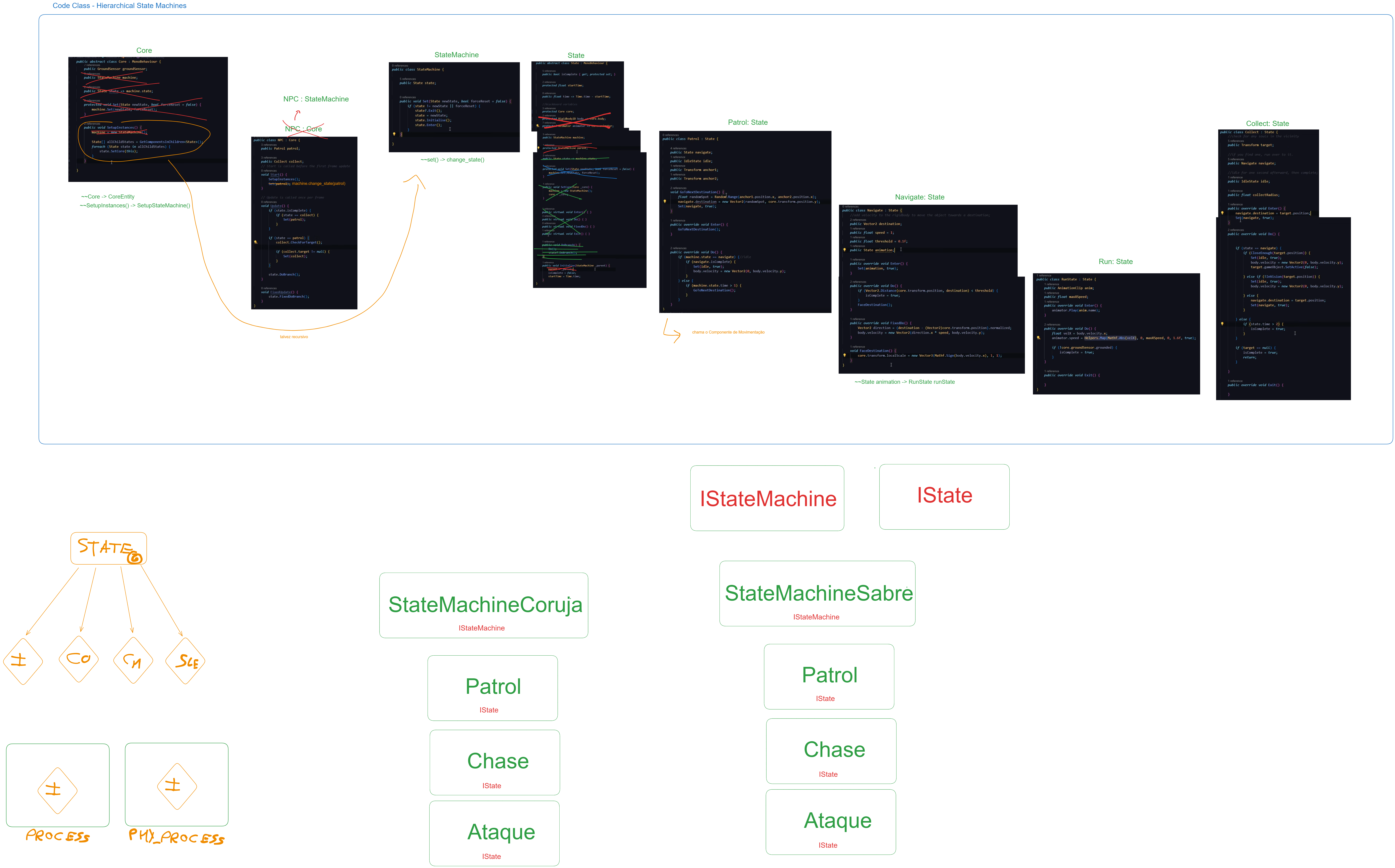
Code Class by AdamCYounis (2): Create States that contain States hierarchically in Unity .
-
 .
.
-
His code is confusing and poorly written in many moments, creating complexity and awkwardness where there should be none.
-
I made some drafts with good changes that could be made to the code.
-
One thing I hated about his code is how it makes the Entity itself be the StateMachine, making the design super inflexible to changes.
-
-
Review :
-
The design in the video is messy and simply confusing. Many things could be modified to give much more clarity to the design; still, it keeps the big problem of over-using state machines, creating an uncomfortable and insecure design pattern. Analyzing this design showed me how problematic state machines can be; doing them hierarchically only creates more problems and demonstrates the fragility of the design.
-
I absolutely did not like how exponentially complex and confusing this design becomes when adding behavior options; the design is highly prone to confusion and debugging problems.
-
-
-
-
The solutions presented are poor, as they only serve to demonstrate the amount of problems generated by making a game completely based on state machines; this is one of the reasons I dislike this design pattern.
-